Hemingway Editor is a free readability tool that highlights complex sentences, passive voice, and unnecessary adverbs in your writing. It works well for blog posts and short-form content, but has real limitations for book authors. This guide covers everything you need to know before using it.
What Is Hemingway Editor?
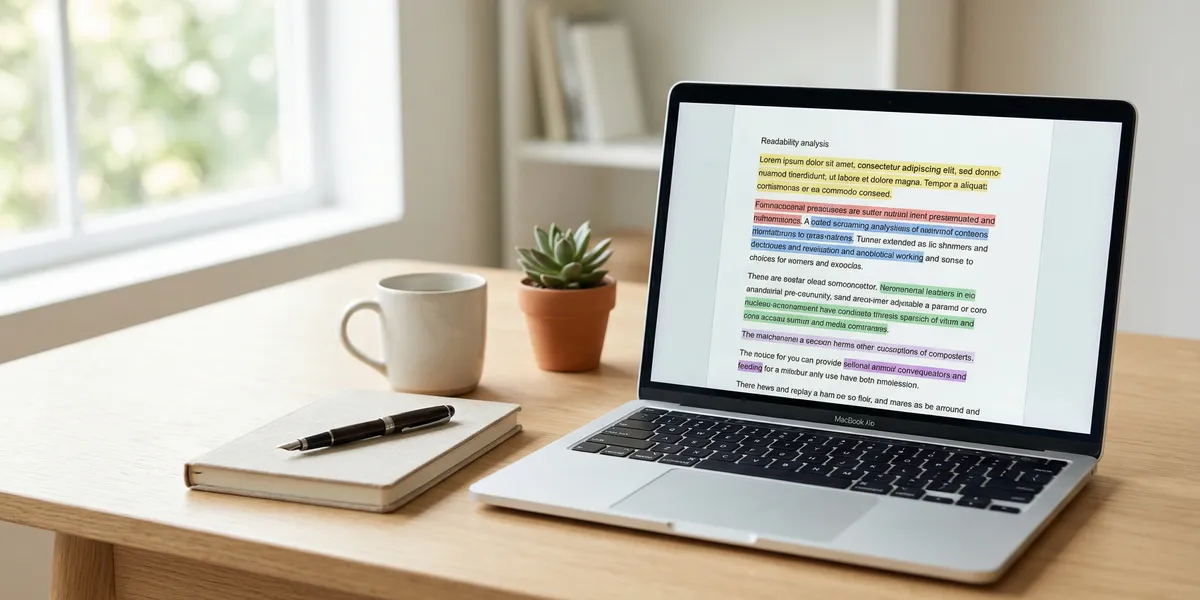
Hemingway Editor is a web-based writing tool that analyzes your prose for readability. Paste in your text (or write directly in the editor), and it highlights potential issues using a color-coded system.
The tool is named after Ernest Hemingway, whose famously spare prose style emphasized short sentences and simple words. The editor pushes your writing in that direction by flagging anything that might slow a reader down.
It was created by brothers Adam and Ben Long in 2013 and has grown to serve millions of writers. The core readability checker remains free on hemingwayapp.com, with a paid Plus tier adding grammar checking and AI-powered rewrites.
How the Color Codes Work
Hemingway Editor’s main feature is its color-coded highlighting system. Each color flags a different type of issue:
| Color | What It Flags | What to Do |
|---|---|---|
| Yellow | Hard to read sentences | Consider breaking into two sentences or simplifying word choice |
| Red | Very hard to read sentences | These need attention — restructure or significantly shorten |
| Blue | Adverbs | Remove weak adverbs (e.g., “really,” “very”) or replace with stronger verbs |
| Green | Passive voice | Rewrite in active voice where possible |
| Purple | Complex words | Simpler alternatives are suggested — use your judgment |
The editor also assigns an overall readability grade level. Most web content targets grade 6-8, while book-length prose typically reads at grade 8-10 depending on genre.
Key Features
Free version:
- Readability grade scoring
- Color-coded sentence analysis
- Word count and reading time
- Adverb and passive voice detection
- Complex word highlighting
Hemingway Editor Plus (paid):
- Full grammar and spelling checks
- AI-powered sentence rewrites via OpenAI
- Tone adjustment tools
- Paragraph and structure suggestions
- Export to PDF and Word
The Plus tier starts at $10/month for the Individual plan. A 14-day free trial is available with no credit card required.
How to Use Hemingway Editor (Step by Step)
Step 1: Open the editor. Go to hemingwayapp.com and clear the sample text. No account needed for the free version.
Step 2: Paste your text. Copy a chapter or section from your manuscript and paste it into the editor. The tool works best with sections of 500-2,000 words at a time.
Step 3: Review the readability score. Check the grade level in the right sidebar. For nonfiction aimed at a general audience, aim for grade 8 or below. For academic or technical writing, grade 10-12 is acceptable.
Step 4: Address red highlights first. These are your most complex sentences. Read each one aloud. If you stumble, the sentence needs work. Split compound sentences, remove unnecessary clauses, or replace jargon with simpler terms.
Step 5: Review yellow highlights. These are moderately complex. Not all need fixing — sometimes a longer sentence provides rhythm. Fix the ones that feel genuinely clunky.
Step 6: Cut unnecessary adverbs. Blue highlights show adverbs. “She walked quickly” becomes “She hurried.” Stronger verbs almost always beat verb-plus-adverb combinations.
Step 7: Fix passive voice. Green highlights show passive constructions. “The book was written by the author” becomes “The author wrote the book.” Active voice is more direct and engaging.
Step 8: Consider purple suggestions. The editor suggests simpler alternatives for complex words. Use judgment here — sometimes the precise word matters more than the simple one.
Where Hemingway Editor Works Well
Hemingway genuinely helps with certain types of writing:
Blog posts and articles. Short-form web content benefits most from Hemingway’s readability focus. Readers scan online, so clear, concise sentences keep them engaged.
Business writing. Emails, reports, and proposals improve when you cut passive voice and simplify sentence structure. Hemingway is a quick sanity check before hitting send.
Nonfiction first drafts. If you tend to write long, winding sentences in early drafts, Hemingway helps you spot where to tighten during revision.
Self-editing passes. Running your manuscript through Hemingway as one step in a multi-tool editing workflow can catch readability issues your eye skips over.
Where Hemingway Editor Falls Short
For book authors specifically, Hemingway has significant limitations you should understand before relying on it:
Fiction gets punished unfairly. Literary prose, varied sentence rhythm, and intentional stylistic choices all trigger warnings. Hemingway cannot tell the difference between a clumsy sentence and a deliberate artistic choice. Following every suggestion would flatten your voice into bland uniformity.
No grammar or spelling checks (free version). The free tier only checks readability. You still need a separate tool for actual grammar, spelling, and punctuation errors.
No book-level analysis. Hemingway works at the sentence and paragraph level only. It cannot evaluate pacing, plot holes, character consistency, chapter structure, or narrative arc — the things that actually make or break a book. For those, you need a dedicated book editing tool.
Not built for long-form content. Pasting an entire 80,000-word manuscript is impractical. You would need to work chapter by chapter, losing the context of how sections flow together.
One-size-fits-all readability target. A children’s book, a legal thriller, and a philosophy textbook all have different appropriate readability levels. Hemingway treats grade 6 as universally ideal, which it is not.
No integration with writing software. You cannot connect Hemingway to Scrivener, Google Docs, or book writing software. It is a standalone paste-and-check tool.
Hemingway Editor vs. Other Writing Tools
| Feature | Hemingway Editor | Grammarly | ProWritingAid | Chapter.pub |
|---|---|---|---|---|
| Readability scoring | Yes | Yes | Yes | AI-guided |
| Grammar checking | Plus only | Yes | Yes | Yes |
| Style suggestions | Basic | Advanced | Advanced | Book-specific |
| Book-length support | No | Limited | Yes | Yes |
| AI writing assistance | Plus only | Premium | Premium | Built-in |
| Pricing | Free / $10+/mo | Free / $12/mo | Free / $10/mo | $97 one-time |
Our Pick — Chapter.pub
If you are writing a book, Chapter.pub handles the full workflow — from outline to draft to polished manuscript. Instead of checking readability after the fact, Chapter’s AI helps you write clearly from the start, with book-level structure, pacing, and consistency built in.
Best for: Authors who want to write an entire book, not just clean up sentences. Pricing: $97 one-time (nonfiction) Why we built it: Sentence-level tools like Hemingway are useful for polishing, but they cannot help you write, structure, or finish a book.
When to Use Hemingway Editor in Your Writing Workflow
Hemingway works best as one tool in a larger editing process, not your only editing tool.
Recommended workflow for book authors:
- Write your first draft using book writing software designed for long-form projects.
- Structural edit first. Address pacing, plot, and chapter-level issues before worrying about sentence clarity.
- Run through Hemingway on a chapter-by-chapter basis during your line editing pass.
- Use a grammar checker (Grammarly, ProWritingAid, or similar) for the errors Hemingway misses.
- Get a human editor. No software replaces a professional developmental edit for books you plan to publish.
This layered approach uses Hemingway for what it does well (readability) while covering its blind spots with other tools.
Common Mistakes to Avoid
- Following every suggestion blindly. Hemingway flags stylistic choices as errors. Not every complex sentence needs simplifying. Trust your voice.
- Using it as your only editing tool. Hemingway checks readability, not grammar, spelling, plot holes, or structure. It is one tool, not a complete editing suite.
- Targeting the lowest possible grade level. Grade 3 readability is not better than grade 8. Match the grade level to your audience and genre.
- Editing in Hemingway instead of your writing software. Paste sections in for analysis, then make changes in your actual manuscript file. Hemingway is not built for manuscript management.
- Ignoring context for fiction. A character’s dialect, an intentionally fragmented sentence, or a literary device are not errors. Override the tool when your creative intent is clear.
FAQ
Is Hemingway Editor free?
Yes. The core readability checker at hemingwayapp.com is free with no account required. The paid Hemingway Editor Plus adds grammar checking, AI rewrites, and tone adjustment starting at $10/month.
Is Hemingway Editor good for writing a book?
It is useful for one specific step — checking sentence-level readability during line editing. It is not sufficient for writing or editing a book on its own. You need tools that handle book structure, pacing, and narrative consistency as well.
What readability grade should I aim for?
For general nonfiction, grade 6-8 works well. For young adult fiction, aim for grade 6-7. Literary fiction and academic writing naturally run higher at grade 9-12. There is no single correct number — it depends on your audience.
Can Hemingway Editor replace Grammarly?
No. The free version of Hemingway does not check grammar or spelling at all. Even the paid Plus version focuses primarily on readability and AI rewrites rather than comprehensive grammar analysis. Most authors benefit from using both tools for different purposes.
Does Hemingway Editor work offline?
The free web version requires an internet connection. The legacy desktop app ($19.99 one-time purchase) works offline, though it lacks the newer Plus features. Check the Hemingway website for current availability.