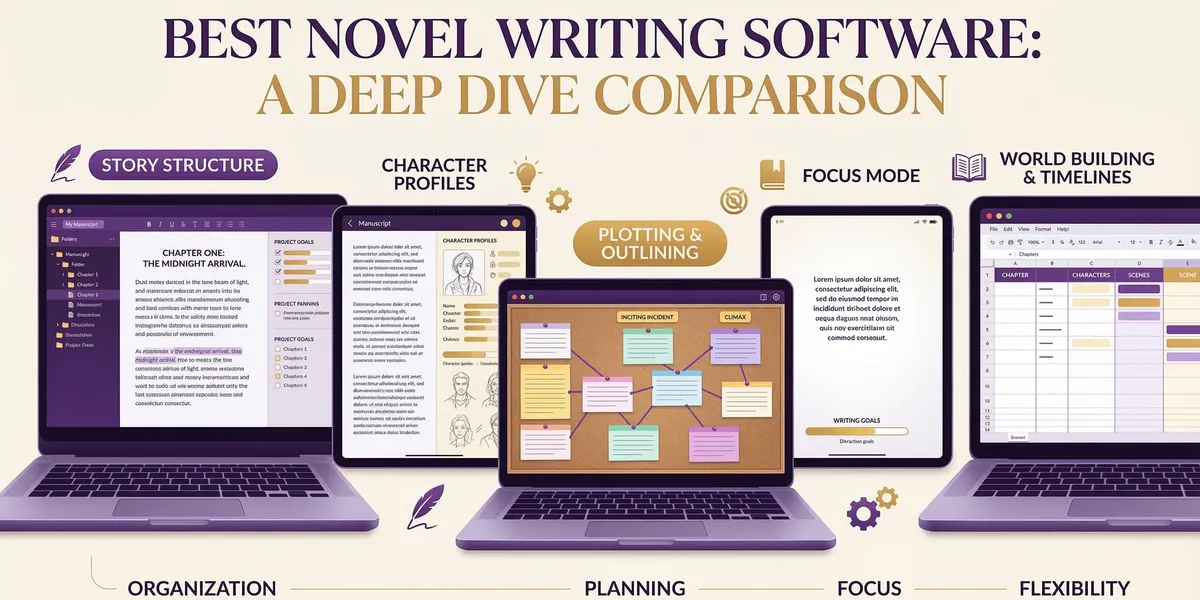
The best novel writing software does more than give you a blank page — it structures your story, tracks your characters, and gets you from first idea to finished manuscript without losing momentum halfway through act two.
This comparison covers eight novel writing tools for 2026, from AI-powered manuscript generators to visual plotters and distraction-free editors. Whether you need software that builds an entire novel from a story framework or a simple writing environment that stays out of your way, the right pick depends on how you work and what you need the software to do.
Quick Comparison
| Tool | Best For | AI Generation | Pricing | Platform |
|---|---|---|---|---|
| Chapter | Complete AI novel generation | Full manuscript, 20K–120K+ words | $97 one-time | Web |
| Scrivener | Organizing complex manuscripts | None | $49 one-time | Mac, Windows, iOS |
| Dabble | Plot-driven writers who track goals | None | From $9/mo | Web, desktop |
| Novlr | Distraction-free novel drafting | None | $10/mo | Web |
| yWriter | Free scene-based organization | None | Free | Windows, Linux |
| Sudowrite | AI-assisted prose and scene writing | Scene-level + Story Engine | $10–59/mo | Web |
| Plottr | Visual plotting and outlining | None | From $60/yr | Desktop |
| Atticus | Writing + formatting in one tool | None | $147 one-time | Web (PWA) |
1. Chapter — Best for Complete AI Novel Generation
Our Pick — Chapter
Chapter generates full fiction manuscripts from proven story structures — not random scenes stitched together. Pick a framework, define your characters and world, and get a complete novel.
Best for: Fiction writers who want a finished manuscript from a single workflow
Chapter works differently from every other tool on this list. Instead of providing a writing environment and leaving the actual writing to you, it generates complete novels between 20,000 and 120,000+ words using the same narrative frameworks that bestselling authors use to structure their stories.
You start by selecting a story structure — Save the Cat, Three Act, Romance Beat Sheet — then define your characters, central conflict, world details, and genre. The AI builds a full narrative arc before writing a single word of prose. That structural foundation means the AI knows a romance needs a meet cute by chapter three, a thriller needs escalating stakes and a ticking clock, and fantasy needs worldbuilding woven into plot rather than dropped in exposition blocks.
The character development system goes deeper than basic profiles. You define motivations, flaws, relationship dynamics, and character arcs that the AI threads through the manuscript. Style training lets you feed in writing samples so the output matches a specific voice instead of defaulting to generic AI prose. Genre-specific trope libraries — particularly strong for romance, thriller, and fantasy — help the AI hit the conventions readers expect.
For authors writing series, the continuity tracker keeps character details, world rules, and plot threads consistent across up to nine books. That solves one of the biggest problems in AI-generated fiction: stories that contradict themselves from one chapter to the next.
Pricing: $97 one-time payment. No monthly fees. Over 2,147 authors have used the platform to create 5,000+ books. One author, Sarah M., went from idea to published in five days and hit #12 in Romance Contemporary on Amazon.
Limitations: Chapter is a full manuscript generator, not a lightweight brainstorming tool. If you want to write every word yourself and just need organizational features, it gives you more than you need. The structured approach also means committing to a story framework upfront rather than discovering the plot as you write.
2. Scrivener — Best for Organizing Complex Manuscripts
Scrivener has been the industry standard for novel organization since 2007, and it earned that reputation. The binder system lets you break a novel into scenes, chapters, and parts that you can rearrange by dragging — move chapter twelve to chapter three and the entire manuscript restructures instantly.
The corkboard view turns each scene into a virtual index card with a synopsis, so you can see your entire novel’s structure at a glance. Scrivenings mode stitches scenes together into a continuous document for reading flow. The split editor lets you reference notes, research, or earlier chapters while writing a current scene — a feature that sounds minor until you’re writing chapter twenty-eight and need to check a detail from chapter four.
Where Scrivener stands apart from web-based tools is its compile system. It exports to Word, PDF, ePub, Final Draft, and more, with granular control over formatting at each level. You can write in whatever font you want and compile to publisher specifications without reformatting anything manually.
Pricing: $49 one-time for Mac or Windows. iOS app sold separately. Educational discount available. Free 30-day trial (actual usage days, not calendar days).
Limitations: The learning curve is steep. Most writers need a few weeks to feel comfortable with the interface, and the compile system — while powerful — can be intimidating. No built-in AI features, no cloud sync without a third-party service like Dropbox, and the Windows version historically lags behind the Mac version in updates.
3. Dabble — Best for Plot-Driven Writers
Dabble combines a writing editor with plotting tools and goal tracking in a single interface. The Plot Grid is the standout feature — a visual spreadsheet where you map storylines, subplots, and character arcs against your chapter structure, so you can see at a glance where each thread appears and spot gaps before they become problems.
Story Notes live alongside your manuscript in a searchable sidebar. Tag characters, locations, and objects, then pull up any note while writing without leaving your current scene. The goal tracking system lets you set word count targets by project, day, or session, with visual progress bars that keep momentum visible.
Dabble syncs across all devices automatically — write on your desktop, review on your tablet, jot a scene idea on your phone. The interface stays clean enough that the plotting features don’t overwhelm writers who just want to draft, but deep enough that plotters can map complex multi-timeline narratives.
Pricing: Basic at $9/month for core writing features. Standard at $19/month adds Plot Grid, Story Notes, and Focus Mode. Premium at $29/month adds grammar tools, co-authoring, and Read-to-Me. Annual billing saves 20%. Lifetime access at $699. 14-day free trial with no credit card required.
Limitations: No export to ePub or formatting for self-publishing — you’ll need a separate tool like Atticus or Vellum for that. The monthly cost adds up: Standard plan runs $228/year, which surpasses both Chapter and Scrivener’s one-time costs within the first year. No offline mode on the web version.
4. Novlr — Best Distraction-Free Writing Environment
Novlr strips novel writing down to what matters: a clean editor, basic organization, and nothing else competing for your attention. The interface is deliberately minimal — no corkboards, no plot grids, no feature bloat. Open it and write.
That simplicity is the point. Novlr targets writers who lose productivity when their software offers too many ways to procrastinate on the actual writing. The editor supports chapters, scenes, and notes with a straightforward sidebar. Formatting is limited to the essentials: bold, italic, headings, and not much else. Word count tracking and writing streaks provide just enough accountability without turning goal-setting into its own project.
Novlr saves everything to the cloud automatically with version history, so you can roll back to any previous session. Export options cover the basics — Word, PDF, and ePub — though formatting control is minimal compared to Scrivener or Atticus.
Pricing: $10/month or $100/year. Free trial available.
Limitations: Too minimal for writers who need plotting tools, character databases, or any organizational structure beyond chapters and scenes. No AI features. The export formatting is basic — serious self-publishers will need a dedicated formatting tool. Not the right choice if you’re the kind of writer who needs to see your story structure visually.
5. yWriter — Best Free Novel Writing Software
yWriter is a free, open-source novel writing tool built by a published novelist, and it’s the best free option for writers who need scene-level organization without spending anything. You structure your novel by chapters and scenes, each with fields for synopsis, notes, point-of-view character, location, and involved characters.
The scene-based approach forces useful habits. Instead of writing into a single continuous document and losing track of what happens where, each scene is a discrete unit you can label, filter, and rearrange. The storyboard view shows scene progression across your novel, and you can filter by character or location to check continuity.
yWriter also tracks word count by scene, chapter, and project. You can set daily targets and view progress over time. Character and location databases store details you can reference while writing, though the interface is functional rather than elegant.
Pricing: Completely free. No trial limitations, no premium tier, no account required. Download directly for Windows. A Linux version (PyWriter) is also available.
Limitations: The interface looks dated — it hasn’t had a visual refresh in years. Windows-only for the main version (workarounds exist for Mac via Wine, but they’re clunky). No cloud sync, no mobile version, and no collaboration features. The learning curve is moderate because the interface isn’t intuitive. But for the price — free — the organizational depth is hard to beat.
6. Sudowrite — Best AI Prose Assistant
Sudowrite takes a different AI approach than Chapter. Where Chapter generates complete manuscripts from structure, Sudowrite works at the scene and paragraph level, helping you write better prose rather than writing an entire book for you. Think of it as an AI co-writer that sits beside you during the drafting process.
The Story Engine is Sudowrite’s full-generation workflow: you provide a premise, characters, and genre, and it produces a beat sheet outline that expands into chapters. The Muse model, fine-tuned on published fiction, produces noticeably better prose than general-purpose AI — it understands that a thriller chapter should read differently than literary fiction at the sentence level.
Where Sudowrite really shines is its Write modes. Describe lets you expand a scene with sensory detail. Brainstorm generates plot alternatives when you’re stuck. Rewrite adjusts tone, pacing, or style on existing passages. These tools work best for writers who enjoy the drafting process but want AI handling specific tasks rather than the entire manuscript.
Pricing: Hobby at $10/month (annual) with 30,000 AI words. Professional at $22/month (annual) with 1,000,000 words. Free trial with roughly 10,000 credits.
Limitations: The learning curve is real — expect several hours before you’re productive. Credits deplete fast on lower tiers. The monthly subscription cost adds up to $264/year for Professional versus Chapter’s one-time $97. Story Engine can generate full manuscripts, but the output requires more manual revision and guidance than Chapter’s structure-first approach.
7. Plottr — Best Visual Plotting Tool
Plottr is a dedicated outlining and plotting tool — not a writing editor. The visual timeline lays out your entire novel’s plot threads as color-coded swimlanes, so you can see how storylines intersect, where subplots drop off, and which chapters carry the most narrative weight.
The template library includes 40+ story structure templates — Save the Cat, Hero’s Journey, Seven-Point Structure, and genre-specific frameworks — that you can apply to your novel and customize. Character sheets and world-building databases store details that link to specific plot points on the timeline, creating a connected planning system.
Plottr integrates with Scrivener and Word, so your outline can export directly into your writing environment. The series planning feature tracks continuity across multiple books with a shared timeline. For writers who plan extensively before drafting, Plottr provides the most sophisticated visual outlining available.
Pricing: Base plan at $60/year or $150 lifetime for desktop only. Plottr Pro at $99/year or $599 lifetime adds cloud sync, browser access, and collaboration. 30-day free trial.
Limitations: Plottr is purely a planning tool. You’ll still need separate book writing software for the actual drafting. The base plan is desktop-only with no cloud sync — you need Pro for cross-device access. The lifetime price jumped significantly in recent years. And while the timeline view is excellent for plotters, discovery writers (pantsers) may find the structured approach constraining.
8. Atticus — Best Writing + Formatting Combo
Atticus combines a writing editor with professional book formatting in a single tool, which makes it the best choice for self-publishers who want to go from first draft to print-ready files without switching applications. Write your novel in the built-in editor, then format it with 17 templates and 1,200+ design combinations for ePub, PDF, and DOCX export.
The writing editor covers the basics — drag-and-drop chapters, word count goals, writing habit tracking, and automatic cloud backup. It’s not as deep as Scrivener for organization or Dabble for plotting, but it handles the drafting process competently. Where Atticus earns its price is the formatting side: preview your book across 8+ device types (Kindle, iPad, iPhone, various paperback sizes), customize fonts from a library of 1,500+, and build custom themes.
Atticus works as a Progressive Web App on Windows, Mac, Linux, and Chromebook — broader platform support than most competitors. It also handles both ebook and print formatting in one export, which tools like Kindle Create or Draft2Digital’s formatter don’t do as cleanly.
Pricing: $147 one-time payment. Unlimited books and pen names. Ongoing updates for life. 30-day money-back guarantee.
Limitations: The writing editor is functional but basic compared to dedicated writing tools. No AI features. No plotting or story structure tools — you’re outlining elsewhere or pantsing it. At $147, it’s more expensive than Scrivener for writers who don’t need the formatting features and already have a formatting workflow. But for self-publishers who need both writing and formatting, it replaces two tools with one.
How We Evaluated
Every tool on this list was assessed across five criteria:
- Manuscript completion: Does the tool help you finish a novel, or just start one? Tools that support the full workflow — from planning through drafting to export — scored higher.
- Organization depth: How well does it handle the complexity of a novel? Scene management, character tracking, and chapter restructuring matter when you’re working with 80,000+ words.
- Learning curve vs. payoff: A steep learning curve is fine if the tool delivers proportional value. A steep learning curve for basic features is not.
- Pricing value: One-time costs versus subscriptions, factored over a typical novelist’s multi-year timeline. A $10/month tool costs $360 over three years. A $97 one-time tool costs $97 forever.
- Output quality: For AI tools, the quality and coherence of generated text. For traditional tools, the quality of export and formatting options.
FAQ
What is the best novel writing software for beginners?
For beginners who want AI assistance, Chapter provides the most guided experience — select a structure, define your story elements, and the AI handles the heavy lifting. For beginners who want to write manually, Novlr’s distraction-free approach removes the complexity of tools like Scrivener.
Can AI write an entire novel?
Yes. Chapter generates complete manuscripts between 20,000 and 120,000+ words using proven story structures. The output quality depends on how well you define your characters, conflict, and genre conventions upfront. Sudowrite’s Story Engine also generates full manuscripts, though with more manual guidance required. Read more about AI story generation and how the process works.
Is Scrivener still worth it in 2026?
Scrivener remains the strongest organizational tool for writers who draft manually. Its binder system, corkboard, and compile features haven’t been matched by any competitor. But if you want AI assistance with the actual writing — not just organizing it — you’ll need a different tool or a combination.
What’s the best free novel writing software?
yWriter is the best free option with genuine depth. It offers scene-based organization, character tracking, word count goals, and storyboard views at no cost. Google Docs works for simple drafting but lacks any novel-specific features. LibreOffice Writer is a free Word alternative but similarly lacks organizational tools for long-form fiction.
Should I use a dedicated writing tool or just Word/Google Docs?
For short projects, Word or Google Docs works fine. For novels — especially anything over 50,000 words — dedicated software pays for itself in time saved. Scene-level organization, character tracking, and structural views prevent the “lost in the middle” problem that kills most abandoned novels. The question isn’t whether you need novel writing software, but which type matches how you write.