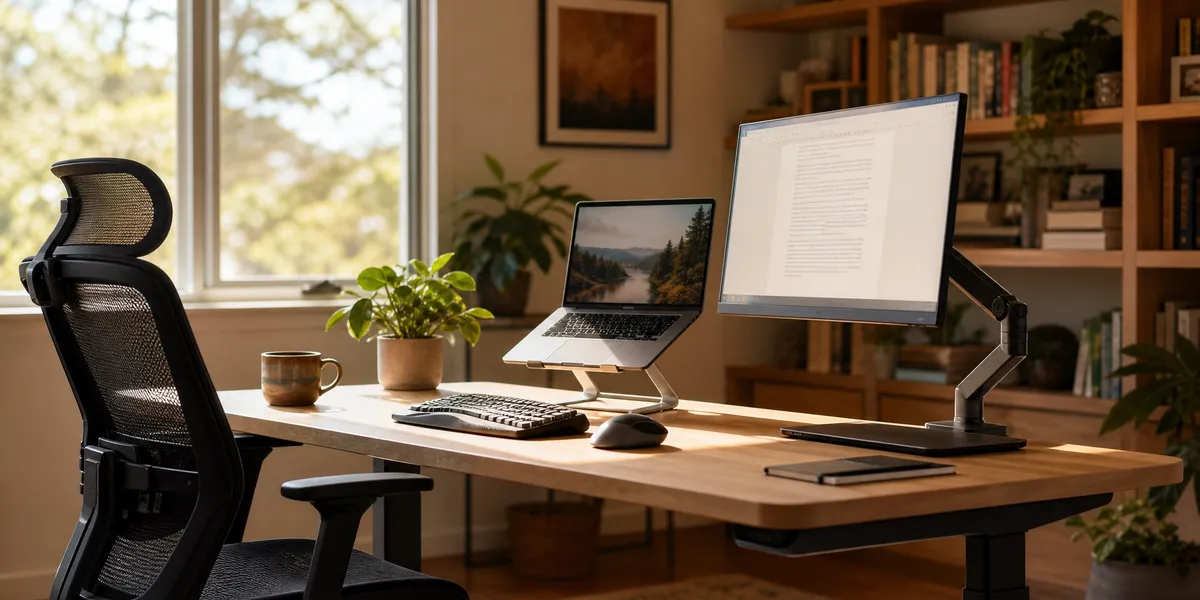
You can write for hours without neck pain, wrist strain, or back stiffness — if your workspace is set up correctly. Most writers ignore ergonomics until pain forces them to stop, but a few simple adjustments today can protect your body for decades of productive writing.
In this guide, you’ll learn:
- How to position your chair, desk, monitor, and keyboard for pain-free writing sessions
- The specific posture adjustments that prevent repetitive strain injuries
- A break routine backed by occupational health research
- Budget-friendly upgrades that make the biggest difference
Here’s how to build a writing workspace your body will thank you for.
Why Ergonomics Matter More for Writers Than Most Professions
Ergonomics for writers is the science of designing your workspace to fit your body, reducing strain during the long, repetitive typing sessions that book writing demands. Writers face unique risks because the work requires sustained focus in a fixed position — often for hours without a natural stopping point.
The average novelist types between 1,000 and 2,000 words per day. At roughly 5 keystrokes per word, that is 5,000 to 10,000 finger movements in a single session. Over a full manuscript, you are looking at millions of repetitive motions through the same tendons, joints, and muscles.
Repetitive strain injuries like carpal tunnel syndrome, tendinitis, and thoracic outlet syndrome can sideline you for months. Chronic back pain from poor posture is the number one complaint among professional writers who work from home. The good news: nearly all of these problems are preventable with the right setup.
How to Set Up an Ergonomic Writing Chair
Your chair is the foundation of your entire ergonomic setup. A bad chair undermines everything else — you cannot maintain good posture on a dining room chair for four hours.
The key adjustments:
- Seat height: Your feet should rest flat on the floor with your thighs parallel to the ground. If your desk is too tall, raise your chair and add a footrest.
- Lumbar support: The chair should support the natural inward curve of your lower back. If yours does not have built-in lumbar support, a rolled-up towel or a $15 lumbar pillow works.
- Seat depth: Leave 2-3 fingers of space between the front edge of the seat and the back of your knees. Seats that are too deep cut off circulation.
- Armrests: Set them so your elbows rest at roughly 90 degrees with your shoulders relaxed — not shrugged up. If armrests push your shoulders up, remove them or lower them.
- Recline: A slight backward lean of about 100-110 degrees reduces spinal disc pressure more than sitting perfectly upright. You do not need to sit at a rigid 90 degrees.
If you are shopping for a dedicated writing chair, look for one with adjustable seat height, adjustable lumbar depth, adjustable armrest height, and a tilt-lock mechanism. You do not need to spend $1,500. Chairs in the $300-500 range from brands like Autonomous, HON, or Flexispot cover all the critical adjustments.
The Best Desk Setup for Long Writing Sessions
Your desk height determines your arm position, which determines your wrist angle, which determines whether you develop pain over time. Getting this right matters.
Ideal desk height: The surface where your keyboard sits should be at elbow height when you are seated with your arms relaxed at your sides. For most people, this is 25-28 inches — lower than a standard 30-inch desk.
Two approaches that work:
-
Adjustable standing desk: Lets you alternate between sitting and standing throughout the day. Electric sit-stand desks from Flexispot or Uplift start around $300 and let you switch positions in seconds. Standing for 15-20 minutes per hour is enough to break up the static load on your spine.
-
Fixed desk with keyboard tray: If you already have a desk you like, adding a pull-out keyboard tray drops your typing surface to the correct height. Trays from 3M or Fellowes mount under the desk and cost $40-80.
Desk surface organization: Keep your most-used items within arm’s reach without twisting. Your keyboard and mouse should sit directly in front of you — not off to one side. If you use reference books or notes while writing, place them between the keyboard and monitor using a document holder so you are not constantly turning your neck.
Monitor and Screen Placement for Writers
Screen position is where most writers go wrong. If you write on a laptop without an external monitor, your neck is almost certainly flexed forward and down — a position that puts enormous strain on your cervical spine over time.
The correct monitor position:
- Height: The top third of your screen should sit at or slightly below eye level. You should look straight ahead or slightly downward — never up.
- Distance: Place the monitor about an arm’s length away (20-26 inches). If you find yourself leaning forward to read, increase your font size rather than moving the screen closer.
- Angle: Tilt the screen back 10-20 degrees so it faces your eyes directly, reducing glare and neck strain.
- Centered: The monitor should be directly in front of you, not off to one side.
Laptop writers: You have two options. The first is to place your laptop on a stand or stack of books to raise the screen, then connect an external keyboard and mouse. The second is to connect an external monitor at the right height and use your laptop keyboard. Either way, you need the screen and keyboard at different heights — a laptop on a flat desk forces you to compromise one for the other.
A basic laptop stand costs $20-40 and makes a dramatic difference. Pair it with a $30 external keyboard and you have solved the single biggest ergonomic problem laptop writers face.
Keyboard and Mouse Ergonomics for Writers
Your hands do the actual writing, so protecting your wrists and fingers is non-negotiable. The goal is a neutral wrist position — flat and straight, not bent up, down, or to the side.
Keyboard positioning:
- Place the keyboard directly in front of you, centered on the letters (not on the whole keyboard — the number pad shifts the letter keys to the left on full-size keyboards).
- Your elbows should be at 90 degrees or slightly wider.
- Your wrists should float above the keyboard, not rest on the desk or a wrist rest while typing. Wrist rests are for pausing between bursts — not for typing on.
- If your keyboard has flip-out feet on the back, do not use them. They angle the keyboard upward, forcing your wrists into extension.
Keyboard types to consider:
- Split keyboards (like the Kinesis Freestyle or Logitech Ergo K860) angle each half outward so your wrists stay straight. These are excellent for writers with existing wrist pain.
- Mechanical keyboards with lighter key switches reduce the force needed per keystroke, lowering finger fatigue during long writing sessions.
- Low-profile keyboards keep your hands closer to the desk surface, reducing the wrist extension angle.
Mouse placement: Keep your mouse directly beside your keyboard at the same height. If you experience wrist pain from mousing, try a vertical mouse or trackball — both keep your forearm in a more natural handshake position rather than the palm-down twist of a standard mouse.
Writing Posture: The Positions That Prevent Pain
Even with perfect equipment, poor posture will still cause problems. Here is the posture checklist to run through at the start of every writing session:
Head and neck:
- Ears aligned over shoulders — not craned forward
- Chin slightly tucked, not jutting out
- If you wear glasses, make sure your prescription allows you to read the screen without tilting your head
Shoulders and arms:
- Shoulders relaxed and down, not hunched toward your ears
- Upper arms hanging close to your body
- Elbows at 90-100 degrees
Back and hips:
- Lower back supported by the chair’s lumbar support
- Slight backward lean (100-110 degrees)
- Hips pushed all the way back in the chair
Legs and feet:
- Thighs parallel to the floor
- Feet flat on the floor or on a footrest
- No crossing your legs — it rotates your pelvis and strains your lower back
The key insight from occupational health research is that no single position is safe if you hold it for hours. The best posture is your next posture. Shift, adjust, lean back, lean forward, stand up. Movement is the real antidote to static loading.
Break Routines That Protect Your Body During Long Writing Days
You cannot out-ergonomic a 6-hour unbroken writing marathon. Breaks are not optional — they are part of the setup.
The 20-20-20 rule for your eyes: Every 20 minutes, look at something 20 feet away for 20 seconds. This relaxes the ciliary muscles that hold your eye’s focus on a close screen.
Movement breaks: Stand up and move for 2-5 minutes every 30-60 minutes. Walk to the kitchen, stretch, do a lap around your home. This resets your spinal discs, restores circulation to your legs, and prevents the stiffness that builds during sustained sitting.
Micro-stretches you can do at your desk:
- Neck rolls: Slowly roll your head in a circle, 5 times each direction
- Shoulder shrugs: Raise both shoulders to your ears, hold 5 seconds, release. Repeat 5 times.
- Wrist circles: Extend your arms and rotate your wrists slowly, 10 times each direction
- Chest opener: Clasp your hands behind your back and squeeze your shoulder blades together. Hold 15 seconds.
- Seated spinal twist: Place one hand on the opposite knee and gently rotate your torso. Hold 15 seconds each side.
If you struggle to remember breaks while deep in a writing flow, use a timer app. Stretchly (free, cross-platform) and Time Out (Mac) run in the background and remind you automatically. Some writers build break reminders directly into their writing routine — for example, taking a stretch break at every chapter transition or scene change.
Lighting and Eye Comfort for Writers
Poor lighting causes eye strain, headaches, and fatigue — all of which kill your writing productivity long before your body gives out.
Screen brightness: Match your screen brightness to the ambient light in your room. If the screen looks like a light source, it is too bright. If it looks dull and gray, it is too dim.
Blue light: Extended screen time, especially in the evening, can disrupt sleep patterns. Use your operating system’s built-in night mode (Night Shift on Mac, Night Light on Windows) to reduce blue light after sunset. This matters for writers who do their best work in the evening or during late-night sessions.
Room lighting: Position your desk so windows are to the side, not directly behind or in front of your monitor. Light behind your screen creates glare. Light behind you reflects off the screen. Side lighting gives you natural light without either problem.
A desk lamp with adjustable color temperature lets you match the light to the time of day. Warm light (2700-3000K) for evening sessions, cooler light (4000-5000K) for daytime focus.
Budget-Friendly Ergonomic Upgrades (Under $100 Total)
You do not need to spend thousands to build an ergonomic workspace. These budget upgrades address the highest-impact problems first:
| Upgrade | Cost | Problem It Solves |
|---|---|---|
| Lumbar support pillow | $15-25 | Lower back pain from unsupportive chair |
| Laptop stand | $20-40 | Neck strain from looking down at laptop screen |
| External keyboard | $25-40 | Allows screen and keyboard at different heights |
| Footrest | $15-25 | Leg circulation when desk is too high |
| Document holder | $10-20 | Neck twisting when referencing notes |
| Desk lamp (adjustable) | $20-35 | Eye strain from poor lighting |
Total for all six: $105-185. Start with whichever solves your biggest current pain point. For most laptop writers, the stand plus external keyboard combination delivers the largest improvement for the lowest cost.
How AI Writing Tools Reduce Physical Strain
One overlooked ergonomic strategy is reducing the raw amount of typing you do. AI writing tools can generate draft text from your outlines and prompts, cutting your keystroke count significantly while keeping you in creative control.
Our Pick — Chapter
Chapter’s AI writing assistant generates full book drafts from your outline, handles repetitive structural work, and lets you focus your typing energy on the creative decisions that matter. Less typing, same creative ownership.
Best for: Writers who want to reduce repetitive typing strain without giving up control of their book Pricing: $97 one time, 2 books included (fiction or nonfiction), 30-day money-back guarantee Why we built it: Long writing sessions should not come with a physical cost. Chapter handles the high-volume drafting so your hands and wrists do less repetitive work.
When you use an AI tool to generate a first draft from your detailed outline, you shift from typing thousands of words from scratch to editing and refining — a task that involves more reading and selective typing. This is not just a productivity win. It is an ergonomic one. Editing puts significantly less mechanical stress on your hands and wrists than sustained drafting.
Over 2,147 authors have used Chapter to write more than 5,000 books — many of them citing reduced fatigue during the writing process.
How to Set Up a Standing Desk for Writing
Standing desks are popular, but using one incorrectly creates new problems. Here is how to set up a standing position that actually helps:
- Desk height: Your elbows should be at 90 degrees with your shoulders relaxed, just like sitting. Most electric desks have memory presets — save both your sitting and standing heights.
- Monitor height: The top third of the screen at eye level. You will need to raise your monitor higher than in seated mode. A monitor arm makes this adjustment seamless.
- Anti-fatigue mat: Standing on a hard floor for 20+ minutes causes foot and knee pain. A cushioned mat ($25-40) makes standing comfortable.
- Footrest bar or step: Alternating which foot you rest on a low bar shifts your weight and reduces lower back fatigue.
- Shoes: Wear supportive shoes or high-quality slippers. Do not stand barefoot on a hard floor.
How long to stand: Research suggests alternating between sitting and standing every 30-60 minutes. You do not need to stand for half the day. Even 10-15 minutes of standing per hour breaks up the static seated posture that causes problems.
Start with short standing intervals and increase gradually. If you go from 8 hours of sitting to 4 hours of standing overnight, your feet and lower back will complain loudly.
Common Ergonomic Mistakes Writers Make
Avoid these pitfalls that undermine even well-intentioned setups:
- Writing on the couch or in bed. It feels comfortable for 20 minutes, then your neck, back, and wrists pay for it. Reserve the couch for reading, not extended writing sessions.
- Using a laptop on a flat desk without external peripherals. This forces you to choose between a good screen height and a good keyboard height. You cannot have both with a laptop alone.
- Gripping the mouse too tightly. Most wrist pain from mousing comes from a death grip, not the mouse itself. Relax your hand — you are clicking, not arm wrestling.
- Skipping breaks because you are in flow. Flow states are valuable, but a 5-minute break after 60 minutes will not break your concentration. Ignoring pain signals will.
- Buying an expensive chair but never adjusting it. Every adjustment exists for a reason. Spend 10 minutes dialing in your seat height, lumbar depth, armrest height, and recline angle.
What About Writing by Hand?
Some writers prefer longhand for first drafts, journaling, or brainstorming. Handwriting has its own ergonomic considerations:
- Pen grip: Hold the pen lightly, about an inch from the tip. Avoid a white-knuckle death grip.
- Writing surface angle: A slightly angled surface (10-15 degrees) reduces wrist extension. Drafting boards or angled lap desks work well.
- Paper position: Angle the paper 20-30 degrees (lefties angle the opposite direction). This keeps your wrist in a neutral position rather than hooked around the top of the page.
- Posture rules still apply. You still need lumbar support, feet on the floor, and regular breaks — the same principles as typing.
If you do a lot of handwriting, consider a pen with a wider barrel (like the Uni-ball Jetstream or Lamy Safari). Thicker barrels require less grip force and reduce hand fatigue.
How Often Should Writers Take Breaks?
Writers should take a movement break every 30-60 minutes and an eye break every 20 minutes. The exact interval matters less than the consistency. A 2-minute stretch every 45 minutes is far better than a 15-minute break every 3 hours.
Build breaks into your writing routine rather than relying on willpower. Some writers use the Pomodoro technique — 25 minutes of focused writing followed by a 5-minute break, with a longer 15-minute break every four cycles. Others prefer writing to a word count goal (say, 500 words) and then taking a movement break before the next sprint.
The point is not the system. The point is that you actually stand up and move regularly. Your spine, wrists, and eyes do not care which timer app you use.
Can a Writing Retreat Ruin Your Ergonomics?
Writing retreats are incredible for productivity — but hotel desks, cabin tables, and coffee shop chairs are rarely ergonomic. If you are planning a retreat, pack a few portable ergonomics essentials:
- A compact laptop stand (folding stands weigh under a pound)
- A travel keyboard (Logitech K380 or similar)
- A lumbar pillow or rolled towel
- Your preferred focus playlist and noise-canceling earbuds
These four items weigh under 3 pounds total and let you write comfortably anywhere. Do not let a productive retreat week turn into a painful recovery month.
FAQ
What is the best ergonomic setup for writers?
The best ergonomic setup for writers includes an adjustable chair with lumbar support, a desk at elbow height, a monitor at eye level, and a keyboard that keeps your wrists flat and straight. Adding regular movement breaks every 30-60 minutes completes the setup and prevents repetitive strain injuries.
Do writers need a standing desk?
Writers do not strictly need a standing desk, but alternating between sitting and standing reduces spinal compression and improves circulation during long sessions. Even standing for 10-15 minutes per hour provides measurable benefits. A sit-stand desk gives you the flexibility to switch positions as your body needs.
How do you prevent wrist pain from typing?
You prevent wrist pain from typing by keeping your wrists in a neutral position — flat and straight, not bent up or down. Use a keyboard at elbow height, avoid resting your wrists on the desk while actively typing, and take micro-breaks every 20-30 minutes to stretch your wrists and fingers. Split keyboards further reduce strain.
What is the best chair for writing for long hours?
The best chair for writing long hours has adjustable seat height, adjustable lumbar support, adjustable armrests, and a tilt-lock mechanism. Look for chairs that let you recline slightly to 100-110 degrees. You do not need to spend over $500 — models from Autonomous, HON, and Flexispot cover all critical adjustments in the $300-500 range.
How can I improve my writing posture?
You can improve your writing posture by aligning your ears over your shoulders, relaxing your shoulders down and away from your ears, supporting your lower back with lumbar support, and keeping your feet flat on the floor. Check your posture at the start of every writing session and remember that the best posture is your next posture — shift positions frequently.