You can absolutely illustrate a children’s book with no experience — and you have more options in 2026 than any generation of authors before you. Between AI illustration tools, affordable freelancers, and simple art styles that don’t require formal training, your lack of a fine arts degree is not the barrier it used to be.
In this guide, you’ll learn:
- How to choose an illustration style that matches your skill level
- Step-by-step methods for creating your own artwork (even if you can’t draw)
- Which AI tools generate consistent children’s book illustrations
- How to hire an illustrator if you decide not to DIY
- Page layout and formatting basics for a professional-looking book
Here’s everything you need to get your children’s book illustrated — starting today.
Decide How You Want to Illustrate Your Book
Before you sketch a single character, decide which illustration path fits your budget, timeline, and creative goals. There are four realistic options for someone with no illustration experience, and each one works.
| Approach | Cost | Timeline | Skill Needed | Best For |
|---|---|---|---|---|
| DIY traditional (hand-drawn) | $50–$200 (supplies) | 2–4 months | Basic drawing | Authors who want a handmade feel |
| DIY digital (tablet/app) | $0–$300 (apps + tablet) | 1–3 months | Beginner digital skills | Authors who want clean, editable art |
| AI illustration tools | $20–$100/month | 1–4 weeks | Prompt writing | Authors on a tight budget or timeline |
| Hire a freelance illustrator | $3,000–$12,000+ | 3–6 months | None (you direct) | Authors who want professional quality |
The right choice depends on your book. A simple bedtime story with collage-style art is something you can absolutely make yourself. A detailed 32-page picture book with watercolor spreads might need a professional.
Most first-time children’s book authors either use AI tools or a hybrid approach — creating rough sketches themselves and hiring an illustrator to polish the finals.
Choose an Art Style That Works for Beginners
You don’t need to paint like a Disney concept artist. Some of the most beloved children’s books use deliberately simple styles. The key is consistency — pick one style and stick with it across every page.
Beginner-friendly illustration styles:
- Collage. Cut and arrange paper, fabric, or found materials. Eric Carle built an entire career on this. No drawing required.
- Simple line art. Clean outlines with minimal detail. Think stick figures elevated to characters with personality. Works well with digital tools.
- Watercolor washes. Loose, expressive paintings that don’t need precision. Imperfections add charm.
- Digital flat illustration. Shapes and solid colors created in apps like Canva or Procreate. Modern, clean, and forgiving of wobbly lines.
- Mixed media. Combine photographs, textures, and drawings. Gives a unique look without requiring mastery of any single medium.
When choosing your style, flip through 20–30 published children’s books in your target age range. Note which illustration styles appeal to you and — more importantly — which ones feel achievable with your current abilities.
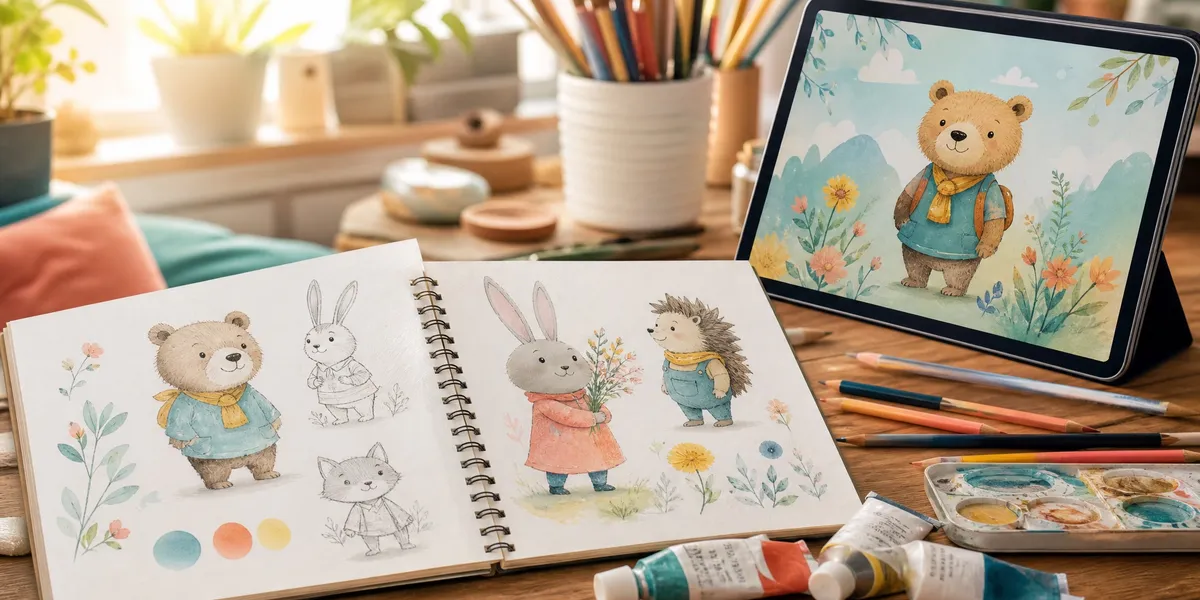
The consistency rule: Young readers notice when a character’s hair changes color or their proportions shift between pages. Whatever style you choose, create a character reference sheet before you start illustrating pages. Draw your main character from the front, side, and back. Note their exact colors. This sheet becomes your visual anchor for the entire book.
How to Create Your Own Illustrations (Step by Step)
If you’re going the DIY route, follow this process. It works whether you’re drawing by hand or using digital tools.
Step 1: Break Your Story Into Page Spreads
A standard children’s picture book is 32 pages. After subtracting the title page, copyright page, and dedication, you have roughly 12–15 spreads (two-page layouts) to illustrate.
Write out your text and assign 1–3 sentences to each spread. Every spread needs a visual purpose — something happening, an emotion, a setting change. If a spread doesn’t have visual action, rewrite the text until it does.
Step 2: Create Thumbnail Sketches
Thumbnail sketches are tiny (1–2 inch) rough drawings of each page spread. They help you plan composition, pacing, and page turns before committing to final art.
What to figure out in thumbnails:
- Where does the character appear on each page?
- Which spreads are full-bleed illustrations vs. text-heavy?
- Where are the page-turn surprises? (Kids love reveals on the next page.)
- Does the visual pacing build toward the climax?
Spend an afternoon on thumbnails. They save weeks of rework later.
Step 3: Design Your Characters
Create a character reference sheet for every recurring character. Include:
- Front view, side view, and 3/4 view
- Key expressions (happy, sad, surprised, angry)
- Color palette (exact hex codes if working digitally)
- Size relative to other characters and objects
- Clothing and accessories that stay consistent
Practice drawing your main character 50 times. By the 30th sketch, you’ll draw them from memory. That muscle memory is what creates consistency across 32 pages.
Step 4: Draw Rough Sketches for Every Spread
Using your thumbnails as a guide, draw full-size rough sketches for each spread. These don’t need to be beautiful — they need to be readable. Show character placement, text positioning, and background elements.
If you’re self-publishing a children’s book, your printer will need specific trim sizes and bleed areas. Standard picture book trim size is 8” x 10” or 10” x 8” (landscape). Add 0.125” bleed on all sides, making your working canvas 8.25” x 10.25”.
Step 5: Create Final Artwork
Now take each rough sketch and produce the final illustration. Work in order from front to back so your style stays consistent (your technique will improve as you go — you don’t want page 1 to look noticeably different from page 30).
Tips for clean final art:
- Work at 300 DPI minimum for print quality
- Use layers if working digitally (separate layers for background, characters, and text areas)
- Leave space for text — don’t cover important visual elements with words
- Export as TIFF or high-quality PNG for the printer
Step 6: Get Feedback Before Finalizing
Show your illustrated spreads to 3–5 people in your target reader’s age group (or their parents). Watch how they react. Do they understand the story from the pictures alone? Do the page turns create anticipation?
Revise based on feedback. Most professional illustrators go through 2–3 revision rounds before final art.
Can You Use AI to Illustrate a Children’s Book?
Yes — AI illustration tools have become a legitimate option for children’s book creators in 2026. They’re particularly useful if you’re on a tight budget or need illustrations fast. But they come with real limitations you need to understand.
How AI children’s book illustration works: You write text prompts describing what you want each illustration to look like. The AI generates images based on those descriptions. You iterate, adjust prompts, and select the best outputs.
Best AI Tools for Children’s Book Illustrations
Our Pick — Chapter
Chapter helps you write and structure your entire children’s book, including guidance on illustration planning and page layouts. While it’s primarily a writing tool, it pairs perfectly with AI illustration workflows by helping you nail the story structure that drives your visual decisions.
Best for: Writing and structuring the book that your illustrations will bring to life Pricing: $97 one time, 2 books included (fiction or nonfiction), 30-day money-back guarantee Why we built it: Because great illustrations start with a great story — and 10,000+ authors have used Chapter to get that foundation right.
For generating the actual illustrations, these AI tools work well:
- Midjourney. Best overall quality for stylized children’s book art. Strong at maintaining a consistent aesthetic across a set of images when you lock in a style prompt. Subscription starts at $10/month.
- DALL-E 3 (via ChatGPT Plus). Understands emotional context remarkably well — when you describe “a nervous rabbit at the first day of school,” it captures the feeling, not just the scene. $20/month with ChatGPT Plus.
- Neolemon. Purpose-built for children’s book illustration with character consistency tools. You design a character once, then generate unlimited scenes with that same character. Solves the biggest AI illustration problem.
The Character Consistency Problem
The biggest challenge with AI illustration is character consistency — making sure your rabbit character looks like the same rabbit on every single page. General-purpose AI tools generate beautiful individual images, but your character’s features, proportions, and colors shift between generations.
Solutions:
- Use Neolemon or similar tools built specifically for character consistency
- Create a detailed character description prompt and paste it into every generation
- Generate all illustrations in a single session to maintain style coherence
- Use AI-generated images as a base, then manually edit for consistency in Procreate or Photoshop
What AI Can’t Do (Yet)
- Complex page layouts with text integration still require manual design work
- Exact pose control is limited — you can’t always get the specific gesture you need
- Legal gray areas around AI-generated art in children’s publishing are still evolving — some publishers and competitions don’t accept AI-illustrated submissions
- Emotional nuance in facial expressions can feel generic compared to human illustration
AI illustration works best as a starting point or for authors planning to self-publish where you control the production process.
Children’s Book Cover Design Tips
Your cover is the single most important illustration in your entire book. It’s what sells your book in online thumbnails, bookstore shelves, and library displays. Get this one right even if every interior illustration is simple.
What makes a great children’s book cover:
- One clear focal point. Your main character doing something — not a busy scene with ten elements competing for attention.
- Readable at thumbnail size. Most book discovery happens online. If your cover doesn’t work at 150 pixels wide, it doesn’t work.
- Title text that doesn’t fight the art. Leave a clear area (usually the top third) for your title. Light text on dark backgrounds or dark text on light backgrounds — never text floating over a busy illustration.
- Age-appropriate colors. Board books and picture books use bright, saturated colors. Middle grade trends toward more sophisticated palettes.
- Consistent with interior style. Your cover illustration should match your interior art style exactly. A watercolor cover with digital interiors looks disjointed.
If you illustrate the entire interior yourself but feel uncertain about the cover, this is the one illustration worth hiring a professional for. A strong cover with simple interior art outsells a weak cover with gorgeous interior art every time.
For more on cover costs, see our book cover design cost breakdown.
How Much Does Children’s Book Illustration Cost?
Understanding children’s book publishing costs helps you budget realistically for illustration — often the single largest expense in a picture book.
| Illustration Route | Cost Range | What You Get |
|---|---|---|
| DIY (supplies only) | $50–$300 | Full creative control, personal style |
| AI tools | $20–$100/month | Fast, affordable, improving quality |
| Fiverr illustrators | $200–$2,000 | Budget-friendly, variable quality |
| Professional freelancer | $3,000–$12,000 | Industry-standard quality |
| Illustration agency | $5,000–$25,000+ | Premium, project-managed |
Per-page rates for professional illustrators:
- Simple character spots: $100–$200 per illustration
- Full-page scenes: $300–$500 per illustration
- Complex double-page spreads: $500–$800+ per spread
These numbers come from industry pricing guides and reflect 2026 market rates. If someone offers to illustrate your entire 32-page picture book for under $500, you’re almost certainly getting AI-generated art resold as original work.
A realistic budget for a first children’s book illustration project: $2,000–$5,000 gets you solid freelance work with 2 rounds of revisions. Below $2,000, you’re either doing significant work yourself or using AI tools.
How to Hire an Illustrator (If You Don’t DIY)
If you decide to hire a children’s book illustrator, here’s the condensed version of what matters.
Where to find illustrators:
- Fiverr and Upwork — Budget-friendly, huge selection, requires careful vetting
- Reedsy — Curated marketplace of publishing professionals
- Children’s Book Illustration Society (SCBWI) — Industry organization with an illustrator directory
- Instagram and Behance — Search hashtags like #childrensbookillustrator to find artists whose style matches your vision
What to look for in a portfolio:
- At least 3 completed children’s book projects (not just standalone illustrations)
- Character consistency across multiple pages
- Ability to draw the same character in different poses and expressions
- Style that matches your book’s mood and target age group
Red flags:
- No children’s book work in their portfolio (editorial or advertising illustration is different)
- No contract or unclear revision policies
- Pricing that seems too good to be true (under $500 for a full picture book)
- No communication about your vision before starting work
Always get a paid test illustration before committing to a full project. Have them draw your main character in 2–3 different scenes. This costs $100–$300 and saves thousands in wrong-fit situations.
Page Layout and Formatting Basics
Even with beautiful illustrations, poor layout ruins a children’s book. These formatting fundamentals ensure your book looks professional whether you self-publish or submit to publishers.
Standard picture book specs:
- Trim size: 8” x 10” (portrait) or 10” x 8” (landscape) — most common
- Page count: 32 pages (industry standard)
- Resolution: 300 DPI minimum for all artwork
- Color mode: CMYK for print (not RGB)
- Bleed: 0.125” on all sides
- File format: PDF/X-1a for print-ready files
Text placement rules:
- Never place text in the gutter (center fold) — it disappears into the binding
- Keep text at least 0.5” from any edge
- Use a maximum of 2–3 lines of text per spread for picture books
- Choose readable fonts — sans-serif for ages 3–5, simple serif for ages 6+
Tools for layout:
- Canva (free) — Beginner-friendly, limited print features
- Affinity Publisher ($70 one-time) — Professional layout at an indie budget
- Adobe InDesign ($23/month) — Industry standard for book layout
- Book Bolt or KDP’s cover creator — Free tools for Amazon self-publishing
Common Mistakes to Avoid
- Inconsistent characters. Your rabbit shouldn’t grow taller, change color, or lose its bow tie between pages. Create a reference sheet and check every illustration against it.
- Ignoring the gutter. Important visual elements placed in the center fold get lost when the book is bound. Keep faces, text, and key details at least 0.5” from the center.
- Too much detail for the age group. Board books (ages 0–3) need bold, simple images. Detailed, busy illustrations work for older middle grade readers, not toddlers.
- Skipping thumbnails. Jumping straight to final art without planning page layouts leads to pacing problems and expensive rework.
- Matching illustration style to the wrong age. Anime-style art might appeal to you but confuse a 3-year-old audience. Match your style to your reader’s age.
How Long Does It Take to Illustrate a Children’s Book?
How long it takes to illustrate a children’s book depends on the method you choose, the complexity of your art, and how many pages you’re illustrating. For a standard 32-page picture book:
- DIY traditional art: 2–4 months (working part-time)
- DIY digital art: 1–3 months
- AI-generated illustrations: 1–4 weeks (including revision and consistency fixes)
- Hired illustrator: 3–6 months from contract to final files
Most first-time illustrators underestimate how long character development takes. Expect to spend 20–30% of your total project time just designing and refining characters before you touch a single page spread.
Can You Illustrate a Children’s Book on a Budget?
You can illustrate a children’s book on a budget by combining free digital tools with a simple, consistent art style. Authors working with under $500 in total illustration budget should consider these approaches:
- Use Canva’s free plan for digital collage-style illustrations
- Learn basic Procreate skills ($13 one-time on iPad) for hand-drawn digital art
- Use AI tools like DALL-E or Midjourney ($10–$20/month) for draft illustrations, then manually refine
- Try mixed media — combine simple drawings with textured paper backgrounds photographed with your phone
- Partner with an art student — university illustration programs often have students looking for real-world portfolio projects
The lowest-cost published children’s books often have the most distinctive styles because their constraints forced creative solutions. A book made from cut-paper collage costs almost nothing in materials and can look stunning.
What Software Do You Need to Illustrate a Children’s Book?
The software you need to illustrate a children’s book depends on whether you’re working traditionally or digitally. Here are the best free and paid options:
Free tools:
- Canva — Browser-based design tool, good for simple digital illustrations and layouts
- GIMP — Free Photoshop alternative for digital painting
- Inkscape — Free vector graphics editor for clean line art
- Krita — Free digital painting program popular with illustrators
Paid tools (worth the investment):
- Procreate ($13, iPad only) — The most popular digital illustration app for beginners
- Affinity Designer ($70) — Professional vector illustration without the subscription
- Adobe Illustrator ($23/month) — Industry standard for clean digital art
- Clip Studio Paint ($50 one-time or $2/month) — Excellent for character illustration
For most beginners, Procreate on an iPad is the sweet spot. It’s affordable, intuitive, has excellent brush packs for children’s book styles, and exports at print resolution.
FAQ
How do you illustrate a children’s book if you can’t draw?
You can illustrate a children’s book if you can’t draw by using collage techniques, AI illustration tools, or digital design apps like Canva that don’t require drawing skills. Many successful picture books use cut-paper collage, photography, or simple shapes rather than traditional illustration. You can also hire a freelance illustrator to bring your vision to life.
How many illustrations does a children’s book need?
A children’s book typically needs 15–20 illustrations for a standard 32-page picture book. This includes 12–15 full-page or double-page spread illustrations plus a cover illustration. Board books need fewer (8–12 images), while chapter books for older children may only include 5–10 spot illustrations.
Can you use AI art in a published children’s book?
You can use AI art in a self-published children’s book without restrictions. However, traditional publishers and some book awards currently don’t accept AI-generated illustrations. If you plan to self-publish on platforms like Amazon KDP, AI illustrations are allowed. Always disclose the use of AI art to maintain reader trust.
How much should you pay an illustrator for a children’s book?
You should expect to pay a children’s book illustrator $3,000–$12,000 for a full 32-page picture book in 2026. Per-page rates range from $100–$500 depending on complexity. Budget illustrators on Fiverr may charge $200–$2,000 for a full book, while established professionals and agencies charge $5,000–$25,000+.
What is the best illustration style for a first children’s book?
The best illustration style for a first children’s book is simple digital illustration or collage — both are forgiving of beginner-level art skills and maintain consistency across pages. Watercolor washes and simple line art also work well for first-time illustrators. Choose a style you can reproduce consistently across 15–20 pages rather than the most impressive style you can create once.