Self-publishing a book gives you complete creative control, higher royalties per sale, and the ability to get your work in front of readers in weeks instead of years. Over 300 million self-published books sell on Amazon annually, and titles like The Martian, Fifty Shades of Grey, and Still Alice all started as self-published works before becoming bestsellers and major motion pictures.
This guide walks you through every step of how to self-publish a book in 2026 — from writing your manuscript to building a launch strategy that generates sales from day one.
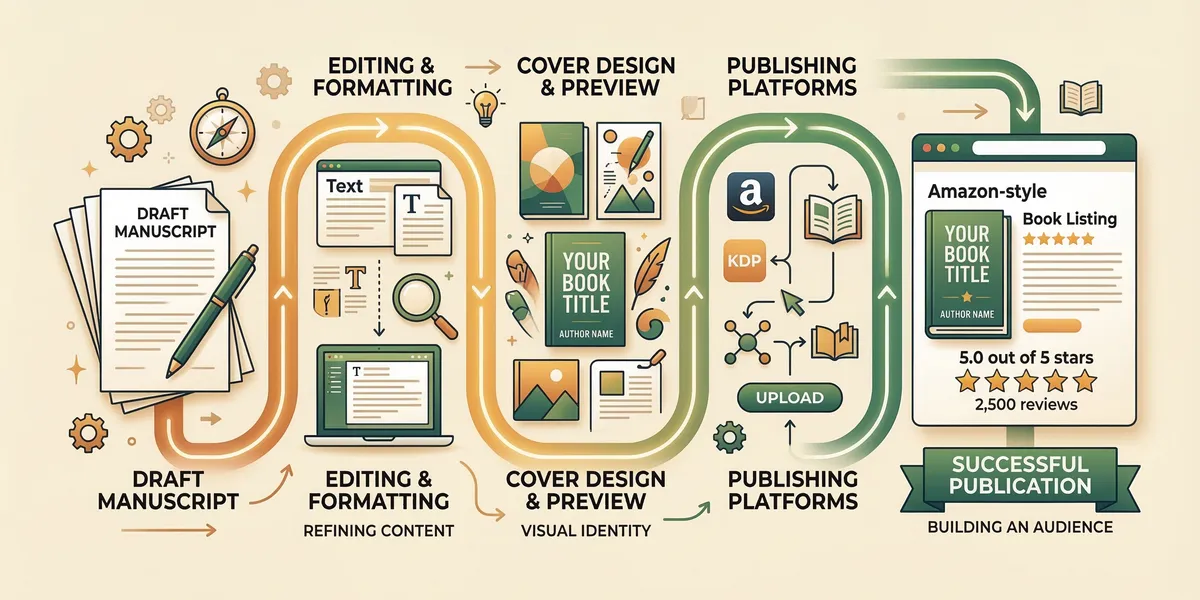
Step 1: Write Your Book
Every published book starts as a finished manuscript. That sounds obvious, but the biggest reason most aspiring authors never publish is that they never finish writing.
Set a daily word count goal that fits your schedule. Even 500 words per day produces a 45,000-word manuscript in three months. Block the same time each day, close your browser tabs, and write. Consistency matters more than speed.
If you are struggling with structure, outline your book before drafting. For nonfiction, list every chapter as a problem your reader needs to solve, then write each chapter as the solution. For fiction, sketch your major plot points, the central conflict, and the resolution before filling in scenes.
AI writing tools can accelerate this process significantly. Chapter.pub helps authors draft, structure, and refine full-length books using AI assistance — more than 2,147 authors have used it to create over 5,000 books. Whether you outline manually or use technology to move faster, the goal is the same: a complete manuscript you are proud of.
For a deeper look at the writing process, read our guide on how to write a book.
Step 2: Edit Professionally
A first draft is never ready for publication. Readers notice poor grammar, awkward pacing, and plot holes immediately, and they leave one-star reviews about them. Editing is the single most important investment you make in your book.
Start with self-editing. Read your manuscript aloud. You will catch clunky sentences, repeated words, and dialogue that does not sound natural. Tools like ProWritingAid or Hemingway Editor can flag passive voice, adverb overuse, and readability issues during this pass.
Then hire a professional editor. There are three levels of editing, and you may need one or more:
- Developmental editing examines your book’s structure, pacing, character arcs, and argument flow. This is the most expensive level but the most impactful for a manuscript that needs structural work.
- Copy editing catches grammar, punctuation, consistency, and style errors at the sentence level.
- Proofreading is the final polish — typos, formatting issues, and anything the copy editor missed.
Budget $500 to $3,000 depending on your manuscript’s length and the level of editing you need. Find editors through Reedsy, the Editorial Freelancers Association, or recommendations in author communities.
Before sending your manuscript to a paid editor, consider using beta readers — volunteer readers from your target audience who provide feedback on story, pacing, and engagement. Their input helps you fix big issues before you spend money on professional editing.
Step 3: Design Your Cover
Readers judge books by their covers. On Amazon, your cover is a thumbnail competing against dozens of others in search results. A cover that looks amateur, cluttered, or off-genre will kill your sales before anyone reads a word.
Study your genre. Browse the top 20 bestsellers in your category on Amazon. Notice the patterns — thriller covers use bold sans-serif fonts and dark color palettes, romance covers feature illustrated or photographic couples, business books use clean minimalist layouts. Your cover needs to signal the right genre instantly.
Where to get a professional cover:
- 99designs runs cover design contests where multiple designers submit concepts and you pick the winner. Budget $300 to $600.
- Professional freelance designers on Reedsy or through referrals typically charge $500 to $1,500 for a custom cover.
- Fiverr offers budget options starting at $50 to $200. Quality varies, so review portfolios carefully and choose designers who specialize in your genre.
- Canva works for basic nonfiction covers if you use professional stock photography and clean typography. It is not ideal for fiction, where custom illustration or compositing is expected.
Invest in both an ebook cover (front only) and a full print cover (front, spine, and back) if you plan to sell paperbacks.
Step 4: Format Your Manuscript
Your manuscript needs to be converted into the file formats that publishing platforms accept. Ebooks require EPUB files. Print books require properly formatted PDFs with correct margins, gutters, headers, and page numbers.
Ebook formatting controls how your text flows across different devices — Kindle, phone screens, tablets, and e-readers. A well-formatted ebook includes a clickable table of contents, consistent heading styles, proper paragraph spacing, and images that scale correctly.
Print formatting is more rigid. You need to choose a trim size (6”x9” is the most popular for nonfiction, 5.5”x8.5” for fiction), set appropriate margins, add page numbers, and ensure your text does not have widows, orphans, or rivers of white space.
Formatting tools:
- Atticus ($147 one-time) handles both ebook and print formatting in a browser-based interface. It is the most versatile option for authors who publish in multiple formats.
- Vellum ($249.99 for ebook and print, Mac only) produces beautiful output with minimal effort. Many professional authors use it exclusively.
- Amazon’s free formatting tools — Kindle Create is free and handles basic ebook formatting directly through KDP. It works well for text-heavy books without complex layouts.
- Draft2Digital’s free converter accepts Word documents and generates clean EPUB files automatically.
Step 5: Choose Your Publishing Platform
Where you publish determines who can buy your book, how much you earn per sale, and how much control you have over pricing and distribution. For a detailed breakdown of every option, read our comparison of the best self-publishing platforms.
Amazon KDP is the dominant platform, controlling roughly 70 to 80 percent of the global ebook market. Publishing on KDP gives you access to the largest reader base, Kindle Unlimited enrollment, and Amazon’s advertising platform. Most self-published authors start here and for good reason — it is where the buyers are.
IngramSpark is the platform to use if you want your print books in physical bookstores and libraries. Ingram distributes to more than 40,000 retailers worldwide. Many authors use IngramSpark for print distribution alongside KDP for ebook sales.
Draft2Digital is an aggregator that distributes your ebook to Apple Books, Kobo, Barnes & Noble, and dozens of other retailers from a single dashboard. It is the easiest way to go wide without managing multiple accounts.
The most common strategy: Publish your ebook on Amazon KDP (optionally enrolling in KDP Select for Kindle Unlimited), use IngramSpark for wide print distribution, and use Draft2Digital for wide ebook distribution to non-Amazon retailers.
For a broader look at the tradeoffs between self-publishing and working with a traditional publisher, read self-publishing vs. traditional publishing.
Step 6: Set Your Pricing
Pricing directly affects your royalties, your ranking in Amazon’s algorithm, and how readers perceive your book’s value. Get it wrong and you either leave money on the table or price yourself out of sales.
Ebook pricing on Amazon KDP:
- Price between $2.99 and $9.99 to qualify for the 70% royalty rate. Price outside that range and you drop to 35%.
- Fiction typically sells best at $2.99 to $4.99 for new authors. Established authors with a backlist can push to $5.99 to $7.99.
- Nonfiction can command $4.99 to $9.99 depending on the topic’s perceived value. Business, health, and technical books sit at the higher end.
- Launch pricing at $0.99 or $2.99 for the first week can drive volume, reviews, and algorithmic momentum.
Print pricing formula:
Calculate your minimum price by adding your printing cost (KDP shows this based on page count and trim size) plus your desired royalty. A 250-page 6”x9” paperback costs roughly $4.50 to print on KDP. If you want a $3 royalty, your minimum list price is approximately $13 to $15 after Amazon’s 40% cut.
General pricing strategy: Research the top 10 books in your category and price within the same range. Pricing significantly below the competition signals low quality. Pricing above it requires strong brand recognition or a clearly differentiated offer.
Step 7: Create Your Amazon Listing
Your Amazon listing is a sales page. Every element — title, description, keywords, and categories — works together to help readers find your book and convince them to buy it. For a step-by-step walkthrough of publishing on Amazon specifically, see our guide to publishing a book on Amazon.
Title and subtitle. Your title should be compelling and your subtitle should include relevant search terms. For nonfiction, the subtitle often does the heavy lifting: Atomic Habits: An Easy & Proven Way to Build Good Habits & Break Bad Ones.
Book description. You get 4,000 characters. Use HTML formatting (bold, italic, line breaks) to make it scannable. Open with a hook that speaks to your target reader’s problem or desire. For fiction, write jacket-copy style — introduce the protagonist, the central conflict, and the stakes without spoiling the resolution.
Backend keywords. Amazon gives you seven keyword slots of 50 characters each. Use these for search terms that are not already in your title or subtitle. Think about what your ideal reader would type into the Amazon search bar.
Categories. You can select up to three categories. Choose categories that are specific enough to rank in but popular enough to have active buyers. Ranking number one in a micro-niche category earns you a bestseller badge, which increases click-through rates across all of Amazon.
A+ Content. If you have a brand registered on Amazon (or use KDP’s Author Central), you can add A+ Content — rich media modules with images, comparison charts, and formatted text below your standard description. This is free and increases conversion rates significantly.
Step 8: Plan Your Launch Strategy
A book launch is not a single event. It is a coordinated campaign that builds momentum before publication day and sustains it for weeks afterward.
Pre-orders. List your book for pre-order two to four weeks before your launch date. Every pre-order sale counts toward your launch day ranking, which means you hit Amazon’s algorithm with a concentrated burst of sales instead of a trickle.
Build a launch team. Recruit 20 to 50 readers — friends, email subscribers, social media followers, or members of your target community — who agree to read an advance copy and leave an honest review during launch week. Reviews are the social proof that converts browsers into buyers.
Email list. If you have an email list, your launch sequence should include a cover reveal, a behind-the-scenes look at the writing process, a pre-order announcement, a launch day email, and a follow-up asking for reviews. If you do not have an email list yet, start building one now. It is the single most valuable marketing asset an author can own.
Social media. Share your publishing journey authentically. Behind-the-scenes content, cover reveals, and excerpts perform better than direct sales pitches. Engage in communities where your target readers already spend time — Facebook groups, subreddits, Goodreads groups, and BookTok.
Launch day pricing. Consider launching your ebook at $0.99 for the first three to five days to maximize downloads, reviews, and ranking. Then raise the price to your target level once you have momentum.
Step 9: Market Your Book Ongoing
Most book sales happen after launch week. Long-term marketing is what separates authors who earn a living from those who sell a few copies to friends and family.
Amazon Ads. Sponsored Product ads on Amazon put your book in front of readers who are actively searching for books like yours. Start with automatic targeting campaigns to discover which keywords convert, then build manual campaigns around your winners. Budget $5 to $10 per day to start and scale based on your return on ad spend.
BookBub. A BookBub Featured Deal is the most powerful promotional tool in self-publishing. A single promotion can generate thousands of sales in 24 hours. Featured Deals are competitive to get — apply through BookBub’s partner dashboard and be prepared to discount your ebook to $0.99 or free. Even if you do not land a Featured Deal, BookBub Ads let you target readers of specific authors and genres.
Email marketing. Continue growing your email list by offering a free chapter, a companion resource, or a short story as a reader magnet. Email your list regularly with new release announcements, backlist promotions, and personal updates. Authors with a book as a lead magnet strategy can build substantial audiences this way.
Social media and content marketing. Maintain a presence where your readers are. For nonfiction authors, blog posts, podcast guest appearances, and YouTube videos that address your book’s topic create ongoing discovery. For fiction authors, BookTok, Bookstagram, and Goodreads engagement drive word-of-mouth recommendations.
Common Self-Publishing Mistakes
Avoid these errors that derail first-time self-published authors:
Rushing the cover. A $15 stock photo with free fonts screams self-published in the worst way. Your cover is your primary sales tool. Invest in it.
Skipping professional editing. No author can effectively edit their own work. You are too close to the text to catch structural issues, and your brain autocorrects your own typos. Budget for at least a copy editor.
Wrong pricing. Pricing your ebook at $14.99 because you spent a year writing it ignores how the market works. Readers compare your price to traditionally published books by household names. Price for your genre and your current audience size.
No marketing plan. “Publish and pray” is not a strategy. Decide before you launch how you will drive initial sales and reviews. Even a simple plan — launch team, email blast, and a $5/day Amazon ad budget — dramatically outperforms doing nothing.
Ignoring metadata. Your title, subtitle, description, keywords, and categories are how Amazon’s algorithm decides who sees your book. Spend as much time optimizing your listing as you did designing your cover.
Frequently Asked Questions
How much does it cost to self-publish a book?
You can self-publish for free using Amazon KDP’s tools, but investing in quality produces significantly better results. A realistic budget: $500 to $1,500 for editing, $300 to $600 for cover design, $0 to $250 for formatting, and $100 to $500 for initial advertising. Total: roughly $900 to $2,850. Many successful self-published authors spend $1,500 to $2,000 on their first book.
How long does it take to self-publish a book?
From finished manuscript to published book, the process takes four to eight weeks. Editing requires two to four weeks (depending on your editor’s schedule), cover design takes one to two weeks, formatting takes a few days, and KDP review takes 24 to 72 hours. If you are starting from scratch, add three to six months for writing the manuscript.
Do I need an ISBN to self-publish?
Amazon KDP provides a free ASIN (Amazon Standard Identification Number) for ebooks and a free ISBN for print books published through their platform. If you want to distribute through IngramSpark or other channels, you need your own ISBN. In the US, purchase ISBNs through Bowker ($125 for one, $295 for ten). Owning your ISBN lets you list yourself as the publisher of record.
Can I sell my self-published book on multiple platforms?
Yes, unless you enroll in KDP Select, which requires 90-day ebook exclusivity on Amazon. Many authors use KDP for Amazon distribution and Draft2Digital or IngramSpark for everywhere else. Print books have no exclusivity restrictions on any platform, so you can publish paperbacks on both KDP and IngramSpark simultaneously.
How much money can I earn self-publishing?
Earnings vary enormously. A well-positioned ebook earning the 70% royalty at $4.99 produces $3.44 per sale. Selling 100 copies per month generates roughly $344 in monthly royalty income. Top self-published authors earning six and seven figures typically have multiple books, active advertising campaigns, and established email lists. The median self-published author earns under $1,000 per year, but authors who treat publishing as a business — investing in quality, marketing consistently, and building a backlist — dramatically outperform that median.