Yes, manuscript formatting matters — and the standard rules are straightforward once you know them. Whether you’re submitting to a literary agent, entering a contest, or preparing a book for self-publishing, proper formatting signals that you’re a professional who takes your work seriously.
This guide covers every element of standard manuscript formatting, from fonts and margins to title pages and chapter breaks, with specific guidance for both fiction and nonfiction.
Why manuscript formatting matters
Agents and editors read hundreds of manuscripts per month. A correctly formatted submission tells them two things: you’ve done your homework, and you respect their time.
According to literary agent Nathan Bransford, improper formatting is one of the fastest ways to signal inexperience. Agents don’t reject manuscripts solely for formatting mistakes, but a messy submission creates doubt before they read a single sentence.
For self-published authors, formatting determines whether your book looks professional or amateurish on readers’ devices and in print. The standards exist for practical reasons — readability, consistency, and ease of editing.
Standard manuscript format at a glance
Here’s the quick-reference version. Every element is explained in detail below.
| Element | Standard Format |
|---|---|
| Font | 12-point Times New Roman |
| Spacing | Double-spaced throughout |
| Margins | 1 inch on all sides |
| Indentation | 0.5-inch first-line indent |
| Alignment | Left-aligned (ragged right) |
| Header | Last Name / Title / Page Number |
| Paper size | 8.5 x 11 inches (US Letter) |
| File format | .docx (preferred) |
| Title page | Title, author name, word count, contact info |
Fonts and type size
Use 12-point Times New Roman. This is the industry standard and what virtually every agent, editor, and publisher expects.
Some submission guidelines accept Courier New or other serif fonts, but Times New Roman is the safest default. Avoid sans-serif fonts like Arial or Calibri — they’re harder to read in long-form manuscript pages. Never use decorative or script fonts anywhere in your manuscript.
The 12-point size combined with Times New Roman produces roughly 250 words per page with standard margins and double spacing. This is the baseline publishers use to estimate page counts and production costs, which is why it became standard in the first place.
Margins
Set 1-inch margins on all four sides — top, bottom, left, and right. This is universal across fiction and nonfiction manuscripts.
In Microsoft Word, go to Layout > Margins > Normal (1”). In Google Docs, go to File > Page Setup and set all margins to 1 inch.
Wider margins waste space. Narrower margins make the text feel cramped and leave no room for an editor’s handwritten notes — a holdover from print editing that persists as a formatting convention.
Spacing
Double-space everything. This includes body text, dialogue, block quotes, and the spaces between chapter headings and body text. Do not add extra space between paragraphs beyond what the double spacing provides.
This is the most commonly broken formatting rule. Many writers use 1.5 spacing or add extra paragraph spacing through their word processor’s paragraph settings. Check your paragraph settings to make sure “After” spacing is set to 0pt.
In Word: Home > Paragraph > Line Spacing > Double. Make sure “Don’t add space between paragraphs of the same style” is checked.
Indentation and alignment
Indent the first line of every paragraph by 0.5 inches (half an inch). Use your word processor’s paragraph formatting — not the Tab key. Tabs can create inconsistent spacing when the file is opened in a different program.
In Word: Home > Paragraph > Special > First Line > 0.5”.
The first paragraph after a chapter heading or scene break is typically not indented. This is a typographic convention that signals a new section.
Left-align all text. Do not use justified alignment (where both margins are straight). Justified text creates uneven word spacing throughout the document, which makes it harder to read and edit. According to Scribophile’s formatting guide, left-aligned text with a ragged right edge is standard across all major publishers.
Your title page
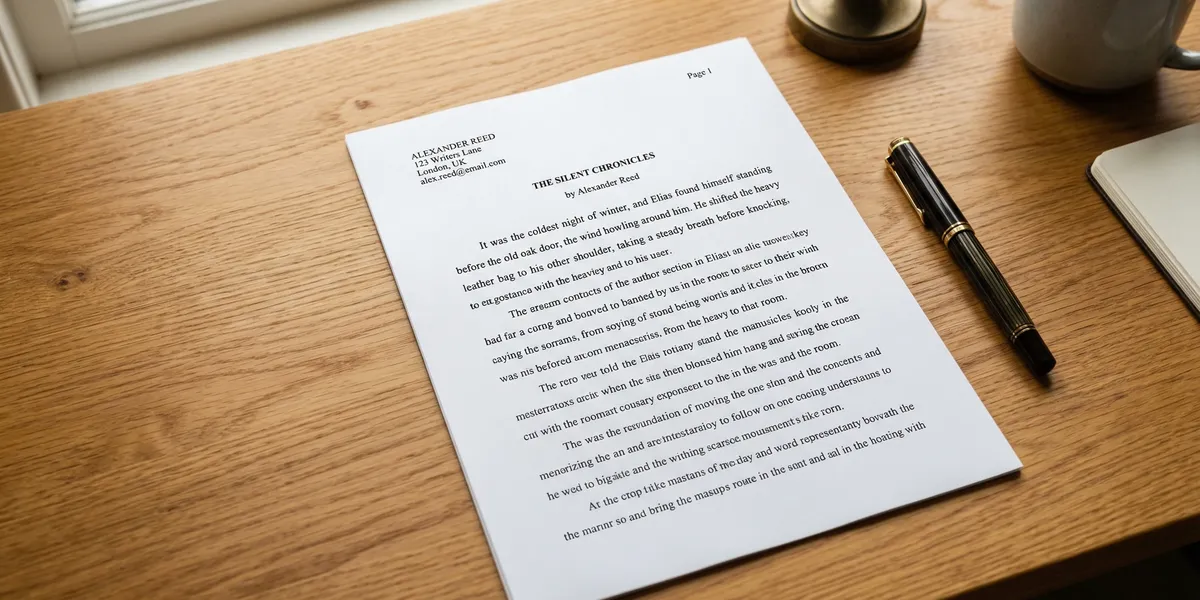
The title page is the first page of your manuscript. It is not numbered and contains the following information:
Upper-left corner:
- Your legal name (not your pen name)
- Your mailing address
- Your phone number
- Your email address
- Your agent’s name and contact info (if you have representation)
Center of the page (roughly halfway down):
- Your book title (capitalized or in title case)
- “by” followed by your pen name (if different from your legal name)
- The word count, rounded to the nearest thousand (e.g., “approximately 85,000 words”)
Upper-right corner:
- Genre or category (e.g., “Literary Fiction” or “Self-Help”)
Keep the title page clean and uncluttered. No decorations, no images, no colored text. Shunn’s classic manuscript format guide provides a visual example of how a properly formatted title page should look.
Headers and page numbers
Starting on the second page (your first page of actual text), add a running header in the upper-right corner or upper-left corner with:
Last Name / TITLE / Page Number
Example: Lennox / THE ART OF WRITING / 2
Some agents prefer the format with the title in all caps, others in title case. Either is acceptable unless the submission guidelines specify otherwise.
Page numbers should run consecutively through the entire manuscript. Do not restart numbering at each chapter. The title page is not numbered.
Chapter formatting
Each new chapter starts on a new page. Use a page break (Ctrl+Enter in Word) — never hit Enter repeatedly to push text to the next page.
Chapter heading placement: Start the chapter title roughly one-third of the way down the page. Some writers use a specific number of blank lines (typically 6-8 double-spaced lines from the top). Center the chapter heading.
Chapter heading style:
Chapter Oneor
Chapter 1: The Beginningor simply
1Choose one style and use it consistently throughout. Do not use different fonts, sizes, or decorative elements for chapter headings. Bold is acceptable but not required.
Leave a few blank double-spaced lines between the chapter heading and the first paragraph of the chapter, then begin writing. Remember: the first paragraph after a chapter heading is not indented.
Scene breaks
When you shift scenes, time periods, or perspectives within a chapter, indicate it with a scene break. The standard is a centered hash mark:
#Some writers use three asterisks (* * *) or three hash marks (# # #). All are acceptable. What matters is consistency — pick one and use it everywhere.
Do not use blank lines alone as scene breaks. A blank line can be lost when the break falls at the top or bottom of a page, and the reader won’t know a scene transition happened.
Fiction vs. nonfiction formatting differences
The standard formatting rules above apply to both fiction and nonfiction manuscripts, but there are a few key differences.
Fiction manuscripts:
- Scene breaks use the centered
#symbol - Dialogue follows standard punctuation rules (new paragraph for each speaker)
- Chapter titles can be numbers, words, or creative titles
- No footnotes or endnotes (generally)
Nonfiction manuscripts:
- Subheadings within chapters are common and expected
- Use a consistent heading hierarchy (Chapter Title > Section Heading > Subsection)
- Footnotes or endnotes may be required depending on the genre
- Block quotes should be indented an additional 0.5 inches from both margins
- Lists and bullet points are acceptable when they serve the content
- Include a bibliography or works cited if the book references sources
For nonfiction, a detailed book outline before you start writing helps ensure consistent heading structure across chapters.
Formatting your manuscript for submission to agents
When submitting to literary agents, the standard format described above is your baseline. Then check the agent’s specific guidelines — they always override general conventions.
Most agents request:
- A query letter
- The first 5-50 pages of the manuscript (varies by agent)
- A synopsis (1-2 pages for fiction, a detailed chapter-by-chapter summary for nonfiction)
File format: Send your manuscript as a .docx file unless the agent requests something different. Do not send PDFs — agents need to be able to make notes and comments in the document.
File naming: Use a clear naming convention: LastName_TITLE_Manuscript.docx. Agents handle dozens of submissions per week, and a descriptive filename helps yours get filed correctly.
Review the agent’s website or QueryTracker listing for specific formatting preferences. Some agents want single-spaced synopses. Some want the query letter pasted into the email body. Follow their instructions precisely.
Formatting for self-publishing
If you’re self-publishing your book, your manuscript formatting needs change depending on the output format.
For print (paperback or hardcover):
- Trim sizes vary (the most common is 5.5” x 8.5” or 6” x 9”)
- Margins should account for the gutter (interior binding margin)
- Headers include the book title on left pages and author name on right pages
- Use a single space after periods (not two)
- Justified text is standard in print books (unlike manuscript submissions)
For ebook:
- Use reflowable formatting — no fixed page sizes
- Avoid hard page breaks between paragraphs
- Embed a clickable table of contents
- Test on multiple devices before publishing
Amazon KDP provides free manuscript templates for print books, which handle trim sizes, margins, and gutter widths automatically.
For ebook formatting specifically, our guide on how to format a book for Kindle covers file types, chapter navigation, and the settings that prevent formatting disasters.
Our Pick — Chapter
Chapter.pub helps authors draft, structure, and export complete books — including nonfiction manuscripts with proper heading hierarchy and chapter organization. Over 2,147 authors have used it to create more than 5,000 books.
Best for: Authors who want to go from idea to finished manuscript without wrestling with formatting from the start Pricing: $97 one-time (nonfiction) Why we built it: Most formatting headaches come from messy drafts. Chapter produces clean, structured manuscripts from the beginning.
How to format your manuscript in Microsoft Word
Most writers use Word, so here’s the step-by-step setup:
- Page Setup: Layout > Margins > Normal (1”). Set paper size to US Letter (8.5” x 11”).
- Font: Home > Font > Times New Roman, 12pt.
- Line spacing: Home > Paragraph > Line Spacing > Double. Set “Before” and “After” to 0pt.
- First-line indent: Home > Paragraph > Special > First Line > 0.5”.
- Alignment: Click the left-align button (or Ctrl+L).
- Header: Insert > Header > Blank. Type your last name, a forward slash, your title in caps, another forward slash. Tab to the right and insert a page number.
- Page break for chapters: Position your cursor where the new chapter starts. Insert > Page Break (or Ctrl+Enter).
- Title page: Create the title page on page 1. Then go to Header & Footer > Different First Page to remove the header from the title page.
Save your formatted document as a template (.dotx) so you don’t have to repeat these steps for future projects.
How to format your manuscript in Google Docs
Google Docs handles manuscript formatting well, though it has fewer options than Word.
- Page Setup: File > Page Setup > Margins: 1” on all sides. Paper size: Letter.
- Font: Select all text (Ctrl+A). Set to Times New Roman, 12pt.
- Line spacing: Format > Line & Paragraph Spacing > Double. Uncheck “Add space after paragraph.”
- First-line indent: Format > Align & Indent > Indentation options > First Line > 0.5”.
- Header: Insert > Headers & Footers > Header. Type your header text. Insert page number via Insert > Page Numbers.
- Page break: Insert > Break > Page Break.
When you’re done, export as .docx (File > Download > Microsoft Word) for submission. Agents expect .docx files, not Google Docs links.
Common mistakes to avoid
- Using the Tab key for indentation. Tab stops vary between programs. Use first-line indent in paragraph settings instead.
- Adding extra space between paragraphs. Double spacing is the only space between paragraphs. Check your paragraph “After” setting — it should be 0pt.
- Justified alignment. Use left-aligned for submissions. Justified text is only for final print layouts.
- Fancy fonts or decorative chapter headings. Your manuscript is a working document, not a designed book. Keep it plain.
- Forgetting the title page. Every manuscript submission needs one. It’s the first thing an agent sees.
- Numbering the title page. Page numbering starts on page two.
- Using blank lines instead of scene breaks. Always use a visible symbol (#, ***, or similar) to mark scene transitions.
- Sending the wrong file format. Send .docx unless told otherwise. Never send .pages files — most agents can’t open them.
FAQ
Does manuscript formatting differ for short stories vs. novels?
The core formatting is identical — same font, margins, spacing, and indentation. Short stories include a word count on the title page and place the title and byline at the start of the story rather than on a separate title page. The Shunn format is the most widely referenced standard for short story submissions.
Can I use Courier instead of Times New Roman?
Courier was the original standard from the typewriter era and is still accepted by some publishers. However, Times New Roman has become the default. Unless submission guidelines specifically request Courier, use Times New Roman.
Should I include a table of contents in my manuscript?
For fiction submissions to agents, no. For nonfiction proposals, yes — include a chapter-by-chapter breakdown. For self-published books, always include a table of contents for both print and ebook formats.
What word count should I put on my title page?
Round to the nearest thousand. A 73,400-word manuscript becomes “approximately 73,000 words.” Do not list the exact word count — the approximation signals that you understand publishing conventions.
Do these formatting rules apply to self-published books?
Standard manuscript format is specifically for submissions to agents and editors. Self-published books follow different formatting conventions for print and ebook. See our guides on self-publishing and Kindle formatting for those specifics.