A strong author press page is the single fastest way to get journalists, podcasters, and bloggers to feature you and your book — because it hands them everything they need in one click.
In this guide, you’ll learn:
- What makes a press page actually get used by media professionals
- Real author press page examples you can model yours after
- Every element your author media kit template needs
- How to set yours up in under an hour — even if you don’t have a fancy website
Here’s exactly how to build a press page that earns you coverage.
What Is an Author Press Page?
Author press page — A dedicated page on your author website that gives journalists, podcast hosts, and event organizers everything they need to feature you without follow-up emails.
Think of it as your professional media hub. Instead of fielding “can you send me your bio and a headshot?” requests one at a time, you point people to a single URL where they grab your bio, photos, book details, and interview angles on their own.
The difference between authors who get media coverage and those who don’t often comes down to this: did you make it easy for the journalist? A press page removes every friction point.
Why Every Author Needs a Press Page
Most journalists work on tight deadlines. According to Reedsy’s guide on author media kits, if they can’t find your bio, headshot, and book details within 30 seconds, they’ll move on to the next author on their list.
Here’s what a press page does for you:
- Saves time — You stop answering the same “can you send me…” emails
- Looks professional — It signals you take your career seriously, which matters to media gatekeepers
- Increases coverage — Journalists are more likely to say yes when you’ve already done half their prep work
- Controls your narrative — You choose which bio, photos, and talking points they use
Authors who land speaking gigs, podcast interviews, and press features almost always have a press page. It’s the difference between hoping for coverage and making coverage easy. If you’re also thinking about speaking opportunities, a press page doubles as your speaker one-sheet.
5 Author Press Page Examples Worth Studying
Let’s look at real author press pages that work — and break down why.
1. The Clean One-Page Layout
The most effective press pages keep everything on a single scrollable page. No clicking through subpages, no hunting for downloads. The layout typically flows: bio at the top, headshots in the middle, book details below, and contact info at the bottom.
What makes it work: Journalists scan vertically. A single-page layout means they never lose their place or wonder if they’re missing something.
Best for: Fiction and nonfiction authors with 1-3 books who want a simple, elegant solution.
2. The Downloadable Media Kit
Some authors pair a press page with a downloadable PDF kit. The page itself has the essentials, but a prominent “Download Full Press Kit” button gives media pros a self-contained package they can share with their editors.
What makes it work: It travels. A producer can forward the PDF to their whole team without sending a URL that might get lost in email chains.
Best for: Authors actively pitching media appearances or working with a publicist.
3. The Multi-Book Showcase
Authors with a larger catalog organize their press page by book, with collapsible sections or tabs. Each book gets its own mini-kit: cover image, synopsis, reviews, and suggested interview questions specific to that title.
What makes it work: A journalist covering your newest release doesn’t have to scroll past six other books to find what they need.
Best for: Prolific authors with 4+ titles across series or genres.
4. The Video-Forward Press Page
Some authors embed a short video introduction (60-90 seconds) at the top of their press page. This immediately shows podcast hosts and event organizers what you sound like, how you present, and whether you’re a good fit for their audience.
What makes it work: Video is proof. A bio says you’re “an engaging speaker.” A 60-second clip proves it.
Best for: Authors who do regular speaking, podcast guesting, or media appearances.
5. The Interactive Digital Kit
The newest approach — highlighted by Scribe Media — treats your press page as a living, interactive profile rather than a static PDF. Embedded social proof, clickable case studies, real-time follower counts, and direct booking links turn the page into a conversion tool — not just an info dump.
What makes it work: It stays current automatically and looks more polished than a dated PDF.
Best for: Authors building a personal brand beyond books — those who also coach, consult, or create content.
What to Include in Your Author Media Kit Template
Every press page needs these core elements. Skip any one of them and you’ll create friction that costs you coverage.
Professional Author Bio (Two Versions)
Write a short bio (75-100 words) and a long bio (250-300 words). The short version is for event programs, podcast intros, and social media. The long version is for feature articles and in-depth profiles.
Both should be written in third person. Include your genre, notable achievements, and a human detail that makes you memorable.
Need help writing yours? Check out these author bio examples for templates you can adapt, or try using AI to write your author bio if you want a faster starting point.
High-Resolution Author Photos
Include at least two headshots: one formal, one casual. IngramSpark recommends providing both high-resolution (300 DPI, minimum 2000px wide) and web-resolution (72 DPI, 800px) versions.
Pro tip: Label your files descriptively. “Jane-Smith-Author-Headshot-Formal-2026.jpg” is infinitely more useful to a journalist than “IMG_4392.jpg.”
Make them downloadable with a single click — no right-click-save-as gymnastics.
Book Information and Cover Images
For each book, include:
- Title and subtitle
- High-resolution cover image (both front cover and full wrap if available)
- ISBN, publisher, and publication date
- Page count and format (hardcover, paperback, ebook, audiobook)
- Book description (150-200 words — your back cover copy works here)
- Purchase links to major retailers
If you’re working on book cover design, make sure your cover images are press-ready from the start.
Suggested Interview Questions
This is the element most authors skip — and it’s the one that gets you the most bookings. Greenleaf Book Group calls it the single most beneficial component of any press kit.
Write 8-10 questions that:
- Highlight your expertise and unique perspective
- Lead to interesting, quotable answers
- Cover a range of topics (not just “tell us about your book”)
- Include 2-3 timely or controversial angles that make you a compelling guest
Group them into categories: “About the Book,” “About the Writing Process,” and “Big Picture” questions about your genre or industry.
Press Coverage and Testimonials
List your previous media appearances, reviews, and endorsements. Include:
- Publication name, date, and a link (or screenshot if the original is paywalled)
- Pull quotes from reviews — bold the most compelling phrases
- Logos of outlets that have featured you (visual social proof is powerful)
Even if you’re a debut author, include endorsements from beta readers, writing mentors, or industry professionals.
Contact Information and Booking Details
As Jane Friedman advises, make it unmistakably clear how to reach you. Include:
- Media-specific email address ([email protected] reads more professionally than your personal Gmail)
- Response time commitment (“I respond to all media inquiries within 24 hours”)
- Publicist or agent contact if applicable
- A simple contact form as an alternative to email
- Social media links — but only the platforms you’re actually active on
Awards, Achievements, and Social Proof
List bestseller rankings, awards, notable sales milestones, and any impressive stats. Specificity wins here.
Instead of “bestselling author,” write “USA Today bestselling author, January 2026” or “50,000+ copies sold across 12 countries.” Concrete numbers are what journalists cite.
How to Create Your Author Press Page Step by Step
Step 1: Gather Your Assets
Before you build anything, collect everything in one folder:
- Two headshots (formal and casual, high-res)
- Book cover images (high-res, each title)
- Short bio and long bio (written in third person)
- Book descriptions for each title
- 8-10 interview questions with brief answer notes
- List of past media coverage with links
- Any logos from outlets that featured you
Step 2: Choose Your Platform
You don’t need a custom-designed website. Here are your options, from simplest to most flexible:
| Platform | Best For | Cost | Difficulty |
|---|---|---|---|
| Dedicated page on your existing site | Authors who already have an author website | Free (already hosting) | Easy |
| Canva or Google Docs PDF | Authors without a website | Free | Very easy |
| Notion or Carrd | Authors wanting a standalone press page | Free-$19/yr | Easy |
| WordPress or Squarespace page | Authors wanting full design control | $12-40/mo | Moderate |
If you’re still building your author platform, start with our guide on how to build an author website.
Step 3: Structure Your Page
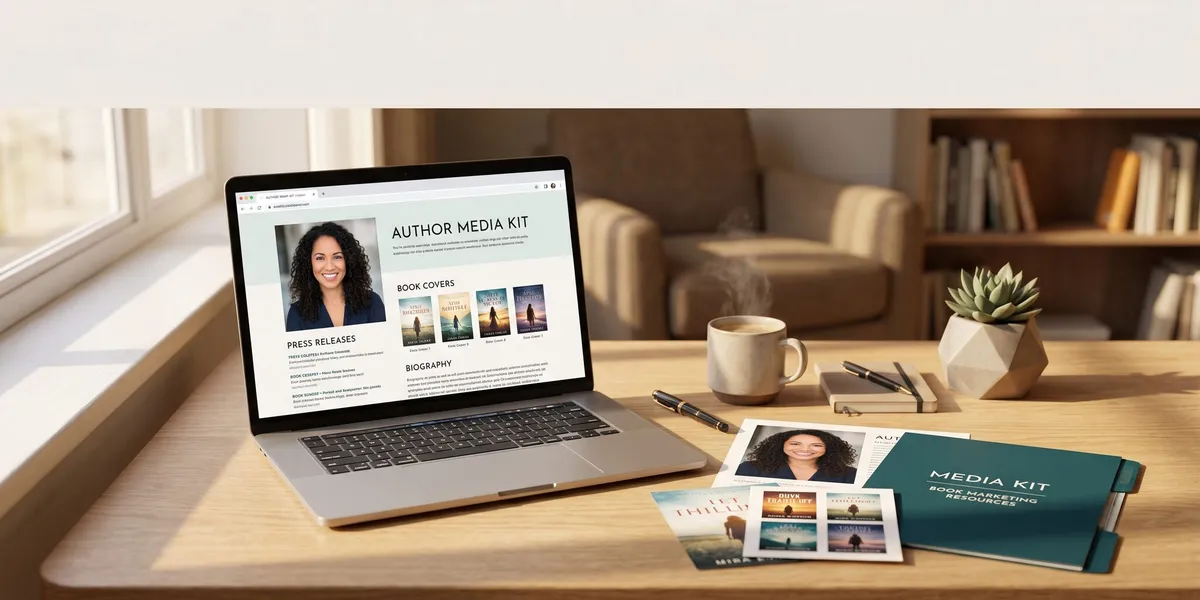
Follow this layout order — it matches how journalists actually scan:
- Headline: “Press Kit” or “Media Kit” (keep it simple)
- Short bio with a headshot beside it
- Download buttons for headshots, full bio, and book covers
- Book section with covers, descriptions, and purchase links
- Interview questions (collapsible or in a downloadable PDF)
- Press coverage with logos and pull quotes
- Contact info at the bottom
Step 4: Make Downloads Effortless
The number one complaint journalists have about author press pages is that downloading assets is too hard.
Use direct download links — not Google Drive folders that require permission requests. Zip your high-res images into a single file. Label everything clearly.
Consider creating a “Download All” button that grabs everything in one click.
Step 5: Test With Someone Who Doesn’t Know You
Ask a friend who isn’t familiar with your work to find three things on your press page:
- Your headshot
- Your book’s publication date
- Your contact email
If they can’t find all three in under 30 seconds, simplify your layout.
Common Mistakes to Avoid
- Using low-resolution images — Nothing screams amateur louder than a pixelated headshot in a magazine feature
- Writing your bio in first person — Media outlets need third-person copy they can paste directly into articles
- Hiding your press page — Put it in your main navigation, not buried three clicks deep. Label it “Press” or “Media” — not “For Journalists” or “Press Resources & Media Inquiries”
- Letting it go stale — Update your press page every time you publish a new book, win an award, or hit a milestone. An outdated press page is worse than no press page
- Forgetting mobile — Journalists check press pages from their phones while commuting, prepping for interviews, or vetting guests between meetings
How to Use Your Press Page to Get Media Coverage
Building the page is step one. Here’s how to actually put it to work:
Include the link in every pitch email. As Author Media recommends, when you reach out to a podcast host or journalist, add “Full press kit: [yoursite.com/press]” to your email signature and within the pitch itself.
Add it to your social media profiles. Your Twitter/X bio, Instagram link-in-bio, and LinkedIn summary should all link to your press page.
Reference it in query letters. If you’re pitching media directly, a line like “my full press kit with headshots, suggested interview questions, and past coverage is at [URL]” removes the back-and-forth.
Share it with your publicist or agent. If you work with a publicist, they’ll use your press page daily. Make their job easier and you’ll get better results.
For a complete strategy on getting your book in front of readers, see our book marketing plan.
How Do You Write an Author Press Page Bio?
Your press page bio follows a specific formula. Start with your name and what you write. Then add your strongest credential — a bestseller ranking, notable publication, or unique expertise. Follow with 1-2 sentences about your personal background that make you relatable. Close with where you live and what you’re working on next.
Keep it factual and third-person. “Jane Smith is the author of…” not “I’m a passionate storyteller who…”
The short version (75-100 words) covers name, genre, top credential, and one personal detail. The long version (250-300 words) adds your writing journey, full list of achievements, and speaking topics.
Check our about the author examples for 25 bios you can use as starting templates.
Do Self-Published Authors Need a Press Page?
Yes — self-published authors arguably need a press page more than traditionally published authors. When you don’t have a publisher’s PR team pitching you, your press page is your publicist. It does the outreach work 24/7.
Self-published authors on platforms like Amazon KDP or other publishing platforms often skip the press page because they assume nobody will look for one. That’s backwards thinking. The press page creates the opportunity — journalists who discover your book can feature you only if they can find your media materials.
Even with a small catalog, having a professional press page separates you from the vast majority of self-published authors who don’t have one.
Can AI Help You Build an Author Press Page?
AI tools can speed up several parts of the process. You can use AI to draft your bio in both lengths, generate suggested interview questions based on your book’s themes, and write compelling book descriptions.
Chapter helps you write your book in the first place — and once it’s written, you can use AI writing tools to craft every text element your press page needs: bios, book synopses, talking points, and pitch angles. The faster you get your book done, the faster you need that press page ready.
For more ways AI can help with the marketing side, check out our guide on AI for book marketing.
FAQ
What Is an Author Press Page?
An author press page is a dedicated section of your website that provides journalists, podcast hosts, and event organizers with your bio, headshots, book details, and interview questions in one accessible location. It serves as your always-available media kit, making it easy for anyone to feature you without back-and-forth emails.
What Should an Author Media Kit Include?
An author media kit should include your professional bio (short and long versions), high-resolution headshots, book cover images, book descriptions with ISBNs, suggested interview questions, past press coverage, and clear contact information. Providing downloadable files in both high and web resolution ensures media professionals can use your materials immediately.
How Long Should an Author Press Page Be?
Your author press page should be one scrollable page that a journalist can scan in under 60 seconds. Include all essential elements — bio, photos, book info, interview questions, and contact details — but keep each section concise. A downloadable PDF can hold expanded materials for those who need more depth.
Do You Need a Website for an Author Press Page?
You don’t need a full author website to have a press page, though it helps. You can create a standalone press page using free tools like Notion, Carrd, or a Google Docs PDF. However, a press page hosted on your own domain looks more professional and gives you full control over the design and content.
How Often Should You Update Your Press Page?
Update your author press page every time you publish a new book, receive notable coverage, win an award, or hit a sales milestone. At minimum, review it quarterly. An outdated press page with old headshots or missing recent titles signals to journalists that you’re not actively promoting — which makes them less likely to feature you.