You almost certainly do not need to buy a barcode for your book cover. If you print through Amazon KDP or IngramSpark, both platforms generate an EAN-13 barcode from your ISBN and print it on your back cover for free — you just have to leave the right amount of blank space for it.
In this guide, you will learn:
- The difference between an ISBN, an EAN-13, and a Bookland EAN (they are three names for related but distinct things)
- What the 5-digit price add-on does, and why 90000 appears on most indie books
- Exactly what KDP and IngramSpark do with barcodes, and how their rules differ
- When paying Bowker $25 is a waste, and the rare cases where it is not
- Free generators, file formats, and the size and quiet-zone specs that make a barcode actually scan
Here is what that black-and-white rectangle actually is, before you go looking for one.
What Is a Barcode for a Book Cover?
A barcode for a book cover is a scannable graphic that encodes your book ISBN in EAN-13 format, usually paired with a 5-digit price add-on. Retailers scan it at checkout and for inventory. It is not a separate identifier — it is a picture of the number you already have.
That last sentence is the one that saves most first-time authors money. The ISBN is the data. The barcode is the rendering. Buying a “barcode” means paying someone to draw a number you already own.
ISBN — The 13-digit International Standard Book Number that uniquely identifies one format of one title. A paperback, hardcover, and ebook each need their own.
EAN-13 — The global retail barcode symbology (the same one on a box of cereal) that encodes 13 digits.
Bookland EAN — The name for an EAN-13 barcode whose first three digits are 978 or 979, the prefixes reserved for books.
If you do not have an ISBN yet, start there instead — our guide on how to get an ISBN number walks through the agencies country by country, and free ISBN options covers the platforms that hand them out at no cost.
What Is Bookland, and Why Does It Start With 978?
Bookland is a fictional country invented in 1980 so that books could join the global retail barcode system. The EAN system assigns number prefixes by country. Books have no country, so the EAN authority and the International ISBN Agency created one and gave it the prefixes 978 and 979.
That is not a metaphor. There is a made-up nation in the retail numbering system, and every printed book on earth is a citizen.
The practical consequence: your ISBN-13 already begins with 978 or 979, so it is already a valid EAN-13. Since the ISBN-13 standard took effect on January 1, 2007, the ISBN and the Bookland EAN have been numerically identical. Older 10-digit ISBNs had to be converted — the 978 prefix was bolted on the front and the check digit recalculated. Today there is nothing to convert.
The 979 prefix is now in active use as 978 capacity runs low. Note one quirk: there is no 10-digit equivalent for a 979 ISBN. If a distributor form demands an ISBN-10 and yours starts with 979, the correct answer is that one does not exist.
What Does the 5-Digit Number Next to the Barcode Mean?
The smaller barcode to the right of the main one is the 5-digit price add-on, and it encodes your cover price in US dollars. The first digit is a currency indicator — 5 means US dollars — and the remaining four digits are the price without a decimal point.
So a $16.95 paperback carries 51695. A $24.99 hardcover carries 52499. The add-on can encode cover prices up to $499.99.
90000 is the exception, and it is the one you will see most often on indie titles. It means no price encoded — the retailer looks the price up in their own system at the register. The leading 9 signals “no information supplied” rather than a currency.
Should you use a price add-on or 90000?
Use 90000 unless a specific retailer has told you otherwise. Here is the trade-off:
| Price-specific (e.g. 51695) | 90000 (no price) | |
|---|---|---|
| Changing your price | Requires a new cover file and reprint | Change it in the dashboard, cover unaffected |
| Bookstore preference | Preferred by some independent bookstores | Universally accepted |
| Amazon KDP | Not supported | Default and only option |
| IngramSpark | Optional, via cover template generator | Default |
| Discounting | Awkward — printed price locks perception | No constraint |
For a print-on-demand title where you may test $14.99 against $17.99, a printed price is a liability. Every price change becomes a cover re-upload. Authors doing serious bookstore consignment sometimes want the printed price because it speeds up manual checkout, but that is a narrow case.
Amazon settles the question for most people: KDP does not support price-specific barcodes at all.
Does Amazon KDP Give You a Barcode for Free?
Yes. KDP automatically places an EAN-13 barcode on your back cover at no cost, generated from whichever ISBN your book uses — either the free KDP-assigned ISBN or your own purchased one. You do not upload anything, and you do not pay for it.
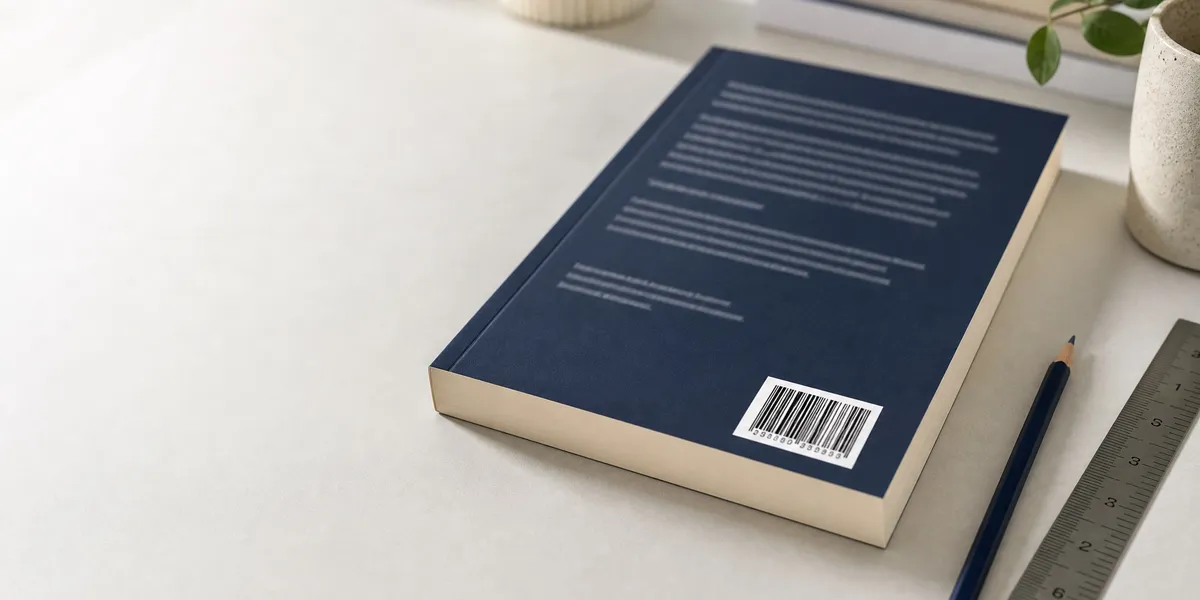
Per KDP documentation, the barcode goes in a 2 inch by 1.2 inch (50.8 mm by 30.5 mm) white box in the lower right-hand corner of the back cover. For right-to-left language books, it moves to the lower left.
This is the part that trips people up: KDP prints that box whether or not you left room for it. If your cover art, author bio, or blurb extends into that rectangle, the white box prints on top of it. Your text disappears under a barcode.
So the design rule is simple. Keep the bottom-right 2 x 1.2 inches of your back cover clear of anything you care about, plus roughly a quarter inch of breathing room around it so nothing crowds the edge.
If you would rather supply your own — because you bought a Bowker barcode, or you want precise control over the rendering — KDP accepts it at 300 DPI, sized 2 inches wide by 1.2 inches tall. Place it in that same lower-right position and KDP will not overprint.
For the full placement geometry, including hardcover dust jackets and how the barcode interacts with your spine, see our dedicated guide to barcode on book cover placement. And if you are still assembling the cover file itself, bleed settings for book covers and the book spine width calculator cover the two specs that cause the most rejections.
How Does IngramSpark Handle Barcodes?
IngramSpark also generates and prints your barcode for free from your ISBN, but it gives you one option KDP does not: you can choose to embed the price.
In the IngramSpark Cover Template Generator, under Optional Information, there is a field labeled “Price in Bar Code?”. Select Yes to get a price-specific add-on, or No for 90000.
IngramSpark recommends leaving a clear white box of 1.75 inches by 1.00 inch for the barcode — slightly smaller than the KDP reservation. The area must be free of text, graphics, and dark background colors.
That difference matters if you are publishing the same book through both platforms, which most authors doing wide distribution are. Design to the larger KDP reservation (2 x 1.2 inches) and both platforms are satisfied. Design to the IngramSpark box and KDP will overprint the margins.
One more IngramSpark-specific point: always run the Cover Template Generator for your exact page count and paper stock. It returns a template with the barcode zone marked, the spine width calculated, and the bleed drawn. Designing a cover without it is guesswork.
Do You Need to Buy a Barcode From Bowker?
Almost certainly not. Bowker sells barcodes as a $25 add-on to its ISBNs, but if you are printing through KDP or IngramSpark, you are paying for a graphic those platforms already generate for free.
Bowker is the sole ISBN agency in the United States, where a single ISBN runs $125 and a 10-pack runs $295. The barcode is a separate line item, discounted when bundled. Full ISBN pricing across agencies is broken down in our ISBN cost guide.
There are three situations where buying one is defensible:
- Offset printing. A traditional print run needs a print-ready vector file, and your printer will want an EPS from a known-good source rather than a PNG from a web tool.
- Non-book retail channels. Selling into gift shops, museums, or general retail where the buyer expects a formally issued barcode.
- Merchandise and boxed sets. Products that need a UPC rather than a Bookland EAN.
To generate one on MyIdentifiers, you enter your price in the Publication Price field (as 19.99, no dollar sign) or 0.00 for a non-price barcode, generate, then download as EPS or PDF. Choose EPS unless you are placing it in Microsoft Word.
Two warnings. First, the price cannot be changed after generation — you buy a new barcode. Second, MyIdentifiers only lets you generate barcodes for ISBNs assigned to you as publisher by the US agency. If your ISBN came from KDP, IngramSpark, or another country agency, you cannot use that tool.
Where to Get a Free Barcode for Your Book Cover
If you need a standalone barcode image — for a media kit, a proof, or a printer who is not KDP or Ingram — several free generators produce compliant Bookland EAN files.
Free options:
- IngramSpark Cover Template Generator — Free, no account gymnastics, and it returns the barcode inside a correctly sized cover template.
- Books.by barcode generator — Free EAN-13 with add-on, downloads as a usable image.
- Bookow — Long-standing free tool used widely by indie authors, outputs PNG and PDF.
- Barcode-generator.org and similar EAN-13 tools — Generic but valid, provided you select EAN-13 and enter all 13 digits.
What to check before you trust any generated file:
- It says EAN-13, not UPC-A, not Code 128, not ISBN-10.
- All 13 digits appear underneath the bars, and they match your ISBN exactly.
- The human-readable ISBN with hyphens appears above the bars (standard on book barcodes).
- It downloads as vector (EPS, PDF, SVG) or as a raster image at 300 DPI minimum at final print size.
- Scanning it with a phone barcode app returns your ISBN.
That last check takes fifteen seconds and catches nearly every failure mode.
What Size Should a Book Barcode Be?
At 100% magnification, a Bookland EAN with the 5-digit add-on measures roughly 2 inches wide by 1.2 inches tall including the human-readable digits — which is exactly why KDP reserves a box of that size. The underlying EAN-13 symbol at nominal size is 37.29 mm by 25.93 mm with an X-dimension (single bar width) of 0.33 mm.
GS1 permits scaling between 80% and 200% of nominal. Below 80% the bars get too fine for retail scanners, especially on uncoated paper stock where ink spreads.
The specification most often ignored is the quiet zone — the blank margin on either side of the bars, which the scanner uses to find where the symbol starts and stops. EAN-13 requires 11 X-dimensions of clear space on the left (about 3.6 mm at nominal) and 7 on the right (about 2.3 mm). With a price add-on attached, the right-hand quiet zone shifts to sit after the add-on block.
In practice, do not measure modules. Do this instead:
- Leave the full white box the platform specifies, and do not push artwork into its edges.
- Keep the background white or very light — black bars on a dark or saturated background will not scan.
- Never place a barcode over a photo, gradient, texture, or pattern.
- Do not stretch it. Scale proportionally or not at all.
- Do not rotate it. Bars run vertically, code reads left to right.
- Do not crop the bottom digits off to fit. The human-readable line is part of the symbol.
Do You Need a Barcode for an Ebook?
No. Ebooks do not need barcodes, because nothing is physically scanned at a checkout counter. Kindle, Apple Books, and Kobo all identify titles by ISBN or their own internal identifier.
You may not even need an ISBN for an ebook — Amazon assigns an ASIN automatically, and we cover the trade-offs in do I need an ISBN for Kindle.
The barcode question only arises the moment you order a physical proof.
What Happens If You Get the Barcode Wrong?
Failures land in three buckets, in rough order of frequency:
- Overprinted design. You left artwork in the reserved zone and the white box printed over your bio or your cover illustration. Cosmetic, but you will hate it. Fix the file and re-upload.
- Unscannable symbol. Dark background, insufficient quiet zone, sub-80% scaling, or a stretched image. The book sits at the register while a clerk keys in 13 digits by hand.
- Wrong number encoded. The barcode belongs to a different edition of your book — usually the paperback ISBN on a hardcover. This is the expensive one, because your hardcover sales report against the paperback and your inventory data goes wrong at every retailer at once.
The third one is entirely preventable and worth a paragraph of your attention. Every format gets its own ISBN and its own barcode. Paperback, hardcover, large print, and audiobook are four separate products. If you are publishing multiple formats, keep a simple spreadsheet mapping format to ISBN before you generate a single barcode file. Our guide to print-on-demand hardcover options covers the format-specific specs in more depth.
Common Barcode Mistakes to Avoid
- Buying a barcode you already get free. Check what your printer supplies before spending $25.
- Designing the back cover before checking the reserved zone. Get the template first, then design.
- Using the IngramSpark box size on a KDP cover. Design to 2 x 1.2 inches and both work.
- Printing a price you plan to change. Use 90000 for any print-on-demand title.
- Reusing one barcode across formats. Each format needs its own ISBN and barcode.
- Downloading a low-resolution PNG. Anything under 300 DPI at print size risks scan failure.
- Skipping the phone-scan test. Fifteen seconds now versus a reprint later.
Getting to the Barcode Stage in the First Place
The barcode is the last five minutes of a project that took months. If you are reading this while your manuscript is still half-finished, the barcode is not your bottleneck — the book is.
Our Pick — Chapter
Chapter is an AI book writing platform built to take you from an idea to a finished, structured manuscript — the part that actually stalls most authors. It handles outlining, drafting, and revision, then exports a clean file you can format and publish.
Best for: Authors who have a book in their head and no draft on the page Pricing: $97 one time, 2 books included (fiction or nonfiction), 30-day money-back guarantee Why we built it: More than 2,147 authors have used Chapter to write over 5,000 books, and the platform has been featured in USA Today and the New York Times. One author earned $13,200 from a single book; another made $60K in 48 hours from a launch.
Chapter does not generate barcodes, design covers, or format print files — it writes the book. Once you have a manuscript, how to self-publish a book walks the rest of the path, and how to format a book for KDP handles the interior.
FAQ
Do I need a barcode for a self-published book?
You need a barcode for a self-published book only if it will be printed and sold at physical retail. KDP and IngramSpark generate one free from your ISBN and print it automatically. Ebooks need no barcode at all, and neither do books sold only as digital downloads.
Is the barcode the same as the ISBN?
The barcode is not the same as the ISBN — the ISBN is the 13-digit number that identifies your book, and the barcode is the scannable graphic that encodes it. Since 2007, an ISBN-13 and a Bookland EAN contain identical digits, so no conversion is needed. You own the number; the barcode is just a rendering of it.
What does 90000 mean on a book barcode?
90000 on a book barcode means no price is encoded in the 5-digit add-on. The leading 9 signals that no pricing information was supplied, so the retailer looks up the price in their own system. It is the standard choice for print-on-demand books, where prices change without a reprint.
Can I make my own book barcode for free?
Yes, you can make your own book barcode for free using the IngramSpark Cover Template Generator, Books.by, or Bookow. Select EAN-13, enter your full 13-digit ISBN, and download a vector file or a 300 DPI image. Then scan it with a phone app to confirm it returns your ISBN.
How big should the barcode be on a book cover?
The barcode on a book cover should occupy roughly 2 inches by 1.2 inches — the size Amazon KDP reserves in the lower right of the back cover. IngramSpark asks for a 1.75 by 1.00 inch clear box. Design to the larger KDP dimensions and both platforms will print correctly.
Where does the barcode go on a book cover?
The barcode goes in the lower right corner of the back cover for left-to-right languages, and the lower left for right-to-left languages. Keep the area white or very light and free of text, artwork, and dark backgrounds, or the printed barcode will not scan reliably at retail.