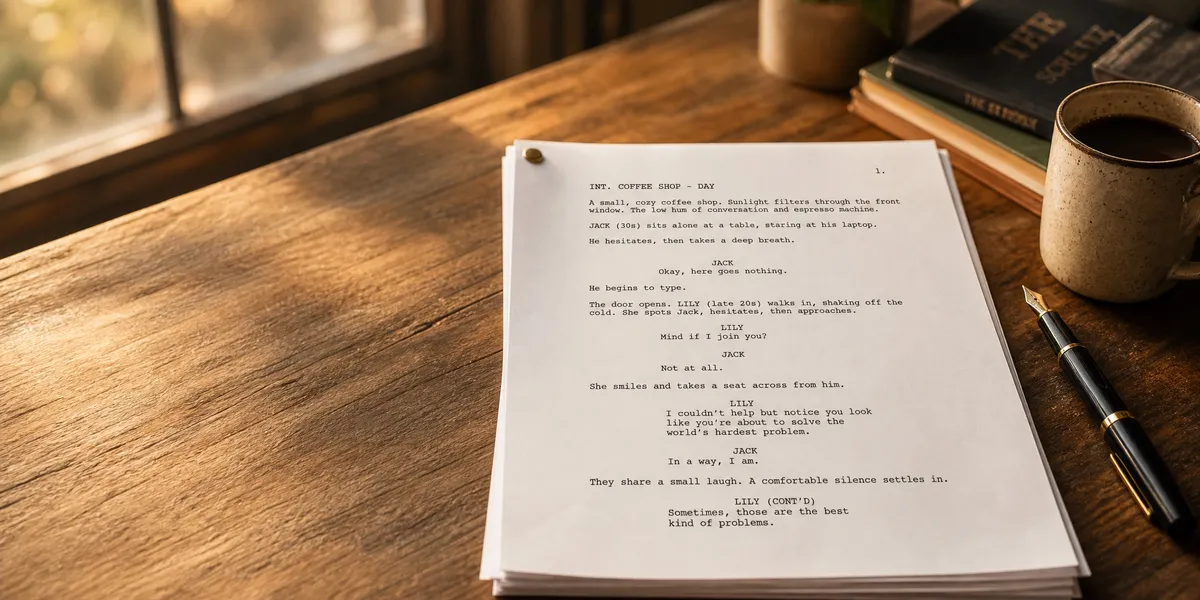
A screenplay format template is a pre-formatted document that sets up the correct margins, fonts, spacing, and element placement so your script looks exactly like what Hollywood expects. Whether you’re writing your first short film or pitching a feature, proper formatting tells readers you know what you’re doing.
In this guide, you’ll learn:
- The exact margins, font, and spacing the industry requires
- How to format every screenplay element (scene headings, action, dialogue, transitions)
- The difference between feature film and TV script formatting
- Where to download free templates that work in Word, Google Docs, and dedicated software
Here’s everything you need to format your screenplay like a professional.
What Is a Screenplay Format Template?
A screenplay format template is a document with pre-set margins, Courier 12-point font, and correct spacing for every script element — scene headings, action lines, character names, dialogue, and transitions. It lets you start writing immediately without manually configuring your page setup.
The industry has used the same basic format since the studio system era. One properly formatted screenplay page equals roughly one minute of screen time. That means a 90-page script produces a 90-minute film, and a 120-page script gives you a two-hour feature.
This page-per-minute rule is why the format is so rigid. Change the font, adjust the margins, or mess with the spacing, and you break the timing system that every producer, director, and script reader depends on.
What Are the Standard Screenplay Margins and Font?
The standard screenplay format uses 12-point Courier font (or Courier Prime) with specific margins that haven’t changed in decades. Here’s the exact setup:
| Element | Specification |
|---|---|
| Font | Courier / Courier Prime / Courier New, 12pt |
| Top margin | 1 inch |
| Bottom margin | 1 inch |
| Left margin | 1.5 inches |
| Right margin | 1 inch |
| Paper size | 8.5 x 11 inches (US Letter) |
| Spacing | Single-spaced |
| Lines per page | ~55 |
The 1.5-inch left margin exists for a practical reason — it accommodates the three-hole punch and brass brads used to bind printed scripts. The extra half-inch keeps your text from disappearing into the binding.
Courier is non-negotiable. It’s a monospaced font, meaning every character takes the same horizontal space. This consistency is what makes the one-page-per-minute rule work. Use Times New Roman or Arial, and your script screams “amateur” before anyone reads a word.
How Do You Format a Scene Heading?
A scene heading (also called a slugline) tells the reader where and when a scene takes place. It’s written in ALL CAPS, flush left, and contains three parts:
INT./EXT. + LOCATION + TIME OF DAY
Examples:
INT. COFFEE SHOP - DAY

EXT. PARKING LOT - NIGHT

INT./EXT. MOVING CAR - DUSK
Keep scene headings simple. Use INT. for interior scenes and EXT. for exterior scenes. If a scene moves between inside and outside, use INT./EXT.
For time of day, stick to DAY or NIGHT. You can use DAWN, DUSK, or CONTINUOUS when the story requires it, but avoid putting specific dates, years, or clock times in your sluglines.
Every new location or time change gets a new scene heading. This is how production teams break down your script into a shooting schedule, so clarity matters more than creativity here.
How Do You Write Action Lines in a Screenplay?
Action lines (also called scene description or direction) describe what the audience sees and hears on screen. They sit directly below the scene heading, flush left, and written in present tense.
Here’s what properly formatted action lines look like:
INT. APARTMENT - NIGHT

SARAH (30s, sharp eyes, paint-stained jeans) stands at
the kitchen counter, sorting through a stack of overdue
bills. She picks up an envelope, reads it, drops it like
it burned her.

The front door SLAMS. She doesn't flinch.
Rules for action lines:
- Write in present tense — always (“walks” not “walked”)
- Keep paragraphs to 3-4 lines maximum — white space controls pacing
- Capitalize a character’s name the FIRST time they appear
- Capitalize important sounds (SLAM, CRASH, RING)
- Describe only what the camera can see — no internal thoughts
- Use active, visual language
Short action paragraphs read like quick cuts. Long blocks slow the reader down. Experienced screenwriters use this spacing to “edit” the film on the page before it’s ever shot.
Think of each action paragraph as a single shot or beat. If you wouldn’t hold the camera on it for more than a few seconds, keep the description to one or two lines.
How Do You Format Dialogue in a Screenplay?
Dialogue formatting is where most beginners make mistakes. Screenplay dialogue has three possible components: the character cue, the optional parenthetical, and the spoken lines.
Here’s the proper layout:
                    CHARACTER NAME
              (parenthetical)
         The dialogue goes here, indented
         from both margins in a narrow column.
Exact measurements:
| Element | Position |
|---|---|
| Character name | 3.7 inches from left edge (ALL CAPS) |
| Parenthetical | 3.1 inches from left edge |
| Dialogue | 2.5 inches from left edge, max 3 inches wide |
Here’s a formatted example:
                         SARAH
              (under her breath)
         If you think I'm paying that, you're
         out of your mind.

                         MIKE
         I heard that.

                         SARAH
         Good. You were supposed to.
Key dialogue rules:
- Character names are ALWAYS in caps above their dialogue
- Use parentheticals sparingly — only when the delivery isn’t obvious from context
- If dialogue is interrupted by action, add (CONT’D) after the character name when they resume
- When dialogue continues to the next page, put (MORE) at the bottom and (CONT’D) at the top
Parentheticals like “(angrily)” or “(sadly)” are the hallmark of a beginner script. If your dialogue is well-written, the emotion should be clear without stage direction. Save parentheticals for moments where the delivery genuinely contradicts what the words say.
What Does a Complete Screenplay Outline Template Look Like?
A screenplay outline template breaks your story into the structural beats that drive a feature film. While your actual script uses proper formatting, your outline is a planning document that maps the dramatic arc before you write a single slugline.
Here’s a standard three-act screenplay outline structure:
Act One (Pages 1-30)
| Beat | Page Range | Purpose |
|---|---|---|
| Opening Image | 1 | Sets tone, world, and visual theme |
| Setup | 1-10 | Introduce protagonist and their ordinary world |
| Catalyst / Inciting Incident | 10-12 | The event that disrupts everything |
| Debate | 12-25 | Protagonist resists the call to action |
| Break Into Two | 25-30 | Protagonist commits to the journey |
Act Two (Pages 30-90)
| Beat | Page Range | Purpose |
|---|---|---|
| B-Story | 30-35 | Introduce subplot (often a relationship) |
| Fun & Games | 30-55 | The “promise of the premise” — the trailer moments |
| Midpoint | 55 | Stakes raise, false victory or false defeat |
| Bad Guys Close In | 55-75 | Obstacles intensify, allies fall away |
| All Is Lost | 75 | The lowest moment |
| Dark Night of the Soul | 75-85 | Protagonist processes their defeat |
| Break Into Three | 85-90 | New insight or information changes everything |
Act Three (Pages 90-120)
| Beat | Page Range | Purpose |
|---|---|---|
| Finale | 90-110 | Protagonist applies lessons, confronts antagonist |
| Final Image | 110-120 | Mirror of opening — shows transformation |
This beat sheet approach — popularized by Blake Snyder’s “Save the Cat!” — gives you a structural foundation. You can adapt it, but most produced screenplays hit these beats within a few pages of the targets.
If you’re outlining a novel instead of a screenplay, our story outline template and novel outline template cover prose-specific structures.
How Is TV Script Format Different From Feature Film?
TV script format follows the same basic rules as feature film — Courier 12pt, same margins, same element formatting — but adds act breaks and adjusts page count based on the show type.
Here’s how the main TV formats differ:
| Format | Length | Key Differences |
|---|---|---|
| One-hour drama | 50-65 pages | Act breaks marked with “END OF ACT ONE” centered, followed by a page break |
| Single-cam comedy (30 min) | 28-35 pages | Essentially a short movie script with act breaks |
| Multi-cam sitcom (30 min) | 45-55 pages | Double-spaced dialogue, action in ALL CAPS, acts start mid-page |
| Streaming drama | 50-70 pages | Fewer rigid act breaks, more flexible structure |
| TV pilot | Varies by format | Includes a separate title page noting “PILOT” |
The biggest difference is the multi-cam sitcom format. If you’re writing for a show like a classic three-camera comedy, your script will look completely different from a feature:
- Dialogue is double-spaced
- Action lines are in ALL CAPS
- New acts begin halfway down the page
- Scene headings are underlined
- The page count is higher because of the double spacing
Single-camera shows (most modern comedies and dramas) use standard feature film formatting with act breaks inserted.
If you’re writing your first TV pilot, start with the single-cam format. It’s closer to feature screenplay format and easier to learn.
What Are the Most Common Screenplay Formatting Mistakes?
Even writers with strong stories sabotage themselves with formatting errors. Here are the mistakes that make script readers stop taking you seriously:
- Using the wrong font. Anything other than Courier 12pt signals inexperience instantly.
- Writing “we see” or directing the camera. Unless you’re also the director, leave out camera angles like “CLOSE UP ON” or “PAN TO.” Focus on what happens, not how to film it.
- Walls of action text. Keep action paragraphs to 4 lines maximum. Dense blocks of description kill pacing and make readers skim.
- Overusing parentheticals. Your dialogue should convey emotion without “(angrily)” or “(sarcastically)” before every line.
- Describing internal thoughts. Film is a visual medium. You can’t show what someone is thinking — only what they do. Replace “She thinks about her dead mother” with a visible action that implies it.
- Including “CONTINUED” on every page. Modern spec scripts omit the top “CONTINUED:” and bottom “(CONTINUED)” — those belong in shooting scripts, not submissions.
- Going over 120 pages. For a spec script, anything over 120 pages tells readers the script needs editing. Most produced features land between 95 and 115 pages.
How Many Pages Per Minute in a Screenplay?
One screenplay page equals approximately one minute of screen time. This is the foundational rule of screenplay formatting, and it’s why every element — font, margins, spacing — is standardized.
Here’s how page count translates to common film lengths:
| Film Type | Pages | Runtime |
|---|---|---|
| Short film | 5-40 | 5-40 minutes |
| Comedy feature | 90-100 | 90-100 minutes |
| Standard feature | 100-120 | 100-120 minutes |
| Epic / drama | 120-150+ | 2-2.5+ hours |
| TV half-hour | 28-35 | 22-30 minutes |
| TV one-hour | 50-65 | 42-55 minutes |
This rule is approximate. Action-heavy sequences with short, punchy action lines will play longer on screen than their page count suggests. Dialogue-heavy scenes tend to track closer to the one-to-one ratio.
The rule works because of the Courier font’s fixed-width spacing. Every character occupies the same width, so every page contains roughly the same amount of content. Switch to a proportional font and the entire timing system falls apart.
What Are the Best Screenplay Formatting Tools?
You don’t need to set up margins manually. Modern screenwriting software handles formatting automatically so you can focus on your story. Here are the most popular options:
Our Pick — Chapter
If you’re writing a book adaptation of your screenplay — or developing your story as both a script and a novel — Chapter helps you write and format the prose version with AI-powered assistance. Over 10,000 authors have used Chapter to write their books, and it’s been featured in USA Today and The New York Times.
Best for: Turning your screenplay into a published book Pricing: $97 one time, 2 books included (fiction or nonfiction), 30-day money-back guarantee Why we built it: Many screenwriters develop their stories as novels first — Chapter makes that process faster with AI.
Other Screenwriting Tools
| Tool | Best For | Price | Platform |
|---|---|---|---|
| Final Draft | Industry standard, studio submissions | $249.99 | Mac, Windows |
| WriterDuet | Real-time collaboration | Free tier / $11.99/mo | Web-based |
| Celtx | Beginners + pre-production tools | Free tier / $22/mo | Web-based |
| Highland 2 | Minimalist writing on Mac | $49.99 | Mac only |
| Fade In | Affordable pro alternative | $79.95 | Mac, Windows, Linux |
| WriterSolo | Free, no account needed | Free | Web-based |
Final Draft is what most working screenwriters use and what most production companies expect. If you’re serious about a screenwriting career, it’s the standard.
WriterDuet is the best free option — it handles formatting perfectly and lets you collaborate with writing partners in real time.
For beginners, free templates in Google Docs or Microsoft Word work fine for learning the format. But you’ll want to graduate to dedicated software before submitting anywhere, because word processors can’t handle page breaks, dual dialogue, or CONT’D marks reliably.
How to Set Up a Screenplay Template in Google Docs
If you’re not ready for dedicated software, you can set up a basic screenplay format template in Google Docs:
- Set your font to Courier New, 12pt
- Set margins: File > Page Setup > Left: 1.5”, Top/Bottom/Right: 1”
- Create custom styles for each element:
- Scene Heading: Left-aligned, ALL CAPS, bold off
- Action: Left-aligned, normal case
- Character Name: Center-aligned (or tabbed to 3.7” from left), ALL CAPS
- Dialogue: Set left indent to 2.5”, right indent to 2.5”
- Parenthetical: Set left indent to 3.1”
- Set line spacing to single
- Turn off widow/orphan control for more predictable page breaks
This gets you 80% of the way there. The limitation is that Google Docs won’t handle dual dialogue (two characters speaking simultaneously), automatic CONT’D marks, or proper page-break rules for dialogue that splits between pages.
For a first draft or writing exercise, it works. For a submission-ready script, use proper writing software.
Screenplay Format Template: Quick Reference Cheatsheet
Here’s every element at a glance for fast reference:
| Element | Alignment | Case | Position |
|---|---|---|---|
| Scene Heading | Flush left | ALL CAPS | Left margin (1.5”) |
| Action | Flush left | Normal | Left margin (1.5”) |
| Character Name | Centered | ALL CAPS | 3.7” from left edge |
| Parenthetical | Indented | Normal | 3.1” from left edge |
| Dialogue | Indented | Normal | 2.5” from left, 3” wide |
| Transition | Flush right | ALL CAPS | Right margin |
| Page Numbers | Top right | Followed by a period | 0.5” from top |
| Title Page | Centered | Title in CAPS | Center of page |
Title page format:
Your title page is the first thing anyone sees. Keep it clean:
- Title in ALL CAPS, centered, about 1/3 down the page
- “Written by” or “by” below the title, centered
- Your name centered below that
- Contact information (or agent info) in the bottom left corner
- No date, no draft number, no WGA registration number on spec scripts
The first page of your actual script starts with FADE IN: in the top left, and it’s the only page without a page number.
How to Adapt Your Screenplay Into a Book
Many screenwriters discover their stories work better — or find a wider audience — as novels. The adaptation process involves expanding your visual shorthand into full prose, adding internal character thoughts, and building the descriptive world that a film crew would otherwise create.
If you’ve written a screenplay and want to adapt it into a book, here’s the basic process:
- Expand action lines into narrative prose — what was “She crosses the room” becomes a full paragraph with sensory detail
- Add internal monologue — the one thing screenplays can’t do, novels do best
- Convert dialogue tags — screenplay dialogue needs prose formatting with “said” tags and action beats
- Build scene transitions — films cut between scenes; novels need transitional prose
- Develop backstory — screenplays imply it; novels can explore it
Tools like Chapter can help you draft the prose version faster using AI, especially when you already have a complete screenplay as your structural foundation.
What Should You Do After Formatting Your Screenplay?
Once your screenplay is properly formatted, the real work begins. Here’s the typical next-steps path for a spec screenplay:
- Proofread for formatting consistency — check that every element sits at the correct margin
- Get coverage or feedback — professional script readers or trusted peers
- Register with the WGA — the Writers Guild of America offers script registration for copyright protection
- Write a compelling logline — a one-sentence summary that sells your concept
- Research submission targets — contests, fellowships, managers, production companies
- Prepare a query letter — a brief pitch letter to accompany your script
If you’re also developing your story as a novel or considering self-publishing a novelization, you’ll want to explore book formatting standards, which follow entirely different rules than screenplays.
FAQ
What Font Do You Use for a Screenplay?
The font for a screenplay is Courier, Courier Prime, or Courier New in 12-point size. This monospaced font is the entertainment industry standard because its fixed character width ensures that one page of script equals approximately one minute of screen time. Using any other font will mark your script as amateur.
What Are the Standard Screenplay Margins?
Standard screenplay margins are 1.5 inches on the left and 1 inch on the top, bottom, and right. The wider left margin accommodates the brass brads used to bind printed scripts. Dialogue sits in a narrow column centered on the page, with character names positioned at 3.7 inches from the left edge.
How Long Should a Screenplay Be?
A feature film screenplay should be 90 to 120 pages long, which translates to roughly 90 to 120 minutes of screen time. Comedies often run shorter (around 90-100 pages), while dramas and epics can stretch to 120 pages. Going significantly over 120 pages signals to readers that the script needs editing.
Can You Write a Screenplay in Google Docs?
You can write a screenplay in Google Docs by setting Courier New 12pt font and adjusting margins manually (1.5” left, 1” elsewhere). However, Google Docs won’t handle dual dialogue, automatic CONT’D marks, or proper page-break rules. For drafts and learning, it works. For submissions, use dedicated screenwriting software like Final Draft or WriterDuet.
What Is the Difference Between a Spec Script and a Shooting Script?
A spec script is written to sell your story — it omits scene numbers, “CONTINUED” marks, and camera directions. A shooting script is the production version with scene numbers, technical annotations, and detailed camera direction added by the director. When submitting to contests or agents, always use spec script format with clean, uncluttered formatting.