You can create professional AI generated cover art for books in under an hour — without hiring a designer or learning Photoshop.
In this guide, you’ll learn:
- Which AI tools produce the best book cover artwork in 2026
- How to write prompts that match your genre’s visual conventions
- A step-by-step workflow from first concept to publish-ready file
- Common mistakes that make AI covers look amateur (and how to fix them)
Here’s everything you need to turn AI-generated art into a cover that sells.
What Is AI Generated Cover Art for Books?
AI generated cover art for books is artwork created by artificial intelligence image generators — tools like Midjourney, DALL-E 3, and Stable Diffusion — specifically designed or prompted to serve as book cover imagery. You provide a text description of what you want, and the AI produces original artwork in seconds.
This is different from traditional cover design. Instead of hiring an illustrator who works for days or weeks, you iterate through dozens of concepts in a single sitting. The AI handles the visual creation. You handle the creative direction, typography, and final layout.
Over 2,147 authors have used Chapter to write and publish books, and many of them use AI-generated art for their covers. The approach works especially well for self-published authors who need professional-quality visuals on a limited budget.
Why Authors Are Switching to AI Cover Art
The shift to AI cover art isn’t just about saving money — though that matters. Here’s what’s driving the trend.
Speed. A traditional cover commission takes 1-4 weeks. AI generates usable concepts in minutes. You can test 50 ideas before lunch.
Cost. Professional custom covers cost $300 to $2,000+. AI image generation costs $10-30/month for unlimited generations, or nothing with free-tier tools.
Creative control. You’re not explaining your vision to a third party and hoping they interpret it correctly. You refine the image yourself, iteration by iteration.
Iteration speed. Don’t like the color palette? Change one word in your prompt. Want a different mood? Generate 10 variations in two minutes. This kind of rapid experimentation is impossible with traditional workflows.
That said, AI cover art has real limitations. The AI doesn’t understand typography, book sizing specs, or genre conventions on its own. It generates artwork — not finished covers. You still need to add text, format for print or ebook dimensions, and make design decisions that signal your genre correctly.
Best AI Tools for Book Cover Art in 2026
Not all AI image generators are equal for book covers. Here’s what works best right now.
Our Pick — Chapter
Chapter helps you write your entire book with AI, and pairs naturally with AI cover tools for a complete publishing workflow. Write your manuscript, then generate cover art that matches your content — all in one creative process.
Best for: Authors who want an end-to-end writing and publishing workflow Pricing: $97 one time, 2 books included (fiction or nonfiction), 30-day money-back guarantee Why we built it: Your cover should reflect your actual book, and the fastest way to nail that connection is writing and designing in the same creative session.
Midjourney
Midjourney produces the highest-quality artistic imagery for book covers. The photorealistic and painterly styles work exceptionally well for fiction genres like fantasy, romance, thriller, and literary fiction.
Best for: Fiction covers, artistic styles, photorealistic imagery Pricing: $10/month (Basic) to $60/month (Pro) Strengths: Stunning visual quality, strong artistic styles, active community with prompt-sharing Limitations: Runs through Discord (no standalone app yet), requires learning prompt syntax
DALL-E 3 (via ChatGPT)
DALL-E 3 is the easiest AI image generator to use because it’s built into ChatGPT. Describe what you want in plain English, and it generates images without any prompt engineering.
Best for: Beginners, nonfiction covers, conceptual imagery Pricing: Included with ChatGPT Plus ($20/month) Strengths: Natural language prompts, easy editing, good for conceptual artwork Limitations: Less artistic control than Midjourney, can over-literalize prompts
Stable Diffusion (via Automatic1111 or ComfyUI)
Stable Diffusion is open-source and free to run locally. If you have a decent GPU, you get unlimited generations with full control over every parameter.
Best for: Technical users, high-volume generation, custom fine-tuning Pricing: Free (requires your own hardware) or $5-15/month via cloud services Strengths: Complete control, no content restrictions, custom model training Limitations: Steep learning curve, requires technical setup
Ideogram
Ideogram stands out for one reason: it handles text in images better than any other AI tool. If you want to test title placement directly in your AI-generated artwork, Ideogram is worth trying.
Best for: Covers where you want to preview text integration Pricing: Free tier available, paid plans from $8/month Strengths: Best text rendering in AI art, clean graphic design aesthetic Limitations: Less photorealistic than Midjourney, smaller community
Adobe Firefly
Adobe Firefly integrates directly with Photoshop, making it the best option if you already use Adobe tools. The AI generates artwork that you can immediately refine with professional editing tools.
Best for: Authors already in the Adobe ecosystem Pricing: Included with Creative Cloud ($22.99/month) or standalone at $4.99/month Strengths: Direct Photoshop integration, commercially safe training data, style controls Limitations: Image quality slightly behind Midjourney, less variety in artistic styles
Quick Comparison Table
| Tool | Best For | Price | Image Quality | Ease of Use |
|---|---|---|---|---|
| Midjourney | Fiction, artistic covers | $10-60/mo | Excellent | Moderate |
| DALL-E 3 | Beginners, nonfiction | $20/mo (ChatGPT+) | Very Good | Easy |
| Stable Diffusion | Technical users | Free (local) | Excellent | Hard |
| Ideogram | Text integration | Free-$8/mo | Good | Easy |
| Adobe Firefly | Adobe users | $4.99-22.99/mo | Very Good | Moderate |
For a deeper comparison with more tools, see our full best AI book cover generators roundup.
How to Write AI Prompts for Book Cover Art
The quality of your AI cover art depends almost entirely on your prompt. A vague prompt like “book cover for a fantasy novel” produces generic results. A specific, genre-aware prompt produces artwork you can actually use.
The Book Cover Prompt Formula
Use this structure for consistent results:
[Subject] + [Style] + [Mood/Atmosphere] + [Color Palette] + [Composition] + [Technical Specs]
Example for a dark fantasy novel:
“A lone female warrior standing on a cliff overlooking a burning medieval city at dusk, dark fantasy oil painting style, dramatic moody lighting with deep reds and purples, cinematic composition with the figure silhouetted against the sky, highly detailed, 2:3 aspect ratio”
Example for a self-help nonfiction book:
“Abstract minimalist composition of a golden compass surrounded by geometric shapes, clean modern design, white and gold color palette with navy accents, centered layout with negative space, professional and aspirational mood, 2:3 aspect ratio”
Genre-Specific Prompt Tips
Each genre has visual conventions that readers recognize instantly. Your AI prompts need to match these expectations, or your cover won’t signal the right genre on a bookshelf or Amazon thumbnail.
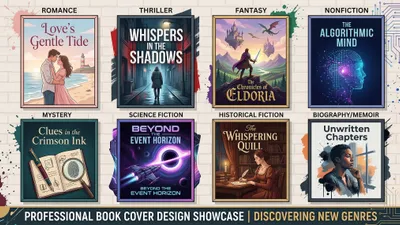
Romance: Warm color palettes (pinks, golds, deep reds). Couples or single figures in emotional poses. Soft lighting. Floral elements for contemporary, dramatic landscapes for historical.
Thriller/Mystery: Dark, high-contrast imagery. Cool color palettes (blues, blacks, grays). Isolated figures, urban settings, or symbolic objects. Sharp shadows and tension in the composition.
Fantasy: Rich, saturated colors. Sweeping landscapes, magical elements, detailed world-building imagery. Painterly or illustrated styles work better than photorealistic for most sub-genres.
Science Fiction: Clean lines, technological elements, space imagery. Blue and silver color palettes. Futuristic architecture or spacecraft. Photorealistic or digital art styles.
Nonfiction/Business: Minimalist compositions. Bold typography space (leave the top third empty for your title). Abstract or symbolic imagery. Professional color palettes — navy, white, gold, or brand-aligned colors.
Literary Fiction: Artistic, often abstract or impressionistic. Muted or unexpected color palettes. Emphasis on mood over literal depiction. Photography-inspired or painterly styles.
For more genre-specific inspiration, browse our book cover design ideas collection.
Step-by-Step: From AI Art to Finished Book Cover
Generating the image is only half the job. Here’s the complete workflow from concept to publish-ready cover.
Step 1: Research Your Genre
Before you write a single prompt, study what’s already working. Go to Amazon’s bestseller list in your category and screenshot the top 20 covers.
Look for patterns in color, composition, typography placement, and illustration style. Your cover needs to fit in — while standing out enough to catch the eye. This research phase takes 15-20 minutes and saves hours of generating artwork in the wrong direction.
We cover this process in detail in our how to design a book cover guide.
Step 2: Generate 20-30 Concepts
Don’t fall in love with your first generation. Create at least 20-30 variations, adjusting your prompt each time. Change the color palette, composition, subject, style, and mood.
Save everything that catches your eye. You’re looking for one concept that nails your genre conventions while feeling fresh and original.
Pro tip: Generate images at a 2:3 aspect ratio. This matches standard book cover proportions (6x9 inches) and saves you from awkward cropping later.
Step 3: Upscale Your Chosen Image
Most AI generators produce images at 1024x1024 or similar resolutions. For print covers, you need at least 300 DPI at your final dimensions — roughly 3,000 x 4,500 pixels for a standard 6x9 paperback front cover.
Use an AI upscaler to increase resolution without losing quality:
- Topaz Gigapixel AI — The industry standard for AI upscaling
- Magnific AI — Great for adding detail during upscaling
- Real-ESRGAN — Free, open-source option
Step 4: Add Typography Separately
This is the most important step that most authors get wrong. Never use AI-generated text on your cover. AI still produces garbled, misspelled, or oddly shaped letters.
Instead, add your title, subtitle, and author name in a proper design tool:
- Canva — Free, easiest option, hundreds of font combinations
- Adobe Photoshop — Professional-grade, full control
- Affinity Publisher — One-time purchase, excellent for book design
- BookBrush — Built specifically for author cover design
Your title needs to be readable at thumbnail size — roughly 100 pixels wide on Amazon. If your title disappears when you shrink the image to thumbnail, choose a bolder font or simplify the layout.
Step 5: Format for Your Publishing Platform
Every platform has specific sizing requirements. Get these wrong and your cover will be rejected or display poorly.
Amazon KDP Ebook: 2,560 x 1,600 pixels (1.6:1 ratio), RGB color, JPEG or TIFF Amazon KDP Paperback: Front cover + spine + back cover as a single file. Use the KDP Cover Calculator for exact dimensions based on your page count. IngramSpark: 300 DPI minimum, PDF format with 0.125-inch bleed on all sides.
For exact template dimensions, check our KDP book cover template guide and KDP cover template sizes reference.
Step 6: Create a Full Wrap Cover for Print
If you’re publishing a paperback or hardcover, you need a full wrap — front cover, spine, and back cover as a single file. AI generates front cover art only, so you’ll need to extend or create matching artwork for the spine and back.
Options for the back cover:
- Use a blurred or darkened version of your front cover art as the background
- Generate separate AI art with the same prompt style for the back
- Use a solid color that matches your front cover palette
Don’t forget the barcode placement on your back cover and spine text with your title and author name.
AI Book Cover Generator Free Options That Actually Work
You don’t need a paid subscription to create quality AI cover art. Several free tools produce artwork good enough for published books.
DALL-E 3 via Bing Image Creator — Microsoft’s free implementation of DALL-E 3. No account needed, decent quality, limited daily generations.
Leonardo AI (free tier) — 150 free tokens daily, good variety of art styles, supports image-to-image refinement.
Stable Diffusion (local) — Completely free if you have a GPU with 8GB+ VRAM. Requires technical setup but offers unlimited generations.
Canva Magic Media — Free tier includes limited AI image generations. The images are lower quality than Midjourney but usable for simple, graphic-style covers.
Ideogram (free tier) — 10 free generations per day with surprisingly good quality, especially for text-integrated designs.
The free options work well for testing concepts and creating covers for initial launches. As your book gains traction, you might upgrade to Midjourney or a paid tool for a more polished final version.
For a full breakdown of free options, see our AI book cover generators comparison.
Book Cover Design Trends 2026: What AI Does Best
The book cover design trends in 2026 play directly to AI’s strengths. Here’s what’s dominating shelves right now.
Typography-Dominant Covers
The biggest trend in 2026 is covers where the title IS the design. Typography now occupies 70-80% of the cover space on many bestsellers. AI handles this beautifully when you generate minimalist background artwork and pair it with bold typographic layouts in Canva or Photoshop.
Illustrated Over Photographic
Readers and designers are pushing back against synthetic-looking photorealism. Hand-drawn, painted, and illustrated styles are trending — and these are exactly the styles where AI generators like Midjourney excel. Painterly, watercolor, ink illustration, and digital art styles all produce excellent results.
Dual-Scale Design
Every cover now needs to work at two sizes: full print resolution and Amazon thumbnail. AI lets you test this instantly — generate your image, then shrink it to 100 pixels wide. If the composition still reads clearly, you have a winner. If it turns into a muddy blob, simplify and regenerate.
High-Contrast Color
Subtle, muted palettes are losing ground to bold, high-contrast color combinations. Deep navy against bright gold. Black and white with a single pop of red. These high-contrast approaches look striking at thumbnail size — which is where most book discovery happens online.
Common Mistakes to Avoid
- Using AI-generated text on your cover. AI can’t reliably render letters. Always add typography in a separate design tool.
- Ignoring genre conventions. Your cover’s primary job is to signal your genre instantly. An artistically stunning cover that looks like the wrong genre will hurt your sales.
- Skipping the upscale step. Low-resolution images look fine on screen but print blurry. Always upscale to 300 DPI at your final print dimensions.
- Over-prompting. Cramming too many elements into a single prompt produces cluttered, confusing images. Simple compositions with one clear focal point work best.
- Forgetting thumbnail readability. If your cover doesn’t look good at 100px wide, it won’t work on Amazon. Test every cover at thumbnail size before finalizing.
Can You Legally Use AI Art on a Book Cover?
Yes, you can legally use AI-generated art on your book cover in most cases. Here’s what you need to know.
Copyright ownership of purely AI-generated images is still evolving legally. In the US, the Copyright Office has ruled that AI-generated images without significant human authorship aren’t copyrightable. However, your final cover — which includes your typography, layout decisions, and creative direction — is copyrightable as a composite work.
Commercial use is allowed on all major AI platforms with paid plans. Midjourney, DALL-E 3, Adobe Firefly, and Stable Diffusion all permit commercial use of generated images.
Amazon KDP does not prohibit AI-generated cover art. They require that your content (including covers) doesn’t infringe on existing copyrights or trademarks, but AI-generated original artwork meets this standard. Check the current Amazon KDP AI content rules for the latest policies.
Platform terms vary. Always review the specific terms of service for whatever AI tool you use. Most paid tiers grant full commercial rights, while some free tiers have restrictions.
How Much Does AI Cover Art Cost vs. Traditional Design?
AI cover art dramatically reduces the cost of getting a professional-looking cover. Here’s how the numbers break down.
| Design Route | Cost Range | Timeline | Quality |
|---|---|---|---|
| AI-generated (free tools) | $0 | 1-3 hours | Good |
| AI-generated (paid tools) | $10-60/month | 1-3 hours | Very Good to Excellent |
| Premade covers | $50-200 | Same day | Good |
| Freelance designer | $200-800 | 1-3 weeks | Very Good |
| Professional agency | $800-2,000+ | 2-6 weeks | Excellent |
For a detailed breakdown of all options, read our full book cover design cost analysis.
If your budget is under $200, AI-generated cover art combined with good typography in Canva gives you the best value. You get custom, original artwork that matches your exact vision — something a premade cover can’t offer.
How Long Does It Take to Make an AI Book Cover?
The complete process — from research to publish-ready file — takes 2-4 hours for your first cover. Once you’ve learned the workflow, subsequent covers take about 1-2 hours.
Here’s the typical time breakdown:
- Genre research: 15-20 minutes
- Prompt writing and generation: 30-60 minutes
- Image selection and upscaling: 15-20 minutes
- Typography and layout: 30-60 minutes
- Formatting for publishing: 15-30 minutes
Compare this to the 1-6 week timeline for traditional cover design, and you can see why AI cover art is becoming the default for self-published authors.
Should You Use AI Art or Hire a Designer?
AI cover art makes sense when:
- Your budget is under $300
- You have a clear visual concept and want creative control
- You need the cover quickly (launching within a week)
- You’re publishing multiple books and need consistent, affordable covers
Hire a professional designer when:
- Your book is positioned as premium or high-end
- You need complex typography or custom lettering
- Your genre relies heavily on specific illustrated character art
- You want a cover that’s truly one-of-a-kind in your genre
Many successful self-published authors use a hybrid approach: AI for the initial concept and artwork, then a professional designer for typography, layout, and final polish. This typically costs $50-150 for the design work alone — much less than a full custom cover commission.
How to Create a Mockup of Your AI Cover
Once your cover is finished, you need a book cover mockup to use in marketing, on your website, and on social media. A 3D mockup makes a flat cover file look like a physical book.
Free mockup tools:
- BookBrush — Simple drag-and-drop mockup creator
- DIY Book Covers — Free 3D mockup generator
- Canva — Book mockup templates available in the free tier
- Adazing — Realistic 3D book renders
Upload your finished cover image, choose a mockup style (standing book, open book, tablet display), and download the result. These mockups work well for Amazon author pages, social media posts, and your author website.
FAQ
What is AI generated cover art for books?
AI generated cover art for books is original artwork created by artificial intelligence image generators like Midjourney, DALL-E 3, or Stable Diffusion. You describe the image you want in a text prompt, and the AI produces the artwork. Authors then add typography and formatting in a separate design tool to create the finished cover.
Can you use AI generated art for a book cover?
Yes, you can use AI generated art for a book cover. All major AI image generators — including Midjourney, DALL-E 3, and Adobe Firefly — allow commercial use with paid plans. Amazon KDP and other publishing platforms accept AI-generated cover art, provided it doesn’t infringe on existing copyrights.
What is the best AI tool for book cover art?
The best AI tool for book cover art is Midjourney for fiction covers requiring artistic, painterly, or photorealistic styles. DALL-E 3 is the easiest option for beginners and works well for nonfiction. For a complete writing and publishing workflow, Chapter pairs AI writing with cover design for an integrated experience.
How much does AI book cover art cost?
AI book cover art costs $0 to $60 per month depending on the tool you choose. Free options like Bing Image Creator and Leonardo AI produce usable results. Paid tools like Midjourney ($10/month) and DALL-E 3 ($20/month via ChatGPT Plus) offer higher quality and more generations. The total cover cost including typography work is typically under $50.
Is AI cover art as good as a professional designer?
AI cover art produces excellent imagery that rivals professional illustration for many genres. However, a complete book cover also requires typography, layout, and technical formatting — areas where human designers still excel. The best approach for most self-published authors is AI-generated artwork combined with careful typography in tools like Canva or Photoshop.