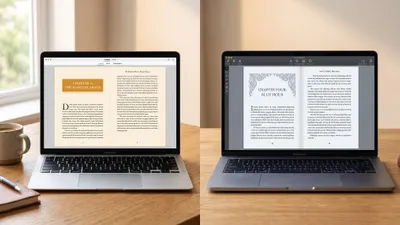
Chapter vs Vellum looks like a head-to-head and isn’t one. Chapter writes your book with AI for $97 once. Vellum typesets a finished manuscript into the best-looking ebook and print files in indie publishing, for $199.99 or $249.99, on a Mac only. They solve opposite halves of the same problem, and buying the wrong half is the most common $250 mistake indie authors make.
In this comparison, you’ll get:
- A side-by-side table of pricing, AI capability, typesetting depth and platform support
- An honest section on where Vellum flatly beats Chapter — because on typography it does, in six specific ways
- The real total cost of each workflow, including the Mac problem nobody prices in
- A clear verdict on which one to buy first, and whether you ever need both
Here’s how they actually compare.
Chapter vs Vellum at a Glance
| Feature | Chapter (Our Product) | Vellum |
|---|---|---|
| Primary job | Writing the manuscript | Typesetting the manuscript |
| Pricing | $97 one-time, lifetime access | $199.99 ebooks only / $249.99 ebooks + print |
| AI drafting | Yes — full manuscript generation | None |
| Story structure frameworks | Save the Cat, Three Act, Hero’s Journey, Romance Beat Sheet | None |
| Writing editor | Full AI-guided drafting workspace | None — import only |
| Typesetting quality | Clean, correct, retailer-ready | Best-in-class, traditionally published look |
| Operating system | Any — runs in the browser | macOS 13 or newer, Mac only |
| Print trim sizes | Standard KDP sizes | 24 trim sizes plus large print |
| Hardcover support | No | Yes |
| Print PDF standard | Standard PDF | PDF/X-1a, press-grade |
| Accessibility | Standard EPUB output | ACE-approved accessible EPUB 3 |
| Export formats | EPUB, PDF, DOCX | EPUB 3 / EPUB 2, print PDF, ARC files |
| Try before you buy | 30-day money-back guarantee | Free to build and preview, pay to export |
| Learning curve | Under an hour | Under an hour |
| Best for | Getting a complete draft to exist | Making a finished draft look professionally published |
Vellum pricing and system requirements verified against vellum.pub in September 2026.
The table reads like a rivalry. It isn’t one. It’s a sequence, and the only real question is which step you’re stuck on.
What Is the Difference Between Chapter and Vellum?
The core difference — Chapter is an AI writing platform that produces a complete manuscript from a premise, while Vellum is a Mac typesetting application that turns an already-finished manuscript into retailer-ready EPUB and print PDF files.
Vellum has no writing environment. None. You write somewhere else — Word, Google Docs, Scrivener, Chapter — then import a finished draft and style it.
Chapter starts at the opposite end. You pick a genre and a story structure, the AI drafts the full book chapter by chapter, and you edit it into shape and export.
So the honest question isn’t “which tool is better.” It’s: do you have 70,000 words sitting on your hard drive right now? If yes, Vellum is a genuinely excellent purchase. If no, Vellum has nothing to do.
Our Product — Chapter
Chapter is built around a single outcome: a finished, exportable manuscript. You choose a genre and a structural framework, the AI drafts the full book, and you edit and export to EPUB, PDF or DOCX. Over 10,000 authors have used it to produce books, and the platform has been featured in USA Today and the New York Times.
Best for: Writers who have started books before and never finished one Pricing: $97 one-time, fiction and nonfiction, 30-day money-back guarantee Why we built it: Because a beautifully typeset book that was never written is worth exactly nothing, and most authors are stuck at the writing step.
Where Vellum Genuinely Beats Chapter
This is the section most comparison posts skip, and skipping it would make everything else on this page worthless. Vellum beats Chapter in six real ways. If any of them describe you, buy Vellum — and I’d tell you that to your face.
1. Typography is not a fair fight
Vellum is a dedicated typesetting application built by former Apple engineers. Chapter is not a typesetting application. That’s the whole story.
Vellum’s styles handle drop caps, ornamental scene breaks, small caps first lines, running headers, chapter-number treatments and intelligent page balancing — automatically, correctly, every time. Its widow and orphan control is the reason professional formatters still keep a Mac around.
Chapter’s exports are clean, valid and perfectly acceptable on Amazon. They are not designed. Put a Vellum paperback interior next to a Chapter export and an experienced reader will see the difference on page one.
2. Print output that survives an offset press
Chapter exports a standard PDF. Vellum exports PDF/X-1a — the prepress standard with embedded fonts and a locked color space that offset printers and IngramSpark’s print specifications actually ask for.
Vellum also gives you 24 trim sizes, hardcover layouts and dedicated large-print editions. If you’re going beyond KDP paperback into bookstore distribution, that matters enormously. Our large print book formatting guide explains why that single feature is worth more than authors expect.
Chapter gives you standard KDP trim sizes and no hardcover. That’s a real gap, not a quibble.
3. Accessibility compliance out of the box
Vellum produces ACE-approved accessible EPUB 3 output. That’s not marketing language — ACE is the DAISY Consortium’s accessibility checker, and passing it is becoming a hard requirement as the European Accessibility Act tightens the rules for ebooks sold in the EU.
If you sell into European retailers, Vellum is currently the easiest path to compliance for an indie author. Chapter’s EPUB output is standard and valid, but it isn’t certified against that spec.
4. You can build the entire book before paying a cent
Vellum’s pricing model is unusually generous and worth naming plainly. The app is free to download. You can import your manuscript, apply every style, preview it on simulated devices and see exactly what you’re getting. You pay only when you hit export.
That’s a better trial than almost anything in this category, including our own 30-day refund window. You get to see the finished product first.
5. Device preview before you upload
Vellum shows your book rendered as it will appear on Kindle, iPad, iPhone and other devices, side by side, live as you change styles.
Chapter has no equivalent. You export, upload to KDP, and check in the KDP previewer. That’s an extra loop, and Vellum removes it.
6. It’s a native Mac app, and it feels like one
Vellum is fast, offline-capable and beautifully made. Importing a 90,000-word manuscript and re-styling it takes seconds with no spinner. Chapter is a browser application and needs a connection.
If you work on planes, in cabins, or anywhere with bad wifi, that’s a genuine advantage and no amount of AI makes up for it.
Where Chapter Beats Vellum
It writes the book; Vellum explicitly does not
This is the whole argument, so it’s worth stating without spin.
Vellum has no writing tools, no editor, no outlining, no word-count tracking, no drafting assistance of any kind. It’s a formatter. Its own site is clear about this — you arrive with a finished manuscript or you have nothing to do.
Chapter drafts the manuscript. If your problem is the 70,000 words that don’t exist yet, Vellum cannot touch it, and $249.99 buys you a very elegant way to format a document you never wrote.
Structure is built in, not assumed
Chapter drafts against real story frameworks — Save the Cat, Three Act, Hero’s Journey, Romance Beat Sheet. You pick one and the AI plots to it before it writes a word.
That matters because most abandoned manuscripts die in the sagging middle, not the formatting stage. If you’ve never finished a book, structure is your problem and typography is not. Our chapter outline template shows what that scaffolding looks like in practice.
It runs on the computer you already own
Vellum is Mac only, and this is the single biggest practical strike against it. It requires macOS 13 or newer. There is no Windows version and no plan for one.
If you’re on Windows, Linux or a Chromebook, Vellum’s real price isn’t $249.99. It’s $249.99 plus a virtual Mac rental at roughly $30 to $50 a month, forever, or a Mac purchase. That’s a serious hidden cost and it’s why Atticus exists.
Chapter runs in a browser on anything.
$97 versus $249.99, for the harder half of the job
Chapter costs $97 once. Vellum’s full package costs $249.99 — 2.6 times as much — to solve the problem that comes after the hard part.
That gap buys a cover designer, or a developmental edit, or your first month of ads. Our breakdown of the cost to self-publish a book puts those trade-offs in order.
Chapter’s export is good enough that many authors stop there
This is the pragmatic point. Chapter exports EPUB, PDF and DOCX that upload cleanly to KDP and pass its validators. Amazon’s own KDP formatting guidelines accept EPUB directly, which removes most of the old formatting friction.
For a straightforward novel with normal chapters, readers do not notice the difference between a Chapter export and a Vellum export on a Kindle screen. Reflowable ebooks strip most of the typographic craft anyway — that’s what “reflowable” means. Vellum’s advantage is largest in print, and smallest where most indie sales actually happen.
How Much Do Chapter and Vellum Cost in 2026?
Chapter costs $97 one-time. Vellum costs $199.99 for ebook-only or $249.99 for ebooks plus print, both one-time with unlimited books. Neither has a subscription. Vellum adds a hidden platform cost for non-Mac users of roughly $30 to $50 per month for a virtual Mac.
| Cost line | Chapter | Vellum |
|---|---|---|
| License | $97 one-time | $199.99 or $249.99 one-time |
| Subscription | None | None |
| Mac requirement | None | Mac, or $30–50/mo virtual Mac |
| Books covered | Unlimited | Unlimited |
| Refund / trial | 30-day money-back | Free until you export |
| Still need to buy | Cover, editing | The manuscript itself, cover, editing |
Vellum is not overpriced for what it is. Across five books, $249.99 is about $50 a book for typesetting that would cost $200 to $400 a book from a book formatting service. It’s the platform tax that stings.
Which One Should You Buy First?
Buy Chapter first if your manuscript doesn’t exist yet. Buy Vellum first if you have a finished draft, own a Mac, and are publishing in print. The order is decided by what’s actually blocking you, not by which tool looks more impressive.
Buy Chapter if you:
- Have an idea, an outline, or three abandoned drafts and no finished book
- Are on Windows, Linux or a Chromebook
- Want structure and drafting help more than typographic polish
- Are publishing ebook-first, where formatting differences barely show
- Have $97 rather than $250 to spend this month
Buy Vellum if you:
- Have a complete, edited manuscript sitting on your drive right now
- Own a Mac running macOS 13 or newer
- Are publishing paperback or hardcover and care how the interior looks
- Need ACE-compliant accessible EPUB for EU retailers
- Plan to publish enough books that $250 amortizes to nothing
If you’re on Windows with a finished draft, neither is your answer — read our Atticus vs Vellum comparison, because Atticus is the cross-platform version of the same job at $147.
Can You Use Chapter and Vellum Together?
Yes, and it’s the strongest workflow available if you own a Mac. Draft in Chapter, export to DOCX, import into Vellum, apply a style, export EPUB and print PDF. Total cost: $346.99 once, for a complete idea-to-published pipeline with no monthly fees.
The handoff is clean because Vellum imports Word documents and reads your heading structure as chapter breaks. Chapter’s DOCX export preserves that hierarchy.
Most authors shouldn’t buy both on day one, though. Buy Chapter, write the book, publish the ebook, see whether Chapter’s export is genuinely holding you back. If it is, add Vellum later — the manuscript will still be there.
Is Vellum Worth $249.99 for One Book?
Vellum is hard to justify for a single ebook and easy to justify for a print series. For one ebook, a $249.99 license against a $100 to $200 freelance formatting job is a wash, and reflowable ebooks hide most of what you paid for.
For print, the maths flips. Vellum’s PDF/X-1a output, 24 trim sizes and page balancing replace a print formatter you’d otherwise pay per book. Three paperbacks in and it’s clearly cheaper.
The free-until-export policy also makes this a low-risk question. Build your book in Vellum, look at the preview, and decide with the actual result in front of you.
Does Vellum Have Any AI Features?
No. Vellum has no AI features of any kind — no drafting, no rewriting, no summarizing, no cover generation. It’s a deliberate design choice, and its users generally like it that way.
That’s the clean dividing line between these two tools. Chapter is an AI writing platform. Vellum is a typesetting application that has stayed firmly out of the AI category. Neither is confused about what it is, which is more than you can say for most of this market.
If you want AI help with drafting and formatting from one place, that’s Chapter’s territory — see our roundup of AI book formatting tools for the wider landscape.
The Verdict
Chapter wins for most authors, because most authors haven’t finished the book. For $97 it solves the step where writing projects actually die, on any operating system, and it exports files that publish to Amazon without complaint.
Vellum wins a narrow, real category, and wins it decisively: Mac-owning authors with finished manuscripts who are publishing in print and want the interior to look traditionally published. Nothing Chapter does competes with Vellum’s typography, and pretending otherwise would be dishonest.
The failure mode to avoid is spending $249.99 on a beautiful formatter for a book you haven’t written. That happens constantly. Write the book first — then decide whether the typesetting is worth another $250.
Ready to write it? Chapter drafts your manuscript for $97 one-time, with a 30-day money-back guarantee. Or read our full Chapter review first, including what it doesn’t do well.
FAQ
Is Chapter better than Vellum?
Chapter is better than Vellum for writing a book; Vellum is better than Chapter for formatting one. Chapter costs $97, runs on any operating system and drafts your manuscript with AI. Vellum costs up to $249.99, requires a Mac, and produces superior typesetting for print.
Does Vellum work on Windows?
No, Vellum does not work on Windows. Vellum requires macOS 13 or newer and the company has never released a Windows version. Windows authors must rent a virtual Mac at roughly $30 to $50 per month, or use a cross-platform alternative like Atticus or Chapter.
How much does Vellum cost in 2026?
Vellum costs $199.99 for the ebook-only tier and $249.99 for Vellum Press, which adds paperback and hardcover output. Both are one-time purchases with unlimited book exports and no subscription. The app is free to download, and you pay only when you export.
Can Chapter format a book for Amazon KDP?
Yes, Chapter exports KDP-ready EPUB, PDF and DOCX files. The output is clean and passes Amazon’s validators for standard novels and nonfiction. It does not match Vellum’s typographic polish for print interiors, but it uploads and publishes without extra tools.
Do I need both Chapter and Vellum?
Most authors don’t need both. Use Chapter to write and export, publish the ebook, then add Vellum only if print interior design becomes your bottleneck. Together they cost $346.99 one-time and cover the entire pipeline from blank page to press-ready PDF/X-1a.
What is the best alternative to Vellum for Windows users?
Atticus is the best direct Vellum alternative for Windows, at $147 with cross-platform support and 1,500+ fonts. If you also need help writing the manuscript, Chapter covers drafting and export in one $97 tool. See our book formatting software guide for the full comparison.