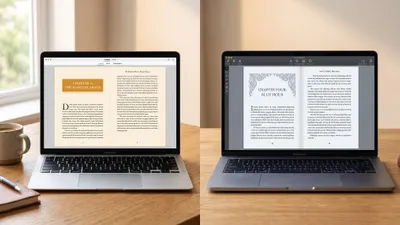
Chapter vs Atticus is not really a fight, and pretending otherwise is how authors waste money. Chapter writes your book with AI for $97 once. Atticus typesets a finished manuscript into print-ready files for $147 once. If your book does not exist yet, Atticus cannot help you. If your book exists and needs a designed interior, Atticus is genuinely excellent at that and Chapter is not its equal.
In this comparison, you will get:
- A side-by-side table of pricing, AI capability, formatting depth and export
- An honest section on where Atticus beats Chapter outright — because on interior design it does, in five specific ways
- The real total cost of each workflow, including what you still have to buy
- A clear verdict on which one to buy first, and whether you need both
Here is how they actually stack up.
Chapter vs Atticus at a Glance
| Feature | Chapter (Our Product) | Atticus |
|---|---|---|
| Primary job | Writing the manuscript | Formatting the manuscript |
| Pricing | $97 one-time, lifetime access | $147 one-time, lifetime updates |
| AI drafting | Yes — full manuscript generation | None |
| Story structure frameworks | Save the Cat, Three Act, Hero’s Journey, Romance Beat Sheet | None |
| Writing editor | Full AI-guided drafting workspace | Basic distraction-free editor |
| Interior design themes | Clean standard templates | 17+ themes, 1,200+ styling combinations |
| Fonts | Curated set | 1,500+ |
| Device preview | No | Yes — Kindle, iPad, iPhone, Galaxy |
| Print PDF for IngramSpark | Standard trim sizes | Full control, bleed, gutter, large print |
| Export formats | EPUB, PDF, DOCX | EPUB, print PDF, DOCX |
| Platforms | Browser | Browser PWA — Windows, Mac, Linux, Chromebook |
| Offline use | No | Limited, via PWA cache |
| Learning curve | Under an hour | Two to four hours for custom themes |
| Guarantee | 30-day money-back | 30-day money-back |
| Best for | Getting a complete draft to exist | Making a finished draft look professionally published |
The table makes them look like rivals. They are closer to two halves of one workflow, and knowing which half you are stuck in is the entire decision.
What Is the Actual Difference Between Chapter and Atticus?
The core difference — Chapter is an AI writing platform that produces a complete manuscript from a premise, while Atticus is a typesetting application that turns an already-written manuscript into retailer-ready EPUB and print PDF files.
Atticus starts where your draft ends. Every one of its best features — theme builder, device preview, ornamental scene breaks, drop caps — assumes you already have 60,000 words to pour into them.
Chapter starts where your draft does not exist. You pick a genre and a story structure, the AI drafts the full book, and you edit it into shape.
That means the honest question is not “which is better.” It is: is your bottleneck the writing, or the presentation? Almost every author who buys the wrong one has answered that question wrong.
Our Product — Chapter
Chapter is built around one outcome: a finished, exportable manuscript. You choose a genre and a structural framework, the AI drafts the full book, and you edit and export to EPUB, PDF or DOCX. Over 10,000 authors have used it to produce books, and the platform has been featured in USA Today and the New York Times.
Best for: Writers who have started books before and never finished one Pricing: $97 one-time, fiction and nonfiction, 30-day money-back guarantee Why we built it: Because a beautifully formatted book that was never written is worth nothing, and most authors are stuck at the writing step, not the formatting one.
Where Atticus Genuinely Beats Chapter
This is the section most comparison posts skip, and skipping it would make everything else here worthless. Atticus beats Chapter in five real ways. If any of them describe your situation, buy Atticus — and I would say that to your face.
1. Interior design is not a fair fight
Atticus is a dedicated typesetting tool and Chapter is not. That is the whole story.
Atticus ships 17 base themes with over 1,200 styling combinations, plus a custom theme builder that controls drop caps, ornamental scene breaks, running headers, chapter title treatments and first-line small caps. It supports 1,500+ fonts against Vellum’s 26, according to Atticus.io.
Chapter’s exports are clean, correct and perfectly acceptable on Amazon. They are not designed. If you want a paperback interior that looks like it came from a traditional publisher’s design department, Atticus produces that and Chapter does not try to.
2. Complex book structures Chapter does not handle
Most writing tools assume a novel with 40 identical chapters. Atticus does not.
It handles volumes and parts, footnotes and endnotes, H2 through H6 heading hierarchies, callout and sidebar boxes, full-bleed images, recipe layouts and dedicated large-print editions. If you are formatting a cookbook, textbook, workbook, or nonfiction with heavy apparatus, that structural range is worth the $147 on its own. Our large print book formatting guide covers why that one feature matters more than authors expect.
Chapter exports a well-structured manuscript. It does not give you a sidebar box.
3. Device preview before you upload
Atticus previews your book side by side as it will render on iPhone, iPad, Kindle Paperwhite, Kindle Oasis and Galaxy devices.
This is not a gimmick. Ebook rendering differs meaningfully between readers, and catching a broken scene break on Kindle before upload saves a re-upload cycle and a 72-hour KDP review wait. Chapter has no equivalent — you export, upload, and check in Kindle Previewer yourself. The ebook formatting guide walks through what usually breaks.
4. Print-ready control for IngramSpark and offset
Chapter’s PDF export targets standard trim sizes and works for Amazon KDP. Atticus gives you gutter margins, bleed settings, mirrored margins, custom trim sizes and PDF profiles that pass IngramSpark’s stricter preflight without an argument.
If your book is going into bookstores, libraries, or an offset print run, that difference stops being cosmetic and starts being a rejected file.
5. It works offline, and it is a real desktop-class app
Atticus runs as a Progressive Web App with local caching, so a dropped connection does not stop you mid-session. It runs on Windows, Mac, Linux and Chromebook — the reason it exists at all, since Vellum remains Mac-only and used to force Windows authors to rent a cloud Mac or pay a freelancer $200 to $400 per book.
Chapter is browser-based and needs a connection, because the AI generation happens server-side. That is an honest limitation, not a feature we are hiding.
If you already have a finished manuscript and your complaint is that it looks amateur, this comparison is over. Buy Atticus. Our full Atticus review goes deeper, and Atticus alternatives covers the rest of the formatting field.
Where Chapter Beats Atticus
Chapter wins on the step that decides whether there is anything to format at all.
It writes the book; Atticus explicitly does not
Atticus has no AI features whatsoever. Multiple independent reviews confirm this, including Reedsy’s Atticus review — you write or import the manuscript, then format it.
Chapter generates a complete 20,000 to 120,000+ word draft from a premise, plotted to a structural framework you choose. For an author staring at a blank page, that is not a marginal advantage. It is the only advantage that matters.
Structure is built in, not assumed
Chapter ships Save the Cat, Three Act, Hero’s Journey and a Romance Beat Sheet as first-class frameworks. Pick one and the AI plots your book to it. If beat sheets are new to you, our Save the Cat beat sheet guide is the place to start.
Atticus’s editor is deliberately minimal — a distraction-free typing surface with chapter organisation. It offers no outlining, no structural guidance, and no revision assistance. That is a defensible design choice for a formatting tool, but it means Atticus’s writing mode does not compete with Scrivener, let alone with an AI drafting platform.
The writing editor is the weakest part of Atticus
This is the most common complaint in Atticus user reports, and it is fair. The editor exists so you do not have to leave the app, not because it is good. Goal tracking and sprint timers are there; serious drafting infrastructure is not.
Most Atticus owners draft somewhere else and import. That is a legitimate workflow — it is just worth knowing before you buy Atticus expecting a writing tool.
Chapter exports well enough that many authors never need Atticus
Chapter produces EPUB, PDF and DOCX that upload cleanly to KDP, Apple Books and Kobo. For a standard novel or a straightforward nonfiction book, that output publishes without a single complaint.
The $147 for Atticus buys you design, not validity. If your book is a 70,000-word thriller with plain chapter headings, you may genuinely never need it. See AI book formatting tools for where the automated end of that market now sits.
$97 versus $147, and what each one actually replaces
Chapter at $97 replaces months of drafting. Atticus at $147 replaces $200 to $400 per book in freelance formatting — which means Atticus pays for itself on book one if you were going to hire out, and never pays for itself if you were going to format in Word anyway.
How Much Do Chapter and Atticus Cost?
Chapter costs $97 as a one-time purchase and Atticus costs $147 as a one-time purchase. Neither is a subscription, both include lifetime access, and both carry a 30-day money-back guarantee. Buying both costs $244 total, which is still less than a single freelance formatting job on one book.
| Workflow | Cost | What you get |
|---|---|---|
| Chapter only | $97 | Written, edited and exported book, standard interior |
| Atticus only | $147 | Designed interior — you supply the finished manuscript |
| Chapter + Atticus | $244 | AI draft plus professional interior design |
| Freelance writing + formatting | $3,000–$15,000+ | Ghostwriter plus formatter, per book |
| Vellum (Mac only) | $249.99 | Designed interior, Mac hardware required |
Atticus occasionally discounts $20 to $30 during NaNoWriMo and author conferences. Check current pricing at Atticus.io before buying, since both products reprice.
Which One Should You Buy First?
Buy the one that solves your current bottleneck, not the one that solves the step after it.
Buy Chapter first if:
- Your book is unwritten, half-written, or has been “almost done” for a year
- You have started books before and never finished one
- You need a structural framework because plotting is where you stall
- You want a publishable draft to exist in weeks rather than years
Buy Atticus first if:
- Your manuscript is finished and you are staring at the upload screen
- Your book has parts, footnotes, sidebars, recipes, or large-print requirements
- You publish to IngramSpark, not just KDP
- You are on Windows or Linux and want Vellum-class output
- You publish frequently enough that per-book formatting fees add up
Buy both if you are building a publishing business rather than releasing one book. $244 covers writing and design for every title you ever publish. Our how to self-publish a book guide maps where each tool lands in the full pipeline.
Can You Use Chapter and Atticus Together?
Yes — Chapter and Atticus work together cleanly, and this is the strongest workflow of all three options. Draft the book in Chapter, export to DOCX, then import that file into Atticus for interior design and final export to EPUB and print PDF. Nothing about either tool blocks the handoff.
The practical sequence looks like this:
- Draft the full manuscript in Chapter using your chosen structural framework
- Edit and revise in Chapter until the prose is where you want it
- Export to DOCX
- Import into Atticus and pick or build a theme
- Preview across Kindle and iPad, fix what breaks
- Export EPUB for retailers and print PDF for KDP or IngramSpark
One caution: heavy formatting applied inside Chapter can carry stray styling into the DOCX. Import clean, then style in Atticus rather than styling twice. Our AI manuscript formatter piece explains why the handoff order matters.
Is Atticus Worth $147 If You Only Publish One Book?
Atticus is worth $147 for a single book only if that book has a complex interior or you would otherwise pay a freelancer. For one straightforward novel, a $200 formatting gig or a careful Word template gets you to the same shelf for less money and less learning time.
The maths flips immediately on book two. At three books, Atticus has replaced $600 to $1,200 in formatting fees. At ten, it is the cheapest line item in your publishing budget.
The trap worth naming: buying a formatting tool to feel productive about a book you have not written. That is a well-documented way to spend $147 on procrastination. Formatting is a two-day problem. Writing is the year-long one.
What About Vellum and Scrivener?
Vellum and Scrivener each beat Atticus at one thing and lose to it overall on cross-platform value. Vellum produces marginally cleaner default typography and is faster to learn, but it is macOS-only and costs $249.99. Scrivener is the stronger drafting environment at around $49 to $60, but it does not produce retailer-ready formatting without real effort.
A common stack is Scrivener for drafting, Atticus for formatting. Chapter replaces the Scrivener half for authors who want the AI to do the drafting rather than organise it. Compare directly in our Atticus vs Vellum breakdown, the Vellum review, and book formatting software for the wider field.
The Verdict
Chapter wins the overall recommendation, because the writing is the bottleneck for the overwhelming majority of authors who search this comparison. A book that does not exist cannot be formatted, and no theme builder has ever finished a manuscript.
But Chapter wins it on sequence, not on superiority in every category. Atticus is the better product at the one job it does, and it is not close. If you have a finished manuscript with a complex interior sitting on your drive right now, Chapter is the wrong purchase and Atticus is the right one.
For everyone else — the author with a premise, a false start, and a year of good intentions — Chapter at $97 gets the book written, and you can decide about interior design once there is an interior to design. See what the drafting process actually looks like in our Chapter review and how to write a book with AI.
FAQ
Is Chapter better than Atticus?
Chapter is better than Atticus for writing a book, and Atticus is better than Chapter for formatting one. They solve different problems at similar prices — $97 versus $147, both one-time. Buy Chapter if your manuscript is unfinished; buy Atticus if it is finished and needs professional interior design.
Does Atticus have AI writing features?
No, Atticus has no AI features. It is a formatting and typesetting tool with a basic distraction-free writing editor attached. You write or import your manuscript manually, then Atticus converts it into print-ready PDF and retailer-ready EPUB files with custom themes and device previews.
Can Chapter format a book for Amazon KDP?
Yes, Chapter exports EPUB, PDF and DOCX files that upload cleanly to Amazon KDP, Apple Books and Kobo. The output is correct and publishable with standard interior styling. For custom drop caps, ornamental scene breaks or IngramSpark print profiles, you would export to DOCX and finish in a dedicated formatter like Atticus.
Is Atticus a one-time payment?
Yes, Atticus is a one-time payment of $147 with lifetime updates, unlimited books and unlimited pen names, backed by a 30-day money-back guarantee. There is no subscription and no per-book export fee, which is why it undercuts Vellum’s $249.99 on total cost.
Do I need both Chapter and Atticus?
You need both only if you want AI drafting and professional interior design — $244 total, covering every book you publish. Most first-time authors need only Chapter, since its exports publish fine on KDP. Add Atticus when your books get complex or you publish often enough that formatting fees add up.