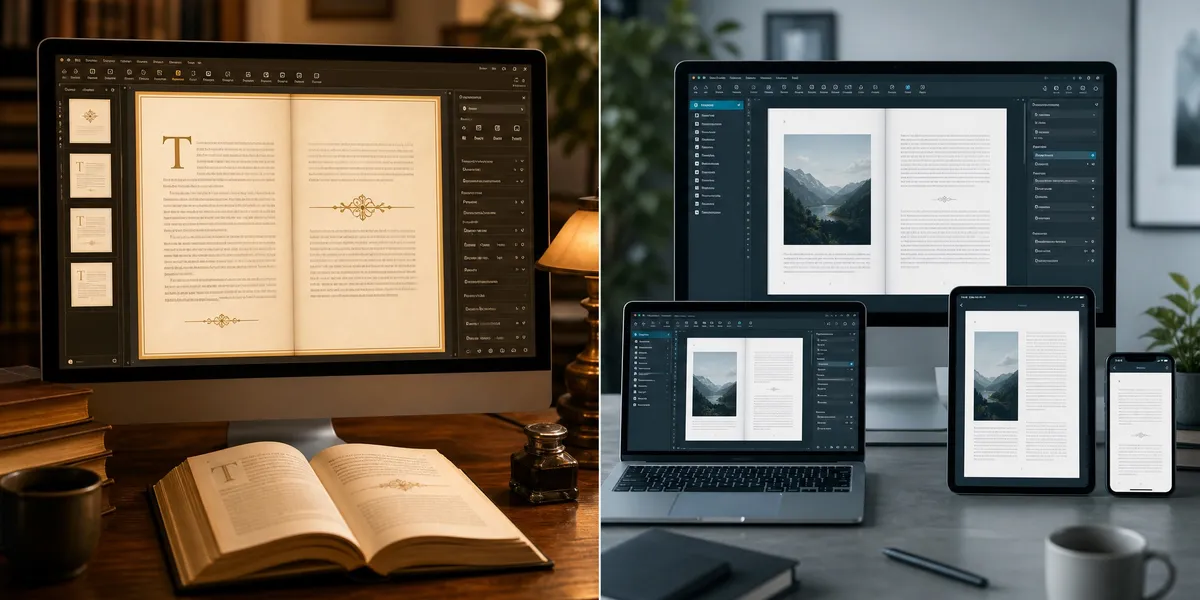
Vellum and Atticus are the two biggest names in book formatting software — and choosing between them depends on your platform, budget, and what you actually need the tool to do.
In this comparison, you’ll learn:
- How Vellum and Atticus compare on pricing, features, and output quality
- Which tool works best for fiction vs. nonfiction formatting
- Why a third option might beat both for authors who want AI-powered writing and formatting in one place
Here’s the full breakdown.
At a Glance: Vellum vs Atticus
| Feature | Vellum | Atticus |
|---|---|---|
| Price | $199.99–$249.99 (one-time) | $147 (one-time) |
| Platform | Mac only | Windows, Mac, Linux, Chromebook |
| Built-in Writing Editor | No | Yes |
| Font Options | 26 | 1,500+ |
| Chapter Themes | 24 (preset) | 17+ (customizable + theme builder) |
| Ebook Export | EPUB, PDF | EPUB, MOBI, PDF |
| Print Export | PDF (KDP, IngramSpark) | PDF (KDP, IngramSpark) |
| Collaboration | No | Yes |
| Cloud Sync | No (local files) | Yes (cross-device) |
| Nonfiction Support | Limited | Strong (footnotes, callouts, tables) |
| Best For | Mac fiction authors wanting polish | Cross-platform authors, nonfiction, budget |
That table covers the essentials. But if you’re investing in a tool you’ll use for years, the details below matter.
What Is Vellum?
Vellum is a Mac-only book formatting application that produces professional-quality ebook and print interiors. It focuses exclusively on formatting — you write your manuscript elsewhere, import it, apply a design, and export publication-ready files.
Vellum has built a strong reputation among fiction authors for its polished output. The drop caps, ornamental scene breaks, and chapter headings look like they came from a Big Five publisher.
You can use Vellum for free until you’re ready to export. That means you can experiment with all the design options, preview your book on different devices, and only pay when you’re satisfied with the result.
If you’re exploring other formatting options, check out our complete book formatting guide for a broader overview.
What Is Atticus?
Atticus is an all-in-one writing and formatting platform built by Dave Chesson, the founder of Kindlepreneur. It launched in 2021 as a cross-platform alternative to Vellum — and it’s grown significantly since then.
Unlike Vellum, Atticus includes a built-in word processor with writing goals, focus modes, and collaboration features. You can write, format, and export all within the same tool.
Atticus runs in the browser and works on every major operating system. That cross-platform flexibility is its biggest differentiator from Vellum.
For a deeper look at Atticus on its own, read our Atticus writing software review.
Pricing: Which Tool Costs Less?
Both Vellum and Atticus use a one-time pricing model with no subscriptions and no per-book fees. But the cost difference is real.
Vellum offers two tiers:
- Vellum Ebooks — $199.99 (ebook formatting only)
- Vellum Press — $249.99 (ebooks + print formatting)
If you buy Vellum Ebooks first and upgrade to Press later, you’ll pay an extra $99.99 — more than if you’d bought Press upfront.
Atticus keeps it simple:
- One price — $147 for everything (ebooks, print, writing editor, collaboration)
That’s a $102 savings compared to Vellum Press. Both include lifetime updates at no extra charge.
Winner: Atticus. You get more features for less money — and no need to guess which tier you’ll need.
Platform Support: Where Can You Use Each Tool?
This is often the deciding factor for authors choosing between these two tools.
Vellum runs only on macOS. There is no Windows version, no Linux version, and no browser-based option. Some Windows users run Vellum through a Mac-in-the-cloud service, but that adds cost and complexity.
Atticus works on Windows, Mac, Linux, and Chromebook. It runs in the browser with offline support, and your projects sync across devices through the cloud.
If you own a Mac and don’t plan to switch, Vellum works fine. If you use Windows, switch between devices, or want the flexibility to work from any computer — Atticus is your only option between these two.
Winner: Atticus. Cross-platform access with cloud sync gives it a clear advantage.
Formatting Quality: Which Produces Better-Looking Books?
This is where Vellum still holds an edge — though the gap has narrowed.
Vellum’s output is the gold standard for indie publishing. The typography is precise, the drop caps are elegant, and the overall look rivals traditionally published books. Vellum’s 24 chapter themes are carefully designed and consistent across ebook and print formats.
Atticus produces clean, professional output that works well for most readers. But the typography isn’t quite at Vellum’s level. Drop cap rendering, text spacing around decorative elements, and print micro-typography show small differences that trained eyes will notice.
For ebooks, the differences shrink significantly — ebook readers control much of the final rendering anyway.
For print books where typography matters to you, Vellum has the edge. For ebooks and most print projects, Atticus output is more than good enough.
Winner: Vellum for print typography purists. Atticus for everyone else.
If print formatting is your focus, our how to format a book for KDP guide covers the essentials regardless of which tool you choose.
Best Book Formatting Software: Key Features Compared
Beyond the basics, both tools have distinct strengths that matter depending on your publishing workflow.
Font and Theme Customization
Vellum gives you 26 fonts and 24 preset chapter themes. The themes look great, but you can’t create your own or modify them beyond what Vellum allows.
Atticus offers over 1,500 fonts and includes a custom chapter theme builder. If you want complete control over your book’s look, Atticus gives you more creative freedom.
Writing and Editing
Vellum is purely a formatter. You import a finished manuscript (Word or EPUB), apply your design, and export. Its text editing capabilities are limited — undoing a change reverts one character at a time rather than full words or sentences.
Atticus includes a full word processor with chapter organization, writing goals, focus mode, and basic editing tools. You can write your entire book inside Atticus and format it without ever switching apps.
Collaboration
Vellum has no collaboration features. You work locally on your Mac, and sharing means exporting files manually.
Atticus supports collaboration with editors, co-authors, and beta readers. Multiple people can access the same project, making the editorial process smoother.
Nonfiction Formatting
Vellum was built primarily for fiction. It handles novels well but lacks features like footnotes, callout boxes, and multiple heading levels that nonfiction books need.
Atticus was designed with nonfiction in mind from the start. Footnotes, tables, callouts, and nested headings all work natively — making it the stronger choice for how-to books, memoirs, and reference titles.
Export Options
Both tools export to EPUB and PDF for print. Atticus also exports MOBI format and generates files specifically formatted for KDP, IngramSpark, Apple Books, and other distributors.
Vellum generates retailer-specific files too, including optimized exports for Amazon, Apple, Kobo, Nook, Google Play, and IngramSpark.
ARC Copies
Vellum includes a built-in Advance Reader Copy (ARC) feature that lets you generate watermarked review copies for early readers. Atticus doesn’t have this feature natively, though you can export and distribute ARCs manually.
Who Should Choose Vellum?
Vellum is the right pick if:
- You use a Mac exclusively and don’t need cross-platform access
- You write fiction and want the most polished print interiors in indie publishing
- You already have a writing tool you love (like Scrivener) and just need a formatter
- You publish multiple books per year and want the fastest formatting workflow
- Print typography quality is a top priority
Vellum does one thing — formatting — and it does it beautifully. If that’s all you need, it’s hard to beat.
Who Should Choose Atticus?
Atticus makes more sense if:
- You use Windows, Linux, or Chromebook (Vellum isn’t an option for you)
- You want writing and formatting in one app
- You publish nonfiction books with complex formatting needs
- You collaborate with editors or co-authors
- You’re budget-conscious and want to save $100+
- You switch between devices and want cloud sync
Atticus covers more ground than Vellum — writing, formatting, collaboration, and cross-platform support — for less money.
Is There a Better Option Than Both?
Both Vellum and Atticus solve the formatting piece of publishing. But formatting is just one step in a much longer process — and neither tool helps you write your book faster.
Our Pick — Chapter
Chapter combines AI-powered writing with professional book formatting in a single platform. Instead of spending weeks writing a manuscript and then importing it into a separate formatting tool, you can draft, refine, and format your book in one workflow.
Best for: Authors who want to write and publish faster without sacrificing quality
Pricing: $97 one-time (nonfiction)
Why we built it: Over 2,147 authors have used Chapter to create more than 5,000 books — because the bottleneck for most authors isn’t formatting. It’s getting the manuscript written.
Chapter doesn’t replace Vellum’s print typography or Atticus’s 1,500 fonts. But if your goal is a finished, published book — not just a beautifully formatted manuscript — Chapter gets you there faster than either formatting-only tool.
Featured in USA Today and the New York Times, Chapter has helped authors generate $13,200 from a single book and $60K in 48 hours from launch.
If you’re weighing your options across the full landscape of AI book writing tools, Chapter is worth a serious look.
Can You Use Vellum and Atticus Together?
Yes — and some authors do exactly this. You might write in Atticus (taking advantage of its word processor and collaboration features) and then export your manuscript to import into Vellum for final formatting.
This workflow gives you the best of both tools but adds an extra step. It makes the most sense for fiction authors who want Atticus’s writing features but prefer Vellum’s print output quality.
For most authors, picking one tool and sticking with it is more efficient than juggling both.
How Do Vellum and Atticus Compare to Free Alternatives?
If you’re not ready to invest in either tool, free options exist — though they come with tradeoffs.
| Tool | Price | Platform | Limitations |
|---|---|---|---|
| Reedsy Book Editor | Free | Browser | Limited customization, no offline |
| Kindle Create | Free | Windows, Mac | Amazon-only exports |
| Calibre | Free | All platforms | Steep learning curve |
| Google Docs + Template | Free | Browser | Manual formatting, limited design |
Free tools work for your first book or two. But once you’re publishing regularly, the time saved with Vellum or Atticus pays for itself quickly.
For a complete breakdown, see our book formatting software comparison.
What About AI-Powered Book Formatting?
The formatting landscape is shifting toward AI-assisted tools that handle design decisions automatically. Rather than choosing fonts, themes, and spacing manually, AI book formatting tools analyze your content type and genre to apply appropriate styling.
This doesn’t replace Vellum or Atticus entirely — but it’s worth knowing that the category is evolving. Authors who want to skip the formatting learning curve entirely now have options that didn’t exist two years ago.
If you’re curious about how AI fits into your overall writing workflow, our AI writing workflow for authors guide covers the full picture.
Vellum vs Atticus: The Final Verdict
For most indie authors in 2026, Atticus is the better value. It costs less, works on every platform, includes a writing editor, supports collaboration, and handles nonfiction formatting that Vellum can’t match.
Vellum remains the superior choice for Mac-only fiction authors who prioritize print typography above everything else. If you already own Vellum and it works for your workflow, there’s no urgent reason to switch.
Chapter is worth considering if your real bottleneck is writing the book — not formatting it. At $97 with AI-powered drafting and formatting combined, it’s the most cost-effective path from idea to published book.
| Tool | Best For | Price |
|---|---|---|
| Chapter | Writing + formatting + publishing speed | $97 one-time |
| Atticus | Cross-platform formatting + writing | $147 one-time |
| Vellum | Mac-only premium print formatting | $249.99 one-time |
No matter which tool you choose, the important thing is getting your book published. The best formatting software is the one that doesn’t slow you down.
For step-by-step instructions on the full publishing process, check out our how to self-publish a book guide.
FAQ
Is Vellum Better Than Atticus for Book Formatting?
Vellum is better than Atticus for print book typography — specifically fiction titles where drop caps, ornamental breaks, and precise spacing matter. For everything else — pricing, platform support, nonfiction formatting, and built-in writing tools — Atticus offers more value at a lower price point.
Does Vellum Work on Windows?
No, Vellum does not work on Windows. Vellum is Mac-only software with no Windows version planned. Windows users can access Vellum through Mac-in-the-cloud services, but Atticus is a more practical alternative that runs natively on Windows, Mac, Linux, and Chromebook.
Is Atticus Worth $147?
Yes, Atticus is worth $147 for most indie authors. You get a writing editor, book formatter, collaboration tools, and cross-platform access — all for a one-time payment with lifetime updates. If you publish more than one or two books, the investment pays for itself in time saved compared to free alternatives.
What Is the Best Book Formatting Software in 2026?
The best book formatting software in 2026 depends on your needs. Atticus ($147) is the best all-around choice for cross-platform formatting with writing tools included. Vellum ($249.99) is best for Mac users who want premium print quality. Chapter ($97) is best for authors who want AI-assisted writing and formatting in a single workflow.
Can I Switch From Vellum to Atticus?
Yes, you can switch from Vellum to Atticus. Export your manuscript from Vellum as a Word document or EPUB file, then import it into Atticus. Your text transfers cleanly — though you’ll need to reapply chapter themes and formatting elements, since design settings don’t transfer between tools.