You can format a professional cookbook for print — even without design experience — once you nail the right trim size, margins, recipe layout, and image specs.
In this guide, you’ll learn:
- The best trim sizes and margin settings for printed cookbooks
- How to lay out recipes so they’re easy to follow while cooking
- Which fonts, spacing, and image specs make your cookbook look professionally published
- Common formatting mistakes that ruin an otherwise great cookbook
Here’s everything you need to get your cookbook print-ready.
What Trim Size Should You Use for a Cookbook?
The best trim size for a printed cookbook is 8” x 10” or 8.5” x 11” — both give you enough room for recipe text, ingredient lists, and full-color food photography on the same spread. Smaller formats like 6” x 9” work for text-heavy recipe collections without photos.
Your trim size determines every other formatting decision. Pick it first.
Common Cookbook Trim Sizes
| Trim Size | Best For | Notes |
|---|---|---|
| 8.5” x 11” (Letter) | Photo-heavy cookbooks | Maximum space for images and text |
| 8” x 10” | Standard cookbook format | Most popular for self-published cookbooks |
| 7” x 10” | Moderate photos | Good balance of space and portability |
| 6” x 9” | Text-focused recipe books | Works for family recipe collections without photos |
| 8” x 8” (Square) | Modern/lifestyle cookbooks | Trendy format, great for Instagram-style food photography |
If you’re publishing through Amazon KDP, check their supported trim sizes before committing. KDP supports up to 8.5” x 11” for paperback, which covers most cookbook formats.
For print-on-demand through IngramSpark, you’ll find similar size options with additional hardcover choices — useful if you’re planning a premium edition.
Pro tip: Order a test print at your chosen size before formatting the entire book. Hold it in your hands. Open it flat on a kitchen counter. If the pages don’t stay open or the text feels cramped, go up a size.
What Margins and Gutters Does a Printed Cookbook Need?
Set your outside margins (top, bottom, and outer edge) to at least 0.5” and your inside gutter margin to 0.75”–1” depending on page count. Cookbooks need wider margins than novels because readers lay them flat on kitchen counters.
The gutter is the inside margin near the spine. Thicker books need a wider gutter because the binding pulls pages inward. Here’s a quick reference:
Book Margin Sizes for Printing
| Page Count | Minimum Gutter | Outside Margins | Top/Bottom |
|---|---|---|---|
| Under 150 pages | 0.625” | 0.5” | 0.5” |
| 150–300 pages | 0.75” | 0.5” | 0.5” |
| 300–500 pages | 0.875” | 0.5” | 0.5” |
| 500+ pages | 1.0” | 0.5” | 0.5” |
If your cookbook uses full-bleed images (photos that extend to the edge of the page), add 0.125” of bleed on all sides beyond the trim line. This means your document size is actually 0.25” wider and 0.25” taller than your trim size.
For print-on-demand services like KDP, bleed increases the minimum outside margin to 0.375”. Always check your printer’s specific requirements — they vary.
Why this matters for cookbooks specifically: People cook with your book open. If text runs too close to the gutter, readers can’t see ingredient amounts without cracking the spine. Give your content room to breathe.
How to Lay Out Recipe Pages for Print
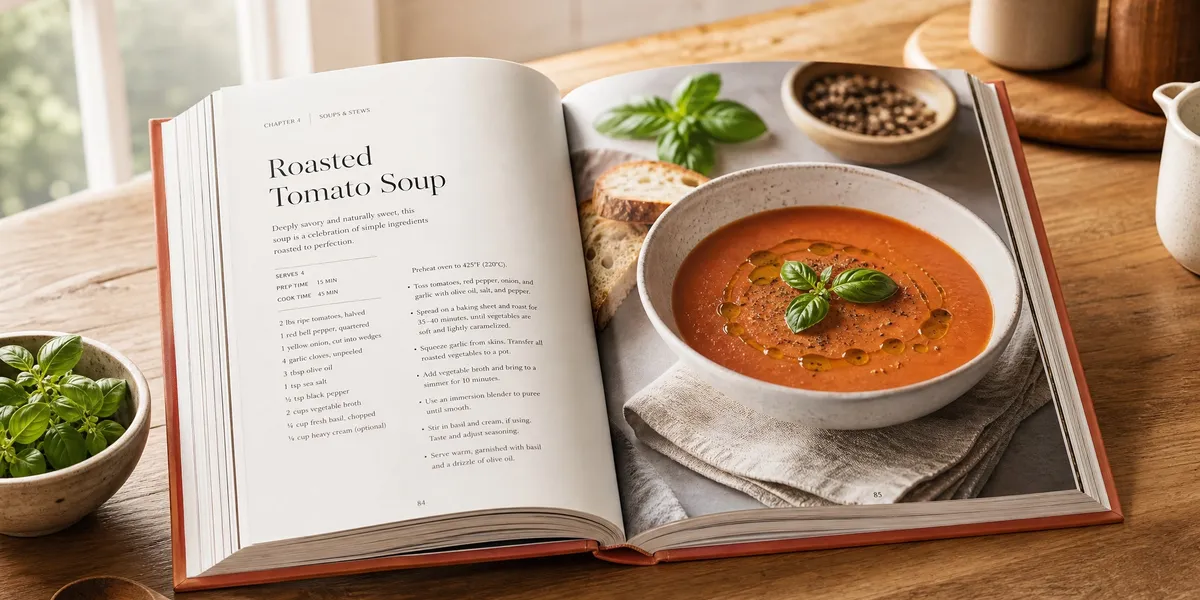
The most reader-friendly cookbook layout puts ingredients on the left side and instructions on the right — or ingredients at the top and steps below. Either way, the cook should see both at a glance without flipping pages.
Every recipe page needs these elements in a consistent order:
- Recipe title — prominent, easy to scan from across a kitchen
- Headnote — 1–2 sentences about the dish (optional but adds personality)
- Prep time, cook time, total time, and servings — formatted as a quick-reference bar
- Ingredients list — in the order they’re used, with specific measurements
- Instructions — numbered steps, concise and clear
- Notes or variations — tips, substitutions, dietary modifications
Single-Page vs. Two-Page Spread Layouts
Single-page recipes work when you have short ingredient lists (under 10 items) and brief instructions. The recipe title, metadata, ingredients, and steps all fit on one page.
Two-page spreads work best for complex recipes or photo-heavy layouts. The classic approach: full-page food photo on the left, recipe text on the right. This is the format readers associate with professional cookbooks.
If you’re using two-page spreads, always start recipes on even-numbered pages (left side) so the photo faces the recipe text. This requires careful page planning — you may need to add a half-page note, tip, or ingredient spotlight to fill gaps.
Formatting the Ingredients List
Keep ingredients scannable:
- Bold the quantities — readers scan for numbers first
- List ingredients in order of use — not alphabetically
- Group by recipe stage — if a recipe has a sauce and a main dish, separate them with subheadings
- Specify sizes and weights — “1 onion” is vague; “1 medium yellow onion, diced (about 1 cup)” is useful
- Use consistent measurement formatting — pick “tablespoon” or “tbsp” and stick with it throughout the entire book
Which Fonts Work Best for Printed Cookbooks?
Use a clean serif font like Garamond, Georgia, or Caslon for recipe body text at 10–12pt, and a complementary sans-serif like Montserrat or Raleway for headings. Stick to 2–3 fonts maximum across your entire cookbook.
Font choice directly affects readability — and cookbooks need to be readable from arm’s length while someone’s hands are covered in flour.
Cookbook Font Recommendations
| Element | Font Style | Size | Examples |
|---|---|---|---|
| Recipe titles | Sans-serif or decorative serif | 18–24pt | Montserrat Bold, Playfair Display |
| Body text / instructions | Serif | 10–12pt | Garamond, Georgia, Caslon |
| Ingredients | Serif or sans-serif | 10–11pt | Same as body or slightly smaller |
| Section headers | Sans-serif | 14–16pt | Raleway, Open Sans |
| Notes / tips | Italic serif or sans-serif | 9–10pt | Garamond Italic, Lato Light |
Set your line spacing (leading) to 1.2–1.3x the font size. Single-spaced text looks cramped and causes readers to skip lines — a real problem when you’re following a recipe step by step.
For more on choosing book interior fonts, see our dedicated typography guide.
Cookbook-specific tip: Use a slightly larger font size than you would for a novel. Readers hold cookbooks farther away (propped on a counter, not held in their hands), so 11pt body text is better than 10pt in most cases.
How to Handle Food Photography and Images
All images must be at least 300 DPI (dots per inch) at their printed size, saved in CMYK color mode. A photo that looks sharp on your screen at 72 DPI will print blurry and pixelated.
This is the single biggest formatting mistake in self-published cookbooks. Screen resolution and print resolution are completely different.
Image Specifications for Print
- Resolution: 300 DPI minimum at the final printed size
- Color mode: CMYK (not RGB — colors shift significantly when converted)
- File format: TIFF or high-quality JPEG (avoid PNG for print)
- Full-bleed images: Extend 0.125” past the trim line on all sides
- Image placement: Keep important elements at least 0.25” from any trim edge
Getting Food Photography Right
You don’t need a professional photographer to get usable cookbook photos. You do need:
- Natural light — shoot near a window, avoid flash and overhead fluorescents
- Consistent styling — use the same backgrounds, props, and color palette throughout the book
- Overhead and 45-degree angles — these are the two standard food photography angles
- Post-processing — adjust white balance, brightness, and contrast in a tool like Adobe Lightroom so all photos have a cohesive look
If you’re working with a professional food photographer, provide them with your exact trim size, bleed settings, and layout templates before the shoot. They’ll frame shots to fit your page layouts.
Convert RGB to CMYK before placing images in your layout. If you wait until export, your printer’s automated conversion may shift colors — bright reds can turn muddy, and vibrant greens can look dull. Do the conversion in Photoshop or a free tool like GIMP so you can adjust colors before they hit paper.
What Software Should You Use to Format a Cookbook?
Adobe InDesign is the professional standard for cookbook layout, but Canva and Affinity Publisher offer beginner-friendly alternatives that produce print-ready files. Your choice depends on your budget, design experience, and how much control you need.
Cookbook Layout Software Compared
| Software | Skill Level | Cost | Best For |
|---|---|---|---|
| Adobe InDesign | Advanced | $23/mo | Full control, professional results |
| Affinity Publisher | Intermediate | $70 one-time | InDesign alternative without subscription |
| Canva | Beginner | Free–$13/mo | Template-based, fast results |
| Blurb BookWright | Beginner | Free | Direct-to-print integration |
| Microsoft Word | Beginner | Varies | Text-heavy cookbooks without complex layouts |
InDesign gives you master pages, paragraph styles, precise image control, and professional PDF export. If you’re formatting a cookbook with 100+ recipes and full-color photography, it’s worth learning.
Canva has cookbook-specific templates that let you drag and drop recipes into pre-designed layouts. The tradeoff: less precise typographic control and occasional issues exporting press-ready PDFs with correct color profiles.
Affinity Publisher hits the sweet spot for most self-published cookbook authors — professional-grade layout tools at a one-time price.
If you’re planning to write your cookbook content with AI before formatting, Chapter’s AI writing tools can help you draft recipe descriptions, headnotes, and chapter introductions. You’ll still need dedicated layout software for the visual formatting, but having polished text ready to drop into your template saves significant time.
For a deeper comparison, see our roundup of the best book formatting software.
How to Set Up Your Cookbook Template
Create a master template with consistent styles before formatting a single recipe. This ensures every page looks cohesive and saves hours of manual adjustment later.
Template Setup Checklist
- Set your document size — trim size plus bleed on all sides
- Define master pages — create separate masters for recipe pages, section openers, photo spreads, and front/back matter
- Set up paragraph styles — recipe title, headnote, ingredients, instructions, notes, page headers, and page numbers
- Create character styles — bold quantities, italic notes, ingredient names
- Place guides — mark your margin boundaries, column positions, and image placement zones
- Add automatic page numbers — placed in the margin area, not inside the content area
Front Matter and Back Matter
Your cookbook needs more than just recipes. Include:
Front matter:
- Title page
- Copyright page
- Dedication (optional)
- Table of contents with page numbers
- Introduction — your story, the cookbook’s theme, how to use it
Back matter:
- Index (organized by ingredient and recipe name)
- Measurement conversion chart
- Glossary of cooking terms (if your audience includes beginners)
- About the author page
- Acknowledgments (optional)
The index is critical for printed cookbooks. Readers look up recipes by ingredient (“chicken,” “chocolate,” “avocado”) more often than by recipe name. Build your index by ingredient, cooking method, and dietary category (vegetarian, gluten-free, etc.).
How to Export a Print-Ready Cookbook PDF
Export your final cookbook as a PDF/X-1a file with 300 DPI images, CMYK color, and crop marks. This is the standard press-ready format that printers and print-on-demand services accept.
Export Settings Checklist
- Format: PDF/X-1a (most compatible for print)
- Resolution: 300 DPI for all images
- Color: CMYK
- Bleed: Include 0.125” bleed marks
- Crop marks: On (shows the printer where to cut)
- Fonts: Embed all fonts (prevents substitution errors)
- Compression: Minimal — don’t over-compress images
Always order a proof copy before approving your book for sale. Screen colors and print colors differ. A proof reveals issues you can’t catch on a monitor:
- Images that print darker than expected
- Colors that shift from RGB to CMYK conversion
- Text too close to the gutter
- Margins that feel too tight when the book is bound
- Bleed images that got cropped in the wrong spot
If you’re using KDP, their online previewer catches basic formatting errors. But nothing replaces holding the physical book. Order the paperback proof — it costs a few dollars and saves you from publishing a book with formatting problems.
For a complete walkthrough of the self-publishing process for cookbooks, including pricing, distribution, and marketing, see our dedicated guide. And if you’re publishing on Amazon, our KDP self-publishing guide covers account setup and listing details.
For more on book interior design beyond cookbooks, check our comprehensive layout guide.
Common Cookbook Formatting Mistakes to Avoid
Even experienced designers make these errors with cookbook-specific layouts:
- Inconsistent recipe formatting — switching between different layouts, font sizes, or ingredient list styles mid-book confuses readers and looks amateurish
- Low-resolution images — photos that look fine on screen but print blurry at 300 DPI; always check actual print size, not just screen appearance
- Ignoring the gutter — text or images that run into the spine area become unreadable once the book is bound
- RGB color mode — exporting in RGB instead of CMYK causes unpredictable color shifts; bright food photos can look dull on paper
- Missing recipe elements — forgetting prep time, serving size, or specific ingredient measurements frustrates readers
- No proof copy — publishing without ordering a physical proof is the most expensive mistake; one print run of incorrectly formatted books wastes your entire budget
How Much Does It Cost to Format a Cookbook for Print?
Formatting a cookbook yourself costs $0–$280/year in software, while hiring a professional cookbook designer runs $1,500–$5,000+ depending on page count, complexity, and number of images.
| Option | Cost | Turnaround | Best For |
|---|---|---|---|
| DIY with Canva | Free–$156/year | Your pace | Simple cookbooks, tight budgets |
| DIY with Affinity Publisher | $70 one-time | Your pace | Intermediate designers |
| DIY with InDesign | $280/year | Your pace | Experienced designers |
| Freelance designer | $1,500–$3,000 | 4–8 weeks | Authors who want professional results without learning design |
| Design agency | $3,000–$5,000+ | 6–12 weeks | Complex cookbooks with professional photography |
If you’re self-publishing your cookbook on a budget, start with Canva or Affinity Publisher. Invest in a professional designer once you’ve validated demand with initial sales.
For more on formatting costs and options, see our guide to book formatting services.
Can You Format a Cookbook in Microsoft Word?
Yes, you can format a basic text-focused cookbook in Microsoft Word, but it’s not ideal for photo-heavy layouts. Word handles simple recipe collections with minimal images well enough for print-on-demand services.
Word works when your cookbook is mostly text — family recipe collections, heritage cookbooks, or recipe compilations without full-color photography on every page.
Word struggles with:
- Precise image placement and text wrapping
- Full-bleed pages
- CMYK color management
- Master page templates
- Professional typography controls
If your cookbook has more than a handful of photos, use dedicated book formatting software or at least Canva’s cookbook templates. The time you save on layout — and the quality difference in the finished product — is worth the switch.
What’s the Best Recipe Layout for Readability?
The most readable recipe layout uses a two-column format with ingredients on the left and step-by-step instructions on the right, allowing cooks to reference both simultaneously without losing their place.
This layout mirrors how people actually cook: they scan the ingredients, then follow the steps, glancing back at quantities as they go.
Key Readability Principles
- Number your steps — readers lose their place less often with numbered steps than with paragraph-style instructions
- Use white space between steps — cramped instructions cause errors in the kitchen
- Bold ingredient names within instructions — “Add the diced onion and minced garlic” helps readers match steps to their prep
- Keep each step to 1–2 sentences — long paragraphs bury critical timing and technique details
- Include visual cues — “cook until golden brown” is clearer than “cook for 5 minutes” because ovens and stovetops vary
FAQ
How do you format a cookbook for self-publishing?
To format a cookbook for self-publishing, choose a trim size (8” x 10” is standard), set margins with at least a 0.75” gutter, create a consistent recipe template with title, times, ingredients, and numbered steps, use 300 DPI CMYK images, and export as a PDF/X-1a file. Always order a proof copy before listing your book for sale.
What is the standard cookbook page size?
The standard cookbook page size is 8” x 10” or 8.5” x 11” for photo-heavy cookbooks. These dimensions give enough room for recipe text alongside food photography. Text-only recipe collections can use the smaller 6” x 9” format, while square formats like 8” x 8” work well for modern lifestyle cookbooks.
What software do professional cookbook designers use?
Professional cookbook designers use Adobe InDesign as the industry-standard layout tool. It offers master pages, paragraph styles, precise image placement, and PDF/X-1a export for press-ready files. Budget-friendly alternatives include Affinity Publisher ($70 one-time) and Canva (free–$13/mo) for template-based designs.
How many recipes should a cookbook have?
A standard cookbook contains 50–100 recipes, though this varies widely by type. Focused cookbooks (one cuisine, one technique) work well with 40–60 recipes. Comprehensive cookbooks covering multiple categories typically include 80–120+ recipes. Each recipe needs enough surrounding content — headnotes, tips, and photos — to justify its page space.
Do I need professional photos for a printed cookbook?
You don’t need professional photos for every recipe, but you do need high-quality images at 300 DPI in CMYK color mode for any photos you include. Natural-light photography with consistent styling works well for self-published cookbooks. Some successful cookbooks use illustrations or minimal photography with strong typography as their visual style.