You don’t need a graphic design degree to create a professional cookbook layout — you just need the right template and a few formatting rules.
In this guide, you’ll learn:
- The exact page dimensions, margins, and fonts professional cookbooks use
- How to structure your cookbook chapters for maximum readability
- Free and paid template options for every skill level
- How to organize recipes so your book feels polished, not chaotic
Here’s everything you need to design a cookbook that looks like it belongs on a bookstore shelf.
What Is a Cookbook Layout Template?
Cookbook layout template — A pre-designed page framework that defines where your recipe titles, ingredient lists, instructions, photos, and page numbers go on every page of your cookbook.
Think of it as the blueprint for your book’s interior. A good template handles all the design decisions — fonts, spacing, margins, columns — so you can focus on the recipes themselves.
Professional cookbook designers use tools like Adobe InDesign to build these templates from scratch. But you don’t have to. Pre-made templates give you the same polished result at a fraction of the time and cost.
The key is choosing a template that matches your cookbook’s style. A rustic family recipe collection needs a completely different layout than a minimalist plant-based cookbook or a community church fundraiser edition.
How to Choose the Right Cookbook Page Size
Your page size determines everything else about your layout — margins, font sizes, photo placement, and how many recipes fit per page.
Here are the standard cookbook sizes used in professional publishing:
| Format | Dimensions | Best For |
|---|---|---|
| Portrait (Standard) | 8.5” × 11” | Traditional cookbooks with large photos |
| Medium Portrait | 7.5” × 9.25” | Most versatile — fits shelves and kitchens |
| Landscape | 11” × 8.5” | Photo-heavy cookbooks, coffee table style |
| Square | 8” × 8” or 12” × 12” | Modern aesthetic, gift cookbooks |
| Compact | 6” × 9” | Budget-friendly, text-focused recipe collections |
The 7.5” × 9.25” size is the sweet spot for most self-published cookbooks. It’s large enough to fit photos alongside recipes but small enough to keep printing costs manageable.
If you’re publishing through Amazon KDP, check their supported trim sizes before finalizing your template. Not every dimension is available for print-on-demand.
What Margins Should a Cookbook Have?
Margins matter more than most new authors realize. Too narrow, and your text gets swallowed by the binding. Too wide, and you waste valuable page real estate.
Here are the margin guidelines professional cookbook designers follow:
- Inside margin (gutter): 0.75” minimum — this is the side closest to the spine, and you need extra space so text doesn’t disappear into the binding
- Outside margin: 0.5” — gives your page a clean border
- Top margin: 0.5” — enough room for running headers or chapter titles
- Bottom margin: 0.4”–0.5” — leave “thumb space” so readers can hold the book open in the kitchen
For KDP self-publishing, the minimum margin on all sides is 0.25”, with a gutter of at least 0.375”. But hitting the minimum produces cramped, amateur-looking pages. Go wider.
Pro tip: Add an extra 0.125” to your gutter for every 100 pages in your book. A 300-page cookbook needs a wider gutter than a 100-page collection because the binding is thicker.
Best Fonts for Cookbooks
Typography can make or break your cookbook’s readability. Remember — your readers will be standing in a kitchen, glancing at your book between chopping vegetables and stirring pots.
Body Text Fonts (Ingredients and Instructions)
Stick with proven serif fonts for body text. They’re easier to read in print at sustained lengths:
| Font | Style | Why It Works |
|---|---|---|
| Georgia | Classic serif | Highly readable, available everywhere |
| Adobe Garamond Pro | Elegant serif | Industry standard for cookbooks |
| Palatino | Warm serif | Generous letter spacing, kitchen-friendly |
| Baskerville | Refined serif | Professional, timeless feel |
| Minion Pro | Clean serif | Excellent at small sizes |
Set your body text at 11pt minimum — ideally 11–13pt. Err on the side of larger. Nobody wants to squint at an ingredient list while their hands are covered in flour.
Heading and Title Fonts
For recipe titles and chapter headings, you have more freedom. Pair your serif body font with:
- A bold or larger version of the same font family (simplest, always works)
- A clean sans-serif like Futura, Gill Sans, or Montserrat (modern contrast)
- A decorative script used sparingly — only for chapter titles, never for body text
The three-font rule: Limit your entire cookbook to three fonts maximum. One for body text, one for headings, and one optional decorative accent. More than three creates visual chaos.
Font Pairing Examples
- Classic: Garamond (body) + Futura Bold (headings)
- Modern: Minion Pro (body) + Montserrat (headings)
- Warm: Palatino (body) + Bookman Old Style (headings) + a script accent for chapter openers
How to Organize Recipes in a Cookbook
Your cookbook’s chapter structure is what separates a professional book from a random recipe dump. Aim for 8 to 12 chapters with a roughly balanced number of recipes in each.
Common Organization Methods
By meal course (most traditional):
- Appetizers & Snacks
- Soups & Salads
- Main Dishes
- Side Dishes
- Desserts
- Drinks
By main ingredient:
- Chicken & Poultry
- Beef & Pork
- Seafood
- Vegetables & Grains
- Eggs & Dairy
By cooking technique:
- No-Cook & Raw
- Stovetop
- Oven & Roasting
- Slow Cooker & Instant Pot
- Grilling
By prep time:
- 15-Minute Meals
- 30-Minute Meals
- Weekend Projects
- All-Day Slow Cooks
By occasion or season:
- Weeknight Dinners
- Holiday Entertaining
- Summer Cookouts
- Comfort Food Classics
The best method depends on your audience. A family cookbook organized by “Grandma’s Recipes,” “Mom’s Favorites,” and “New Traditions” tells a story that a course-based structure can’t.
Cookbook Chapter Structure
Every cookbook chapter needs these elements:
- Chapter divider page — a full page with the chapter title and optional photo or illustration
- Chapter introduction — 1–2 paragraphs setting context (this is where your voice shines)
- Recipes — consistently formatted, one after another
- Optional: tips, variations, or technique sidebars scattered between recipes
Keep your recipe order logical within each chapter. Start with simpler recipes and build to more complex ones. Or arrange alphabetically if your readers will be looking up specific dishes.
Recipe Page Layout Options
The recipe page is the heart of your cookbook. Every layout decision comes down to one question: can a cook follow this recipe while standing at the counter?
Classic Two-Column Layout
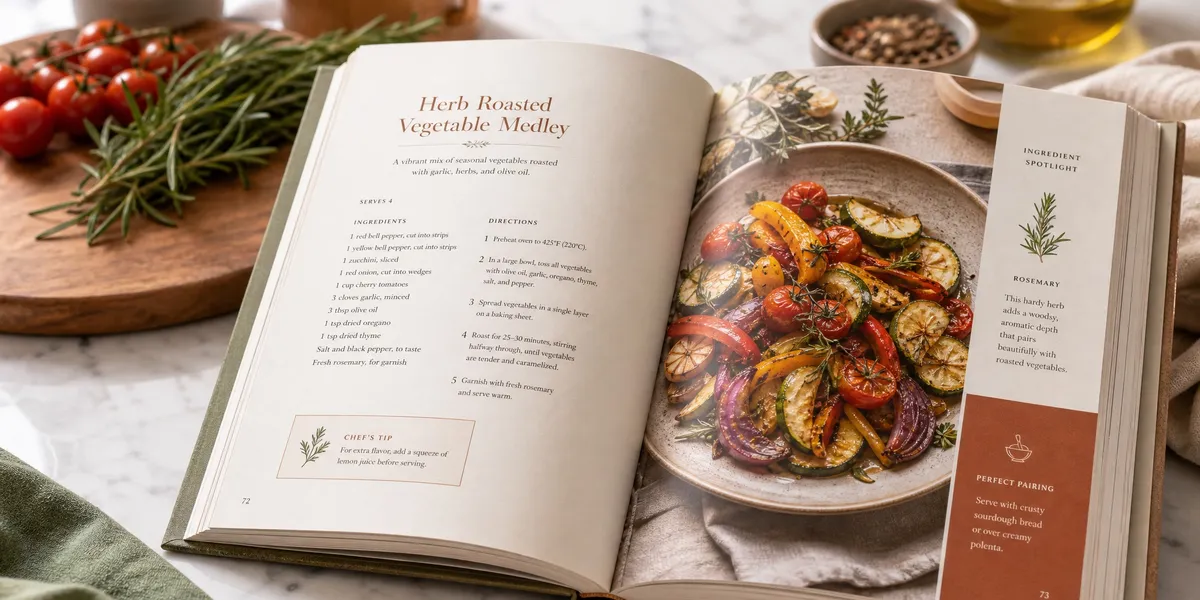
Ingredients on the left, instructions on the right. This is the most popular format in professional cookbooks because your eyes never have to search for the next ingredient — it’s right there across the page.
Best for: Traditional cookbooks, recipes with long ingredient lists, professional-style publications.
Top-Down Layout
Ingredient list at the top of the page, step-by-step instructions below. Clean and simple.
Best for: Minimalist designs, recipes with shorter ingredient lists, cookbooks that want large photos dominating the page.
Full-Page Photo with Recipe Overlay
A full-bleed food photo takes up most of the page, with the recipe text in a clean box or sidebar.
Best for: Coffee table cookbooks, photo-heavy designs, gift books.
Two-Page Spread
Photo on the left page, recipe on the right (or vice versa). This is the most generous format and looks stunning.
Best for: Premium cookbooks with professional food photography, hardcover editions.
Whichever layout you choose, stay consistent throughout the entire book. Switching layouts mid-book is the fastest way to make your cookbook look amateur.
Family Cookbook Template Ideas
Family cookbooks have their own design language. They’re personal, nostalgic, and often include handwritten elements, family photos, and stories alongside the recipes.
Here’s what makes a family cookbook template different:
- Space for headnotes and stories — “Aunt Martha always made this for Thanksgiving” matters as much as the recipe itself
- Photo placeholders for family images — not just food shots, but pictures of the people who created these dishes
- Flexible layouts — some recipes might be handwritten scans from original recipe cards
- Dedication and memory pages — space for tributes, family trees, or historical context
Popular tools for family cookbook templates include Canva (free templates, drag-and-drop), Blurb BookWright (free software with print-on-demand), and heritage cookbook platforms like Heritage Cookbook.
If you’re writing the recipes from scratch rather than scanning handwritten cards, Chapter’s AI writing tools can help you draft consistent recipe introductions and headnotes fast — especially useful when you’re writing stories for 100+ family recipes.
Church Cookbook Template Considerations
Church and community cookbooks have unique layout needs because they’re collaborative projects with dozens (sometimes hundreds) of contributors.
Key design elements for church cookbooks:
- Contributor attribution on every recipe — “Submitted by Mary Johnson” under each recipe title
- Uniform formatting — since recipes come from different people, your template needs to standardize everything (measurements, abbreviations, instruction style)
- Section dividers by category — most church cookbooks use traditional course-based organization
- Index by contributor in addition to the recipe index — people want to find their own submissions
- Sponsor pages — many church cookbooks include local business advertisements to offset printing costs
- Simple, clean design — ornate templates fight with the variety of content; clean layouts handle inconsistency better
Organizations like Morris Press Cookbooks and Cookbook Publishers specialize in community cookbook templates and printing. They provide pre-formatted templates specifically designed for multi-contributor collections.
Free Cookbook Layout Template Tools
You don’t need to spend hundreds on design software. Here are the best tools ranked by skill level:
Our Pick — Chapter
Chapter’s AI writing platform handles the content side of cookbook creation — generating recipe descriptions, writing chapter introductions, and structuring your entire book outline. Pair it with any design template below for a complete cookbook workflow.
Best for: Writing and structuring your cookbook content before design Pricing: $97 one-time (nonfiction) Why we built it: Over 10,000 authors have used Chapter to write nonfiction books, including cookbooks — because getting the words right matters as much as getting the design right.
Design Template Tools
| Tool | Skill Level | Cost | Best For |
|---|---|---|---|
| Canva | Beginner | Free (Pro: $13/mo) | Quick, beautiful templates with drag-and-drop |
| Microsoft Word | Beginner | Included with Office | Simple layouts, text-heavy cookbooks |
| Google Docs | Beginner | Free | Collaborative family/church cookbooks |
| BookWright (Blurb) | Intermediate | Free | Print-on-demand cookbooks with photos |
| Atticus | Intermediate | $147 one-time | Clean book formatting with export options |
| Adobe InDesign | Advanced | $23/mo | Full professional control over every detail |
| Affinity Publisher | Advanced | $70 one-time | InDesign alternative without subscription |
For most self-published cookbook authors, Canva + Chapter is the winning combination. Use Chapter to write and outline your cookbook content, then drop it into a Canva template for visual design.
If you need professional-grade control — custom grids, master pages, precise color management — InDesign is still the industry standard. Atticus splits the difference with a clean interface that exports print-ready files.
Step-by-Step: Setting Up Your Cookbook Template
Here’s the exact process to go from blank page to formatted cookbook:
1. Plan Your Structure First
Before you touch any design tool, outline your entire book:
- List every recipe you’ll include
- Group recipes into 8–12 chapters
- Decide on your chapter structure and organization method
- Write your front matter list: title page, copyright, dedication, table of contents, introduction
A book outline template can help you map this out before you start designing.
2. Choose Your Page Size and Margins
Pick your trim size based on the size guide above. Set your margins generously — remember the gutter rule.
3. Set Up Master Pages
Master pages are reusable templates that define recurring elements:
- Recipe page master — your standard recipe layout (ingredients, instructions, photo placement)
- Chapter divider master — full-page chapter title design
- Front/back matter master — for your table of contents, index, and introduction pages
- Photo spread master — if you’re including full-page food photography
4. Define Your Typography
Choose your fonts and set consistent styles:
- Recipe title: 18–24pt heading font
- Section headers (Ingredients, Instructions): 12–14pt bold
- Body text: 11–13pt serif
- Prep time / servings info: 9–10pt secondary font
- Page numbers: 9–10pt, consistent placement
5. Build One Complete Recipe Page
Design a single recipe page with every element:
- Recipe title
- Prep time, cook time, total time, servings
- Ingredient list (formatted consistently — measurements left-aligned, ingredients right)
- Numbered instructions
- Photo placeholder
- Optional: tips, variations, dietary labels
Get this one page perfect. Then duplicate it for every recipe.
6. Add Front and Back Matter
Your cookbook needs these pages beyond the recipes:
- Title page and copyright page
- Table of contents (essential — list every recipe with page numbers)
- Introduction — your story, how to use the book, how to write a great cookbook introduction
- Recipe index (alphabetical)
- Ingredient index (optional but helpful)
- Acknowledgments
7. Export and Proof
Before sending to print:
- Export as a print-ready PDF with bleed marks if your design includes full-bleed photos
- Print a test copy — colors and fonts always look different on paper than on screen
- Check that no text gets cut off by margins or binding
- Verify page numbers match your table of contents
Common Cookbook Layout Mistakes to Avoid
- Inconsistent recipe formatting — If recipe #1 lists “2 cups flour” and recipe #47 lists “flour, 2 c.” your book looks sloppy. Standardize every measurement, abbreviation, and format choice.
- Margins too narrow for the binding — Your beautiful layout means nothing if the text disappears into the spine. Always print a test copy.
- Using more than three fonts — Every extra font adds visual noise. Stick to three maximum.
- Skipping the table of contents — Readers need to find specific recipes quickly. A detailed table of contents isn’t optional.
- Ignoring white space — Cramming recipes onto every page saves paper but destroys readability. Give your content room to breathe.
How Much Does It Cost to Design a Cookbook?
Cookbook design costs vary dramatically depending on your approach:
| Approach | Cost Range | What You Get |
|---|---|---|
| DIY with free tools | $0–$50 | Canva/Word templates, your own labor |
| Pre-made InDesign template | $30–$100 | Professional template, self-customized |
| AI writing + template | $97–$250 | Chapter for content + Canva/Atticus for design |
| Freelance designer | $500–$3,000 | Custom layout, professional typography |
| Full design studio | $3,000–$10,000+ | End-to-end design, photo art direction |
Most self-published cookbook authors land in the $97–$250 range: writing tools plus a good template. You can always upgrade to professional design for a second edition once your cookbook proves its market.
Can You Design a Cookbook in Canva?
Yes — Canva is one of the most popular tools for self-published cookbook design. It offers dozens of free cookbook templates with drag-and-drop editing.
Canva strengths: Beautiful templates, easy to use, free tier available, great for photo-heavy layouts.
Canva limitations: Less precise typography control than InDesign, harder to manage 200+ page documents, limited export options for professional print-on-demand.
For cookbooks under 100 pages with standard layouts, Canva works beautifully. For longer, more complex cookbooks, consider Atticus or InDesign.
FAQ
What Size Should a Cookbook Be?
The most common cookbook size is 7.5” × 9.25” for portrait orientation, which balances recipe readability with manageable printing costs. Standard alternatives include 8.5” × 11” for photo-heavy layouts, 8” × 8” for square gift cookbooks, and 6” × 9” for compact, text-focused recipe collections.
What Font Size Should a Cookbook Use?
A cookbook should use 11 to 13 point type for recipe ingredients and instructions. Use 18 to 24 point for recipe titles and 12 to 14 point bold for section headers like “Ingredients” and “Instructions.” Larger text improves kitchen readability since cooks read from a distance with busy hands.
How Many Recipes Should a Cookbook Have?
A standard cookbook contains 50 to 100 recipes organized across 8 to 12 chapters. Each chapter should hold a balanced number of recipes — roughly 6 to 12 per chapter. Shorter nonfiction books focused on a specific cuisine or technique can work with as few as 30 recipes.
What Software Do Professional Cookbook Designers Use?
Professional cookbook designers primarily use Adobe InDesign for its precise control over typography, grid layouts, and color management. Alternatives include Affinity Publisher ($70 one-time) and Atticus ($147 one-time) for authors who want professional output without the learning curve. Many indie authors start with Canva for simpler layouts.
How Do I Create a Cookbook Template in Word?
To create a cookbook template in Microsoft Word, set your page size under Layout > Size, adjust margins under Layout > Margins (use 0.75” inside, 0.5” outside), create a recipe text box layout with two columns for ingredients and instructions, and save as a .dotx template file. Replicate the layout for every recipe page to maintain consistency.