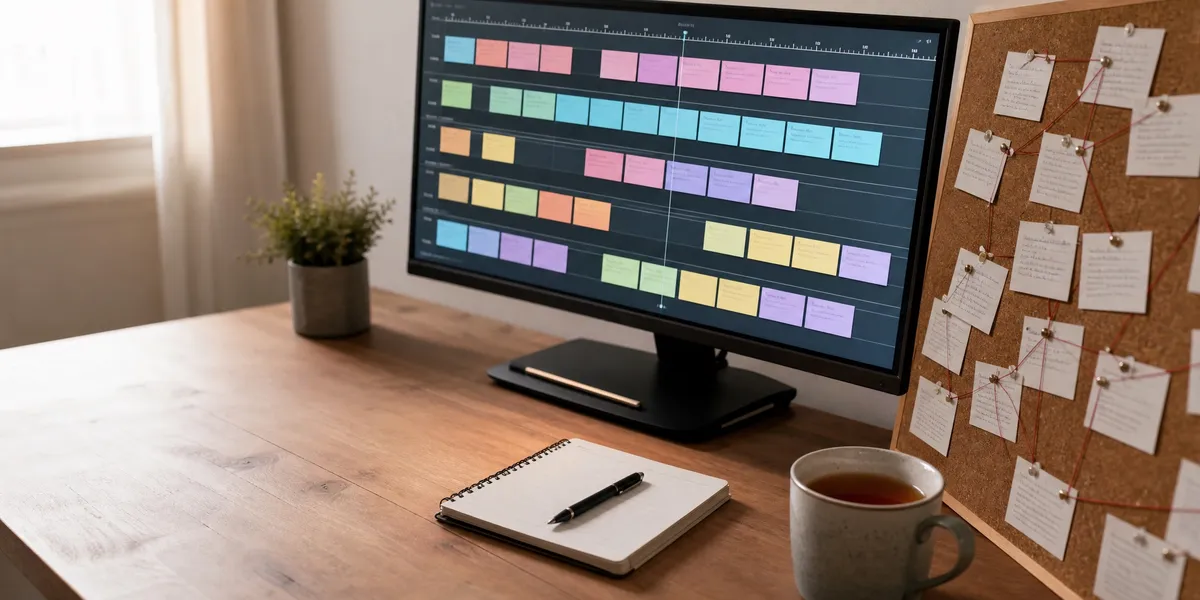
Plottr is visual outlining software that turns your novel into a horizontal timeline of colour-coded scene cards stacked across parallel plotlines. It costs $60 a year or $150 for a lifetime licence at the base tier, and it will not let you write a single sentence of your manuscript inside it.
That last part is the whole review. Everything else is detail.
In this Plottr review, you will get:
- What Plottr actually does, without the marketing language
- The four things it does better than almost anything else, including our own product
- The limitation that sends most buyers back for a refund
- Real 2026 pricing across all three tiers, plus what the full workflow actually costs
- A straight answer on who should buy it and who should walk away
Here is the honest assessment.
What Plottr Actually Is
Plottr — Desktop and browser outlining software that displays a story as a visual timeline of scene cards arranged across multiple plotlines, with linked character, place, and note databases.
You open a project, pick a story-structure template, and start filling cards. Time runs left to right along the top. Plotlines stack vertically down the side — main arc in one row, romance subplot in another, the villain’s thread in a third.
Every card holds a scene description, and you drag cards to reorder your book. The same project also renders as a linear outline view, and the two stay in sync automatically.
Around the timeline sit three databases: Characters, Places, and Notes. You tag scenes with the characters who appear in them, then filter the timeline to see one character’s entire arc in isolation.
That is the product. It plans books. It does not write them, edit them, format them, or publish them.
What Plottr Does Well
The timeline view is the best in its class
Nothing else on the market shows parallel plotlines this clearly. If you write multi-POV fantasy, a mystery with a buried second timeline, or a romance with three intersecting arcs, the visual grid does something a linear outline genuinely cannot.
You see pacing gaps. A subplot that vanishes for eleven chapters is visible in two seconds as a row of empty space.
Dragging a card from chapter 14 to chapter 6 takes one motion, and nothing else in your outline breaks. Try that in a Word document.
The template library is enormous and genuinely useful
Plottr ships with roughly 30 story-structure templates, including Save the Cat, the Hero’s Journey, the Story Circle, and three-act structure. They are filterable by genre.
These are not empty grids. Each beat comes pre-labelled with what it is supposed to accomplish, which is the difference between a template and a spreadsheet.
If you have read about story structure but never successfully applied it, this is the fastest bridge from theory to a filled-in outline that we have used.
It is not trying to be everything
Plottr does one job. That focus is why the interface is learnable in an afternoon rather than a fortnight, and it is the single most common piece of praise in Capterra’s verified reviews.
Compare that to Scrivener, which is more powerful and takes considerably longer to stop fighting.
The no-AI stance is explicit and it is a real feature
Every Plottr tier lists “No AI” on the official pricing page, alongside explicit commitments to no AI training, no generative AI, and no data mining of your work.
For authors bound by contest rules, publisher AI-disclosure clauses, or their own principles, that is not a gap. It is the requirement, and Plottr meets it in writing. We build AI writing software and we still think this is a legitimate and well-executed position.
What Plottr Does Not Do Well
There is no writing area at all
This is the defining limitation and it is not a small one. Reedsy’s review lists “no writing area” as the first thing missing, and Kindlepreneur reaches the same conclusion.
You cannot draft in Plottr. You outline, you export to Word or Scrivener, and then you go write the book somewhere else.
For a planner who already has a drafting setup, that is a clean division of labour. For a writer whose actual problem is producing 80,000 words, Plottr adds a step and solves nothing.
It rewards planning, which is a trap for some writers
The software is extremely satisfying to fill in. Cards go on the board, the timeline gets denser, colours line up, and it feels like progress.
It is not progress. It is a beautifully documented intention to write a book.
If you already own three outlines for books you never drafted, this tool will happily give you a fourth. Our guide to outlining a novel covers when to stop planning, and that judgement is the thing Plottr does not supply.
Sync and mobile reliability are the recurring complaints
Verified reviewers report cloud files becoming unviewable mid-session, an Android app that loses data between saves, and partial imports when restoring from a saved copy. Some report support replies inside hours; others report waits of 24 to 48 hours.
Neither pattern is universal, but the volume is high enough that we would not trust a single unbacked-up cloud project with a deadline attached.
It is poor value for short or simple projects
A novella, a short story, or a linear single-POV book does not need parallel timeline rows. You will spend more time configuring the board than the structure saves you.
Reedsy flags the same thing: Plottr is “not great for plotting shorter pieces.”
Real-time collaboration is locked behind the Pro tier
Co-authors on the base plan cannot work in the same project simultaneously. If you write with a partner, the entry price is not $60, it is $99 a year minimum.
How the Pricing Compares
Third-party sites quote wildly different Plottr numbers because the pricing has moved several times. These figures come from Plottr’s own pricing page as published in August 2026 — verify before you buy.
| Plan | Monthly | Annual | Lifetime |
|---|---|---|---|
| Plottr | No monthly option | $60/yr | $150 |
| Plottr Pro | $9.99/mo | $99/yr | $599 |
| Pro + Community | $14.99/mo | $129/yr | $649 |
All three tiers include unlimited household devices on Windows and Mac, and a 30-day free trial. Pro adds the browser app, cloud sync, and real-time collaboration. Subscriptions auto-renew, and Plottr states it does not offer prorated refunds for unused time.
The base lifetime licence at $150 is the sensible purchase if you want Plottr at all. Plans expire but do not lock you out — you keep using the software, you just stop receiving updates and bug fixes.
Now the number that actually matters, which is the cost of the whole workflow:
| Tool | What it does | Cost |
|---|---|---|
| Chapter (our product) | Structures and writes a complete manuscript, exports KDP-ready | $97 one-time (nonfiction) |
| Plottr | Visual outlining and story bible only | $60/yr or $150 lifetime |
| Scrivener | Drafting and organising | $59.99 one-time |
| Campfire | Worldbuilding modules | $0–$12/mo |
Plottr alone does not produce a book. The realistic Plottr stack is Plottr plus a drafting environment, so budget $150 plus $59.99 for Scrivener — around $210 before you have written a word. That is a fair price for a workflow that works, and a waste of $210 for a workflow that stalls at the drafting step.
What Real Users Say
The praise is remarkably consistent: focused scope, strong templates, sleek interface, and unusually human customer support. Verified Capterra reviewers repeatedly single out reaching a live person quickly, and the ability to buy once rather than rent forever. Software Advice’s profile collects the same pattern.
The criticism is also consistent. Kindlepreneur and WhenYouWrite both note the app occasionally freezing and requiring a restart, though both add that autosave prevented data loss and that fixes ship frequently.
The split on support response time is genuine — some reviewers describe near-instant replies, others describe two-day waits. We cannot reconcile those, so we are reporting both.
We have not run a formal survey of Plottr users, and we are not going to invent one.
Who Should Buy Plottr
Buy Plottr if you are a committed outliner writing a long, structurally complex book — multi-POV, braided timelines, a mystery with clues that must land in a specific order, or book four of an ongoing series.
Buy it if you already draft comfortably somewhere else and your bottleneck is genuinely structure rather than word count.
Buy it if you need a documented no-AI toolchain for contest or publisher compliance.
Buy the $150 lifetime base licence, not the subscription, and take the full 30-day trial first.
Who Should Not Buy Plottr
Do not buy Plottr if your real problem is finishing a draft rather than organising one. This is the most common misdiagnosis in author software, and Plottr will make it worse by making the planning feel productive.
Do not buy it for a novella, a short story, or a straightforward linear narrative. The Snowflake Method on a single page will do the same job for free.
Do not buy it for nonfiction. Memoir, business books, and how-to books do not have subplots, and the timeline metaphor does not map onto an argument.
Do not buy it as your writing environment. It is not one, and no update is going to change that.
Where Plottr Beats Chapter
We would rather say this plainly than lose your trust over it. Plottr is straightforwardly better than Chapter at four specific things.
Visual structural editing. Chapter has no timeline board. You cannot drag a scene card from chapter 14 to chapter 6 and watch the parallel plotlines rearrange around it. If you think about structure spatially, Plottr gives you a tool for that and Chapter simply does not have one. Not “does it differently” — does not have it.
Braided multi-POV plotting. Plottr’s stacked plotline rows are purpose-built for a book where four viewpoint characters intersect on a schedule. Seeing all four arcs at once, filtered by character tag, is a genuine capability. Chapter produces a manuscript from a structure; it does not give you a board to interrogate that structure on.
A guaranteed AI-free toolchain. Chapter is AI writing software. That is the entire point of it, and it disqualifies Chapter outright for anyone entering an AI-prohibited contest, working under a publisher AI-disclosure clause, or who simply does not want generated prose. Plottr’s written no-AI, no-training, no-data-mining commitment is exactly the right product for that author, and we are not going to pretend otherwise.
Template-led structural teaching. Plottr’s 30-plus pre-labelled frameworks teach structure while you fill them in. An author who has never successfully applied Save the Cat will learn more from a weekend in Plottr than from Chapter’s output, because Plottr makes you place every beat yourself.
If any of those four describe your actual bottleneck, buy Plottr. We mean that.
The Alternative We Built
Our Product — Chapter
Chapter takes an idea and produces a complete, structured manuscript, then exports files ready for KDP upload. It solves the step that stops most authors — producing the book — rather than the step that stops relatively few.
Best for: Authors who have a concept and an outline but no finished draft Pricing: $97 one time, 2 books included (fiction or nonfiction), 30-day money-back guarantee Why we built it: Outlining tools assume the hard part is the plan. For most unfinished books, the hard part is the 80,000 words.
Here is the honest positioning. Plottr and Chapter solve adjacent halves of the same job, and the right purchase depends entirely on which half is blocking you.
If you have a finished outline, a full cast, and a structure you can already recite, but two years have passed and the manuscript is at 9,000 words, Plottr will not fix that. It will document the nothing you have very beautifully, on a very attractive timeline.
Chapter builds the structural framework and then writes the prose, which is why the output reads like a book rather than an expanded outline. Over 10,000 authors have used it to produce books, and the approach has been covered in USA Today and the New York Times. Client results include a $13,200 return from a single book and $60,000 in 48 hours.
For a lot of authors the honest recommendation is a stack rather than a winner. Plan in Plottr’s 30-day trial, draft in Chapter, and skip the Plottr licence unless the trial proved you actually use the timeline. If you write braided multi-POV fantasy, buy both — that is roughly $247 and it is money well spent.
If AI-generated prose is not acceptable to you, buy Plottr and Scrivener and ignore this section entirely. That is a good workflow and we are not going to talk you out of it.
For the wider picture, our guide to writing a book with AI walks through the drafting workflow, the Chapter review holds our own product to exactly this standard, our best novel writing software roundup puts Plottr in context, and the self-publishing guide covers everything downstream of the manuscript.
Try Chapter for nonfiction ($97) | Try Chapter for fiction
FAQ
Is Plottr worth it?
Plottr is worth it if you are a committed outliner writing a structurally complex, multi-POV novel and you already have a separate drafting environment. At $150 lifetime it is fair value for that author. It is poor value for anyone whose bottleneck is finishing the draft.
Does Plottr have a writing area?
Plottr has no writing area. You cannot draft your manuscript inside it. Plottr is an outlining and story-bible tool, so you export your outline to Microsoft Word or Scrivener and write the book in a separate application.
How much does Plottr cost in 2026?
As of August 2026, Plottr’s published pricing is $60 a year or $150 lifetime for the base plan, $9.99 a month, $99 a year, or $599 lifetime for Pro, and $14.99 a month, $129 a year, or $649 lifetime for Pro + Community. All tiers include a 30-day free trial.
Is there a free version of Plottr?
There is no permanently free version of Plottr. Every tier is paid. What you get instead is a 30-day free trial across all plans, which is long enough to outline an entire book and decide whether the timeline view earns the licence fee.
Does Plottr use AI?
Plottr uses no AI. Every tier explicitly lists no generative AI, no AI training on your work, and no data mining of personal information. That makes it a defensible choice for AI-prohibited writing contests and publisher disclosure requirements.
Is Plottr better than Scrivener?
Plottr is better than Scrivener at visual plotting; Scrivener is better at everything involving actual writing. They are complementary, not competing. Most authors who use Plottr seriously also own Scrivener or an equivalent drafting tool.
Can you export from Plottr?
Plottr exports cleanly to Microsoft Word and Scrivener, and reviewers consistently describe the process as fast and hassle-free. Your outline, scene cards, characters, and notes carry across, which you then use to guide drafting in your word processor of choice.