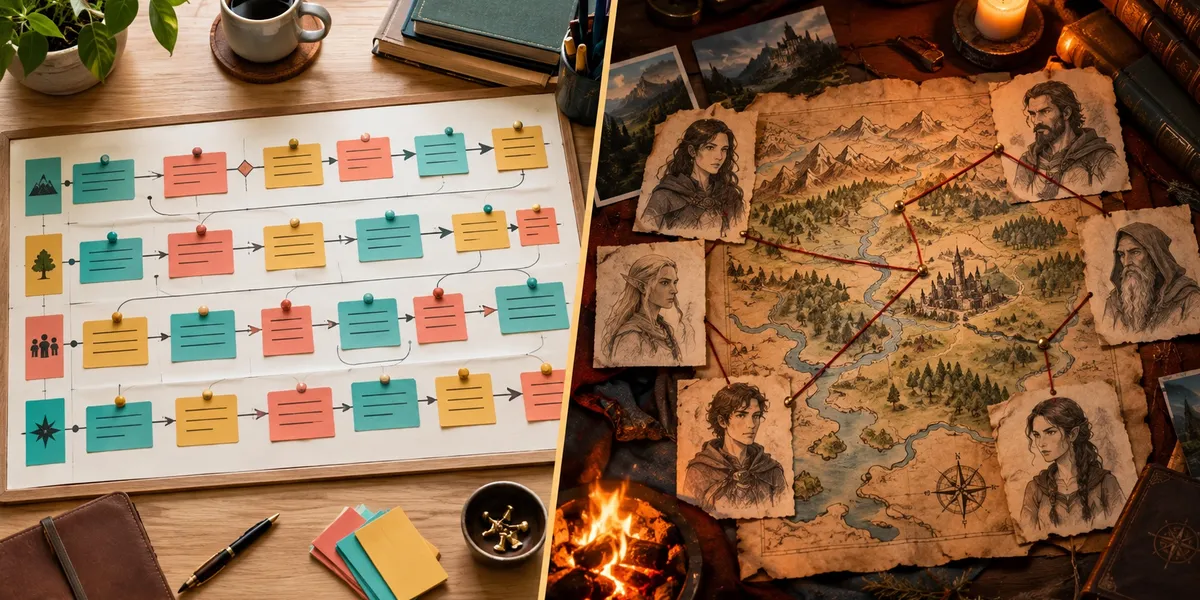
Plottr vs Campfire comes down to whether your story’s complexity lives in its plot or in its world. Plottr is a desktop outliner, $60 a year or $150 lifetime, that lays your book out on a colour-coded timeline. Campfire is a browser-based worldbuilding suite that starts free and costs $12 a month for every module.
In this comparison, you will get:
- A side-by-side table of pricing, plotting, worldbuilding, drafting and export, checked against both official pricing pages in October 2026
- Where Plottr clearly wins, where Campfire clearly wins, and which one fits your genre
- A three-year cost breakdown, including the drafting tool Plottr still needs
- An honest look at the step neither tool handles, and where our own product fits (and where it does not)
Here is how they compare.
Plottr vs Campfire at a Glance
| Feature | Plottr | Campfire |
|---|---|---|
| Core job | Visual plot outlining | Modular worldbuilding and story bible |
| Signature feature | Timeline of scene cards across parallel plotlines | Cross-linked modules for maps, species, magic, cultures and more |
| Pricing | $60/yr or $150 lifetime (Standard); Pro $9.99/mo, $99/yr or $599 lifetime | Free tier; $12/mo for all modules (list $19); annual and lifetime billing offered |
| Free option | 30-day free trial | Permanent free tier with per-module caps |
| Refunds | No refunds after purchase | 30 days on annual and lifetime; monthly is non-refundable |
| Writing area | None; you export and draft elsewhere | Manuscript module (25,000-word cap on free) |
| Story templates | 30+ plot and scene templates | Templates and custom themes inside modules |
| Series support | Series View with unlimited books | Shared story bible across your project |
| Worldbuilding | Characters, places, notes, custom attributes | Maps, timelines, species, magic systems, languages, religions, relationship webs |
| Export | Outline, characters and places to Word or Scrivener | Manuscript to PDF or EPUB |
| Devices | Windows and Mac desktop; browser app on Pro | Browser, desktop and a free mobile app |
| Offline | Yes, Standard works fully offline | Browser-based with offline caching |
| Collaboration | Pro only, and each collaborator needs Pro | Unlimited collaborators on every tier |
| AI | Written “No AI” commitment on every tier | No AI features listed |
| Best for | Plotters, multi-POV novels, mysteries, series | Fantasy and sci-fi worldbuilders |
Sources: Plottr’s pricing page, Plottr’s features page and Campfire’s pricing page, all checked October 2026.
The table shows two tools that sound like rivals but rarely compete for the same writer. Plottr is a structure tool. Campfire is a reference library for an invented world.
What Is the Difference Between Plottr and Campfire?
The difference between Plottr and Campfire is what each tool organizes. Plottr organizes events in order: scenes, chapters and plotlines on a timeline. Campfire organizes facts about a world: characters, places, species, religions and magic systems, each in its own module and all cross-linked.
Plottr — Visual outlining software that maps your book as a drag-and-drop timeline of colour-coded scene cards, with a story bible for characters and places, and exports the outline to Word or Scrivener.
Campfire — A modular story-planning platform where each worldbuilding element (characters, maps, species, cultures, languages) is its own module, linked into one searchable story bible with a manuscript editor attached.
Our full Plottr review and Campfire review cover each tool in depth. This post is about choosing between them.
A quick test: imagine reaching chapter 30 and losing track of something. If it is “when did the detective first see the locket,” you need Plottr. If it is “which river borders the eastern duchy and what language they speak there,” you need Campfire.
Is Plottr Better Than Campfire for Plotting?
Yes, Plottr is better than Campfire for plotting because its timeline shows every plotline across every scene on one screen. Time runs left to right, plotlines stack top to bottom, and each card is a scene you can drag to a new position. The outline view updates automatically to match.
That single view is why Plottr exists. You can see in seconds that your romance subplot vanishes for nine chapters, or that two POV characters never share a scene in Act Two.
Plottr also ships with 30+ structure templates, including Three Act Structure, the Hero’s Journey, the Snowflake Method and Romancing the Beat. Pick one, and the beats appear as empty cards for you to fill. Our guide to plot structure explains what each framework is actually for.
Campfire does have plotting tools. Its Arcs and Timeline modules let you group beats and track events chronologically. But plotting is one module among eighteen in Campfire. In Plottr, it is the whole product, which is why Storyflow’s comparison picks Plottr for visual plotting and Campfire for worldbuilding.
Plottr wins for:
- Multi-POV novels where you need to see who appears when
- Mysteries and thrillers where clues must land in a fixed order
- Series authors, thanks to Series View and unlimited books per series
- Writers who already know their structure and want to see it
If you are still deciding whether you are a planner at all, read pantsing vs plotting before buying either tool.
Is Campfire Better Than Plottr for Worldbuilding?
Yes, Campfire is better than Plottr for worldbuilding because it gives every kind of world element its own dedicated, cross-linked module. Maps, species, cultures, religions, languages, magic systems, philosophies and items each get structured fields. Click a character and you see their species, their homeland and their relationships.
Plottr’s story bible is solid but generic. You get Characters, Places, Notes, Tags and custom attributes. That is enough to track a contemporary cast across a series, and it is not enough to run a fantasy world with three religions and a working magic system.
Campfire’s relationship webs are the feature Plottr simply lacks. You draw connections between characters and label them (rivals, siblings, sworn enemies), and the web stays linked to each character’s profile.
Campfire wins for:
- Epic fantasy, science fiction and anything with invented cultures
- Long series where canon must stay consistent across many books
- Writers who want maps, languages and magic rules in one place
- Co-writing teams, since collaboration is included on every tier
Our worldbuilding guide and worldbuilding tips cover what to actually put in those modules, and our roundup of AI worldbuilding tools compares Campfire with newer options.
Can You Write Your Book in Plottr or Campfire?
You cannot write your manuscript in Plottr; it has no drafting area at all. You outline, export to Word or Scrivener, and draft somewhere else. Campfire does include a Manuscript module, so you can write inside it, and it compiles your book to PDF or EPUB.
That is a meaningful difference for your workflow. A Plottr author almost always runs a second tool. Most pair it with Scrivener, which is why Plottr’s Scrivener export and import exist.
Campfire’s editor works, but in our Campfire review it is the weakest of its modules. It is a reasonable place to draft if you want everything in one tab, not a reason to choose Campfire on its own.
The free tier caps the Manuscript module at 25,000 words, so anything novel-length needs a paid plan.
Plottr vs Campfire Pricing
Plottr is cheaper for a long-term single user who buys the $150 lifetime Standard licence. Campfire is cheaper if you only need a few modules, thanks to its permanent free tier, but costs more over time on a monthly plan.
| Plan | Year 1 | 3-year total |
|---|---|---|
| Plottr Standard, lifetime | $150 | $150 |
| Plottr Standard, annual | $60 | $180 |
| Plottr Pro, annual | $99 | $297 |
| Campfire free tier | $0 | $0 (with caps) |
| Campfire Standard, monthly at $12 | $144 | $432 |
| Chapter (our product), for comparison | $97 | $97 |
Figures are from each pricing page in October 2026. Campfire’s $12 is a discount from a $19 list price, so check the page before you budget on it.
Hidden costs matter here. Plottr Standard plus Scrivener ($59.99 one-time, per Literature & Latte) is about $210 before you write a word. Campfire needs no second drafting app, but you may still want a formatting tool if its PDF and EPUB exports do not meet your print specs.
Two policy differences are worth knowing. Plottr gives you a 30-day free trial but states it does not refund purchases afterwards. Campfire refunds annual and lifetime plans within 30 days, but monthly payments are non-refundable.
Standard Plottr also works fully offline on Windows and Mac. If you write on a train or a plane, that matters more than any feature in this table.
What Do Real Users Say About Plottr and Campfire?
Real users praise Plottr for focus and a short learning curve, and Campfire for depth and flexibility. Plottr’s complaints centre on occasional freezes and sync issues. Campfire’s centre on its module-by-module structure feeling heavy before your world is big enough to need it.
Verified reviewers on Capterra repeatedly single out Plottr’s focused scope, strong templates and responsive support. Kindlepreneur’s Plottr review notes the app occasionally freezes, though autosave prevented data loss.
For Campfire, Reedsy’s review lands on two cons: cost that adds up if you buy everything, and a real learning curve. Eighteen modules is a lot of surface area, and setup can feel like a project of its own. The free tier softens that, because you can build a real slice of your world before paying.
Which Should You Choose: Plottr or Campfire?
Choose Plottr if your story is hard to keep straight because of its structure. Choose Campfire if it is hard to keep straight because of its world. Genre is the fastest shortcut.
| Your book | Better pick | Why |
|---|---|---|
| Thriller or mystery | Plottr | Clue placement and pacing across a timeline |
| Romance | Plottr | Beat templates like Romancing the Beat; dual-POV tracking |
| Epic fantasy | Campfire | Maps, cultures, magic systems, languages |
| Science fiction | Campfire | Species, technology systems, political factions |
| Multi-book series, contemporary | Plottr | Series View with a shared bible |
| Multi-book series, fantasy | Campfire | Living canon across a large world |
| Co-written book on a budget | Campfire | Unlimited collaborators on every tier |
Some fantasy authors use both: Campfire for the world bible and Plottr for the book’s scene order. That works, and it costs roughly $294 in year one ($150 plus $144) before any drafting tool.
If neither fits, our list of Campfire alternatives and our roundup of the best novel writing software cover Dabble, Scrivener and others. For head-to-heads with a third tool, see Dabble vs Plottr and Dabble vs Campfire.
The Step Neither Tool Handles: Writing the Draft
Plottr and Campfire both help you plan, and neither writes a word of your book. That is a deliberate choice by both companies, and for many writers it is exactly right. But if your outline is finished and your manuscript is not, a better planning tool will not change that.
That is the gap we built Chapter for.
Our Pick — Chapter
Chapter turns your idea, or your existing outline, into a complete, structured manuscript. You choose a genre, Chapter plans the book using structures modelled on bestsellers in that genre, drafts the full manuscript, then runs automated DoubleCheck passes for character consistency, timeline errors and voice breaks. Over 2,147 authors have used it to create 5,000+ books, and it has been featured in USA Today and the New York Times.
Best for: Writers whose plan is done but whose draft is not Pricing: $97 one time, 2 books included (fiction or nonfiction), 30-day money-back guarantee Why we built it: Most unfinished novels have an outline. What they are missing is the prose.
Chapter costs the same $97 for fiction and nonfiction, with no subscription, and you keep 100% of the rights. Over three years, that is less than Plottr Pro or a monthly Campfire plan. Our comparisons of Chapter vs Plottr and Chapter vs Campfire go through each matchup in detail, and our Chapter review covers the product on its own.
Try Chapter for fiction ($97) | Try Chapter for nonfiction ($97)
Where Plottr and Campfire Beat Chapter
This is our blog, so you should hear the limits from us directly. Plottr and Campfire do several real things that Chapter does not do well, or does not do at all.
Visual timeline plotting. Chapter has no drag-and-drop timeline or card view. If you think in colour-coded plotlines and want to rearrange scenes by hand, Plottr is simply better, and Chapter offers nothing equivalent.
Deep worldbuilding. Chapter has no maps, species, magic systems, languages or relationship webs. For an epic fantasy world, Campfire gives you tools Chapter does not have in any form.
Series canon. Chapter works one book at a time and checks continuity inside that manuscript. Plottr’s Series View and Campfire’s shared world bible track canon across many books, and both do that job better.
Writing every word yourself. Chapter generates prose that you then edit. If you need an AI-free manuscript for contest rules, a publisher’s AI-disclosure policy or personal principle, Plottr’s written no-AI commitment and Campfire’s AI-free toolset are the right choice, and Chapter is not.
Collaboration. Campfire includes unlimited collaborators on every tier, and Plottr Pro has real-time co-editing. Chapter has no collaboration layer.
Trying before paying. Campfire has a permanent free tier and Plottr has a 30-day free trial. Chapter has no free plan or free trial; you pay $97 and rely on the 30-day money-back guarantee if it does not suit you.
If any of those is your main need, use Plottr or Campfire. If your main need is a finished draft, Chapter solves the problem they leave open, and it pairs well with either: plan in Plottr or Campfire, then bring that plan to Chapter.
The Verdict: Plottr or Campfire?
Choose Plottr if you are a committed outliner writing a structurally complex book: multi-POV, braided timelines, a mystery, or book four of a series. Buy the $150 lifetime Standard licence after the 30-day trial.
Choose Campfire if you write fantasy, sci-fi or a long series set in an invented world. Start on the free tier, and upgrade only when you hit a cap that matters.
Choose Chapter if your plan already exists and the manuscript is what is missing. It is our product, so weigh that, but it is the only one of the three that produces a complete draft, for $97 once. If you want to sharpen your plan first, our guide on how to outline a novel works with any of these tools.
FAQ
Is Plottr better than Campfire?
Plottr is better than Campfire for visual plotting and story structure, thanks to its drag-and-drop timeline and 30+ templates. Campfire is better for worldbuilding, with dedicated modules for maps, species, cultures and magic systems. Pick Plottr for plot-driven fiction and Campfire for fantasy or sci-fi worlds.
Is Campfire cheaper than Plottr?
Campfire is cheaper than Plottr only if you stay on its free tier or use it briefly. Over three years, Plottr’s $150 lifetime licence beats Campfire’s $12-a-month plan, which totals $432. Plottr Pro, at $99 a year, costs $297 over the same three years, per both pricing pages in October 2026.
Can you write a novel in Plottr?
No, you cannot write a novel in Plottr, because it has no drafting area. Plottr is an outlining tool: you build your timeline and story bible, then export to Word or Scrivener and draft there. Campfire, by contrast, includes a Manuscript module and exports finished books to PDF or EPUB.
Does Plottr or Campfire use AI?
Neither Plottr nor Campfire drafts prose with AI. Plottr lists “No AI” on every pricing tier and commits to no AI training on your work. Campfire lists no AI features on its pricing page. If you want AI to draft a full manuscript from your plan, Chapter does that for $97 once.
Can you use Plottr and Campfire together?
Yes, you can use Plottr and Campfire together, and some fantasy and sci-fi authors do. A common split is Campfire for the world bible (maps, cultures, magic) and Plottr for scene order across the book. The trade-off is cost and keeping two tools in sync manually, since they do not integrate.